1. Airbnb's host-only fee deducts the full service fee from the host payout. Many hosts on this structure pay about 15.5%, though Airbnb notes rates can vary by listing type and market.
2. To keep the same net payout, divide your target payout by 0.845. A host who wants to keep $200 after a 15.5% fee needs to charge about $237.
3. Do not raise every date by one flat percentage. Adjust base rates, discounts, cleaning fees, and seasonal prices separately.
4. For hotels and multi-property hosts, the real goal is net ADR by channel, not simply a higher Airbnb nightly rate.
What Is the Airbnb Host-Only Fee?
The Airbnb host-only fee is Airbnb's single-fee structure. Instead of splitting the service fee between host and guest, Airbnb deducts the full service fee from the host payout. The guest sees a cleaner total price, and the host receives the booking amount minus Airbnb's service fee.
Airbnb's help center describes two service-fee models for stays: split fee and single fee. Under the single-fee model, the entire service fee is deducted from the host payout. Airbnb states that most hosts on this structure pay 15.5%, while remaining hosts typically pay 14% to 16%. Traditional hospitality listings, hosts using property management software, and hosts using channel management software may be required to use it.
That is why many hosts call it the "15% Airbnb host-only fee," even though 15.5% is often the practical number. If your public room rate stays the same, your payout drops. To protect margin, adjust rates based on net revenue, not guesswork.
The Formula for Covering the Fee
The most common mistake is adding 15% to the old room rate. That gets close, but it does not fully protect the same payout because the fee is calculated against the new price.
Use this formula:
New Airbnb rate = target net payout / (1 - host-only fee)
At a 15.5% host-only fee, the host keeps 84.5% of the listed price. So the shortcut is:
Target net payout / 0.845
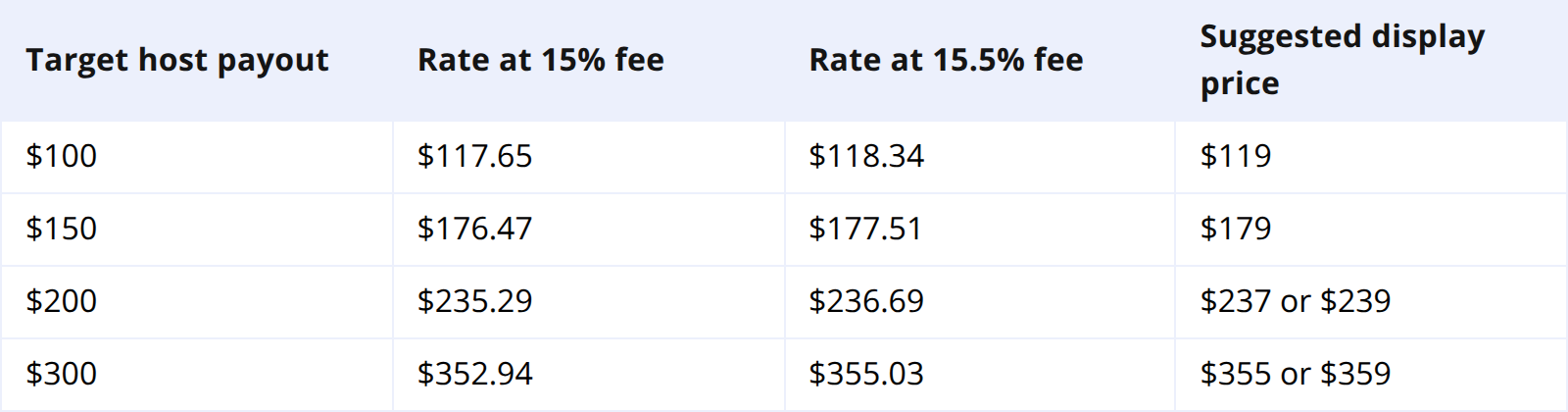
If you want to keep $200 after a 15.5% fee, the correct rate is about $237. If you simply add 15% to $200, you charge $230 and keep $194.35. Across 100 booked nights, that small gap becomes $565 in lost revenue.
Protect Net ADR, Not Just the Nightly Rate
Before changing Airbnb rates, decide what number you are protecting. For most operators, the right number is net ADR: the nightly revenue kept after platform fees.
A public Airbnb rate is not the same as net revenue. Guests may see a nightly rate, cleaning fee, taxes, and discounts. Airbnb then deducts the host service fee from the booking subtotal. If you only look at the nightly rate, you can miss where margin is actually changing.
For example, a studio with a $180 nightly rate, $60 cleaning fee, 10% weekly discount, and 15.5% host-only fee will not net the same across every stay length. A rate increase that protects a two-night stay may still underprotect a weekly stay.
Calculate payout by stay type: short stays, standard stays, weekly stays, and monthly stays. Short stays depend more on cleaning cost recovery. Weekly stays depend more on discount structure. Peak dates may tolerate a higher visible price than weekday shoulder-season dates.
How to Adjust Airbnb Room Rates
Start with the required payout for each listing or room type. If a room must net $170 per night, use $170 as the target. At a 15.5% host-only fee, the rate is:
$170 / 0.845 = $201.18
You could display that as $201, $205, or $199 depending on your market. Premium listings often work well with clean numbers. Competitive urban listings may convert better with $xx9 pricing.
Do not hide the full adjustment inside the cleaning fee. Guests compare total trip price, and a high cleaning fee can hurt conversion faster than a slightly higher nightly rate. Keep cleaning fees tied to real cleaning cost, then adjust the base rate to protect net ADR.
Review discounts after the new base rate is set. A 15% weekly discount that made sense under a smaller host fee may be too generous under the host-only model. If long stays under-net, reduce the discount before raising every public rate.
Should You Raise Prices by 15% or 18%?
It depends on what you are trying to preserve.
If you were previously paying a 3% host fee on a $200 rate, your old payout was about $194. Under a 15.5% host-only fee, the same $200 rate pays $169. To keep the old $194 payout, the new rate needs to be about $230. That is roughly a 15% increase from the old displayed price.
If you want to keep a full $200 net payout, the new rate needs to be about $237. That is an 18.34% increase from $200.
Most hosts should protect the old payout first, then use demand-based pricing to recover extra margin where the market allows. A flat 18% increase can work in peak season, but it may reduce bookings on soft weekdays.
After the change, watch search impressions, click-through rate, booking conversion, and occupancy. If impressions stay steady but bookings fall, the price may be too high for those dates.
What Multi-Property Hosts Should Do Differently
Hotels, serviced apartments, B&Bs, and professional hosts should treat the Airbnb host-only fee as a channel profitability issue, not only a listing-level pricing issue.
Airbnb may still be worth the fee if it brings guests you do not reach through Booking.com, Expedia, or direct booking. But after the host-only fee, Airbnb's economics can look closer to Booking.com-style commission. Compare channels by net ADR, occupancy contribution, cancellation behavior, length of stay, and workload.
A channel with slightly lower net ADR may still be profitable if it brings longer stays and fewer cancellations. A high-occupancy channel may be less attractive if it fills peak dates at low margin.
Manual rate management makes this risky. If you update Airbnb but forget Booking.com, Expedia, or your direct booking engine, you may create price gaps or inventory conflicts.
Smart Order helps operators manage this from one dashboard. When an Airbnb reservation arrives, availability closes across connected channels, revenue flows into reporting, and the team can compare Airbnb net revenue against direct and OTA bookings.
Manage Airbnb Rates With Net Revenue in View
Smart Order connects Airbnb reservations, channel availability, and revenue reporting so you can adjust rates based on the payout you actually keep.
Practical Example
Imagine a boutique property lists a queen room at $160 per night. Under the old split-fee model with a 3% host fee, the payout was about $155.20. Under a 15.5% host-only fee, the same rate pays $135.20.
To preserve the old payout:
$155.20 / 0.845 = $183.67
The property could set the new Airbnb rate at $185. That protects roughly the same payout while keeping the price readable. It should still vary by demand: weekends may support $189 or $195, while soft weekdays may need $179.
The goal is not one perfect rate. The goal is a rate structure that protects payout across different stay lengths and demand periods.
FAQ
What percentage is the Airbnb host-only fee?
Airbnb states that most hosts on the single-fee structure pay 15.5%, while remaining hosts typically pay 14% to 16%. The exact rate can vary by listing type, location, and setup.
How do I calculate the rate needed to cover a 15.5% Airbnb fee?
Divide your target payout by 0.845. If you want to keep $200 after the host-only fee, the rate is $200 / 0.845 = $236.69.
Does the host-only fee apply to cleaning fees?
Airbnb says service fees are calculated as a percentage of the nightly price and fees charged by the host, excluding guest service fees and taxes. Hosts should calculate the full booking subtotal, not only the nightly rate.
Is Airbnb still worth it with the host-only fee?
Yes, if Airbnb brings demand you would not otherwise capture and the net payout works for your property. Measure Airbnb against Booking.com, Expedia, and direct bookings using net revenue rather than gross booking value.
How can I manage Airbnb rates across multiple channels?
Use a PMS or channel manager that keeps availability and rates synchronized. Smart Order connects Airbnb reservations, OTA channels, direct bookings, and reporting so operators can adjust pricing with current data.
