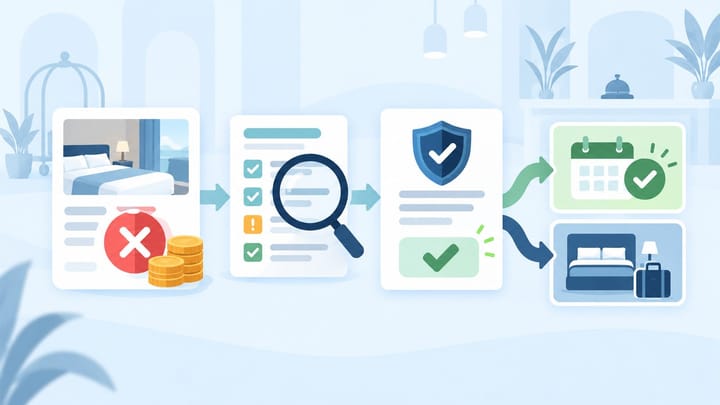
1. A cancellation fee waiver request asks the hotel to make an exception; it does not cancel the booking by itself.
2. Confirm the reservation terms, payment arrangement, reason, deadline, and approval authority before responding.
3. Close the case only when Booking.com, the PMS, room inventory, and the hotel's payment notes show the same result.
A Booking.com cancellation fee waiver request can reach reservations, front desk, or management with very little context. The guest may say the hotel already agreed, a team member may have replied informally, or the request may appear close to arrival when resale is unlikely.
The safest hotel response is a short operational workflow. One person owns the request, one manager approves the financial exception, and the PMS is not changed until Booking.com shows the final reservation status.
This article covers guest requests to waive a cancellation charge. It does not cover a hotel cancelling a guest's stay, changing the property's cancellation policy, or reconciling a completed refund.
Understand What the Guest Is Asking For
The guest is asking the property to release a cancellation charge that would normally apply to the reservation. Approving the request changes the financial outcome of that booking; declining keeps the original terms in place.
Do not treat a request notification as a confirmed cancellation. Until the Booking.com reservation status changes, the hotel should continue protecting the room for that guest. Removing it from the PMS too early can return inventory to sale and create an overbooking.
Also separate a fee waiver from a refund promise. The hotel may approve a waiver, but the next payment step depends on who collected the money and the reservation's payment arrangement.
Use One Booking.com Fee Waiver Workflow
Assign every request to a named owner and work from the reservation record, not from an email subject line or a guest screenshot.
- Open the correct reservation. Match the guest name, booking number, property, stay dates, room, rate plan, and current status. Confirm that the request belongs to an active booking and has not already been processed.
- Read the terms attached to that booking. Check the cancellation deadline, expected fee, prepayment terms, and no-show conditions. Do not rely on today's rate-plan settings because the guest booked under the terms recorded at confirmation.
- Confirm who controls the payment. Identify whether Booking.com handled payment or the property was expected to collect it. This determines who can process money and what the hotel can safely tell the guest.
- Classify the reason. Separate a simple change of plans from a duplicate booking, documented emergency, travel disruption, booking error, or hotel-caused issue. Ask only for evidence required by the hotel's exception rule.
- Estimate the commercial effect. Consider the fee amount, expected net revenue, arrival date, chance of reselling the room, committed costs, and the value of an alternative such as a date change.
- Send the request to the right approver. Front desk may collect facts, but a manager should approve exceptions above the team's agreed limit. Peak dates, multi-room bookings, and high-value stays deserve a clear escalation rule.
- Respond inside the Booking.com request. Approve or decline using the available action and neutral wording. If the account offers a deadline, respond before it expires rather than leaving the outcome to assumption.
- Verify the final reservation status. Confirm whether the reservation remains active or has been cancelled without the original fee. Only then update any PMS record that did not change automatically.
- Record the business decision. Note the approver, reason category, expected charge or waiver, guest communication, final status, and any follow-up for finance.
This workflow protects the team from a common failure: one employee tells the guest that the fee will be waived, another leaves the booking active, and finance later sees a charge or commission that nobody can explain.
When a request crosses reservations, management, and front desk, the decision should stay attached to the booking. Smart Order keeps reservation notes, guest communication, and team follow-up in one shared record so staff can see the approved outcome before changing room inventory or payment notes.
Keep Waiver Decisions With the Reservation
Give hotel teams one shared place to record guest requests, manager approval, and the final reservation action.
Set Approval Rules Before the Next Request
Hotels make inconsistent decisions when there is no written boundary between customer service and revenue protection. Define who can approve a full waiver, partial solution, date change, or decline.
A practical rule can combine timing, value, and cause. Front desk might handle a same-day booking mistake within a small limit, while management reviews peak-season stays, several rooms, or requests after payment has been processed.
Use the same reason categories across the property. Similar guests should not receive different outcomes simply because they contacted a different shift.
If a wider event affects many arrivals, pause individual decisions. Management should set one temporary exception rule, define acceptable evidence, and give staff consistent response wording.
Reply Without Creating a Second Promise
When approving, state the exact exception and next step: "The hotel approves waiving the cancellation fee for this reservation. Please wait for Booking.com to confirm the updated reservation and any payment action."
When declining, state the result without blame: "We reviewed the request against the terms attached to this booking. The hotel cannot waive the cancellation fee, and the reservation remains subject to its confirmed conditions."
If offering a date change or another solution, explain that it is an alternative proposal, not a completed amendment. The booking remains unchanged until the new status or dates are confirmed.
Avoid saying that a refund has been sent unless the hotel actually controls the payment and has completed it. Avoid giving a bank processing date that the property cannot verify.
Check Inventory, Payment, and Commission Afterward
An approved waiver can affect the room, guest payment, expected revenue, and commission record. Verify each one separately instead of assuming the cancellation message completed the entire process.
If the booking is cancelled, confirm that inventory returned once. If the request was declined, confirm that the room remains deducted and front desk still expects the arrival.
Where the property collected money, record whether a charge was avoided, released, or refunded. Where Booking.com controlled payment, keep the property note factual and wait for the channel's final payment record.
Finance should reconcile any later payment or commission difference to the booking number and approved decision. Do not reduce PMS room revenue simply to make a bank deposit match.
Prevent Informal Waivers From Reaching Guests
Train staff to acknowledge the request without approving it in conversation. A useful response is: "We have recorded your request and a manager will review the booking terms. Please wait for the updated Booking.com confirmation."
Keep a daily queue of open waiver requests with an owner and deadline. Review unresolved cases during shift handover so a request does not expire in an unattended inbox.
Audit a small sample monthly. Look for missing approvers, PMS cancellations made before channel confirmation, inconsistent reason codes, and promised refunds without a matching payment record.
Frequently Asked Questions
Does a waiver request cancel the Booking.com reservation?
No. Treat the reservation as active until Booking.com shows the final cancellation or another confirmed status.
Must the hotel approve the request?
No. The hotel can review the request against the booking terms and its exception policy. Some circumstances may require additional contractual or legal review.
Can front desk promise a refund?
Only if the employee has authority, the property controls the payment, and the refund has actually been processed. Otherwise, confirm only the hotel's waiver decision.
Should the PMS booking be cancelled first?
No. Wait for the final Booking.com status unless the hotel is following an approved manual recovery process. Cancelling early can release the room twice.
What closes the case?
The Booking.com status, PMS reservation, inventory, guest message, and payment note must agree. The manager's internal approval alone is not enough.
