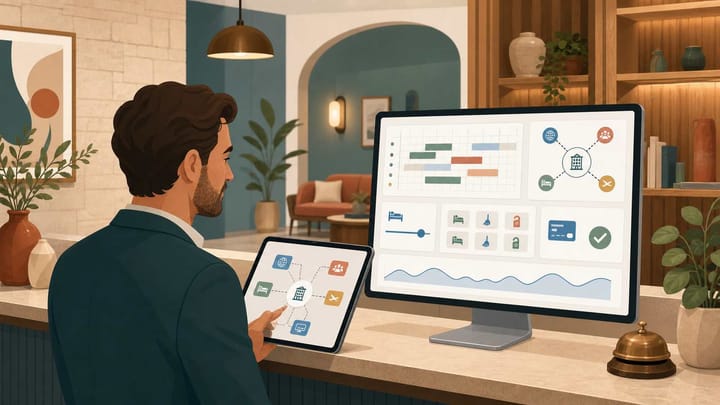
1. Boutique hotel software should protect one live source of truth for rooms, rates, reservations, payments, and guest details.
2. Prioritize reliable PMS, OTA channel sync, a connected booking engine, clear staff handoffs, and owner-ready reporting.
3. Test complete booking workflows in the demo. A long feature list is less valuable than accurate data and fast daily use.
Boutique hotel software matters when a small team must deliver personal service without losing control of inventory, rates, cash, or room readiness. The right boutique hotel software should reduce daily handoffs and make exceptions visible. It should not force staff to reconcile several dashboards after every booking.
For an owner, the useful question is not “How many features does it have?” Ask whether the software protects revenue, reduces operational risk, or makes a recurring task faster. If a feature does none of those things, it should not drive the purchase.
Start With the Boutique Hotel Workflow
A boutique property may have fewer rooms than a chain hotel, but its operation is not necessarily simpler. Room categories can be unique. Packages may include breakfast, transfers, late checkout, or local experiences. A single employee may cover reservations, arrivals, guest requests, and payment follow-up during one shift.
Good boutique hotel software gives those employees one reliable operating record. When a guest books a suite through an online travel agency (OTA), the reservation should enter the property management system (PMS), reduce sellable inventory, update the calendar, and become visible to the team. When the guest later adds an airport transfer, that detail should stay attached to the same reservation.
Boutique Hotel Software Feature Priority Matrix
Use this matrix to separate operational requirements from attractive extras. A “must-have” still needs to work correctly in your property’s real setup; a box on a vendor page is not proof.
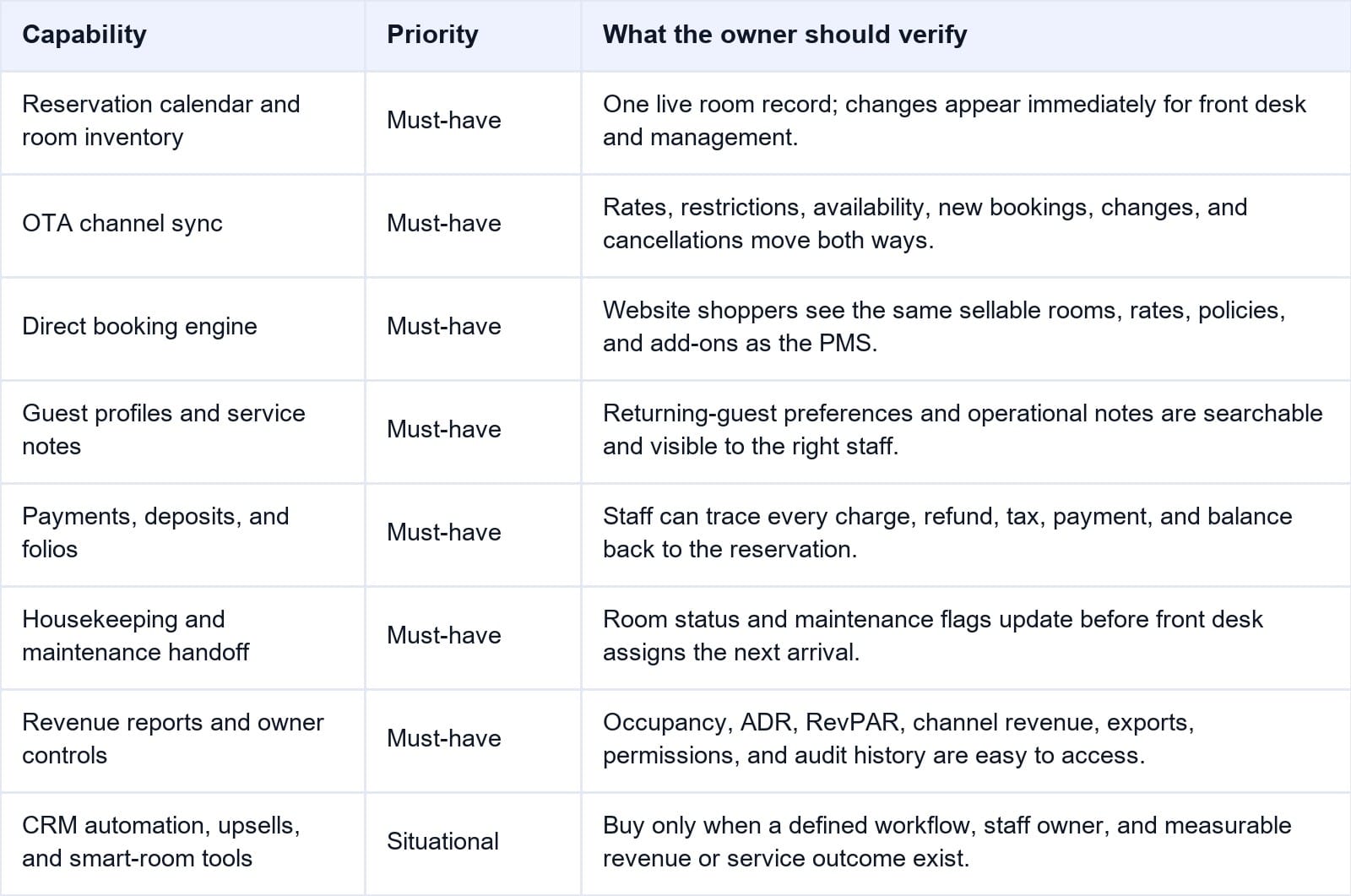
The matrix is deliberately strict. Guest messaging, upsells, and revenue automation can be valuable, but only after reservations, inventory, payments, and room status are dependable.
When room inventory is the weak link, Smart Order’s PMS and channel manager connect the reservation record with OTA availability and rate controls. A booking enters the calendar, inventory changes, and staff can see the operational effect without updating each channel separately.
Test the Core Workflow Before You Add Extras
Use Smart Order to see how reservations, room inventory, and OTA updates work from one operational record.
1. Reservation and Room Inventory Control
The PMS is the operational core. Staff should be able to create, move, modify, split, cancel, and restore reservations without making inventory unclear. The calendar should show room type, assigned room, arrival status, balance, and useful alerts without requiring several screens.
Boutique properties should test unusual cases. Can the system handle a room move halfway through a stay? Can two individually designed rooms sit in one sellable category while staff still assign the correct physical room? Can the owner see who changed a booking and when?
Every downstream tool depends on this record. If the PMS calendar is stale, channel sync, housekeeping, payments, and reporting inherit the problem.
2. OTA Sync, Rates, and Restrictions
Channel management is a high-priority search need for boutique hotel software, and for good reason. The system should exchange more than a simple room count. Owners need to verify rate plans, stop-sell controls, minimum stays, closed-to-arrival rules, booking changes, and cancellations for every important channel.
Ask the vendor to show room and rate mapping, not just a list of connected OTA logos. A “Deluxe King” in the PMS must point to the correct room type and rate plan on each OTA. One bad mapping can place a reservation in the wrong inventory pool or leave a discounted plan open after the base rate closes.
Ask what “real time” means in practice. Useful software shows sync status, failed updates, and the action staff should take instead of silently leaving channels inconsistent.
3. A Booking Engine Connected to Live Inventory
A direct booking engine is useful only when it uses the same availability and rate rules as the PMS. If staff must block rooms or copy prices into a separate website tool, the hotel has created another inventory risk.
Test the entire guest path on mobile. Search dates, select a room, choose an add-on, accept policies, pay a deposit, and receive confirmation. Then confirm that the booking appears in the PMS with the correct room type, rate plan, taxes, source, guest details, payment, and remaining balance.
The Smart Order booking engine is designed to pass direct reservations into the connected operating record. That lets an owner compare direct and OTA production without maintaining a separate booking spreadsheet.
4. Guest Profiles That Staff Can Actually Use
Personal service depends on memory, but it should not depend on one employee being on shift. Boutique hotel software should make returning-guest history, preferences, consent, service recovery notes, and special requests easy to find.
Access matters as much as storage. A housekeeper may need to see a pillow request, while sensitive payment or identity data should remain restricted. Ask whether duplicate profiles can be merged and exported.
Avoid buying “CRM” as a label. Test a specific scenario: a repeat guest books through a different email address, requests the same quiet room preference, and adds a celebration package. See whether staff can recognize the relationship and act without reading old message threads.
5. Payments, Folios, and Reconciliation
Owners need a traceable path from reservation to money. The system should show deposits, authorization or payment status, refunds, taxes, fees, add-ons, and outstanding balances. Staff should not have to guess whether a payment belongs to the original booking, an amended stay, or a separate charge.
Use a realistic test: take a deposit, shorten the stay, add an experience, process a partial refund, and close the folio. Then compare the guest balance, payment record, and owner report. Ask how chargebacks, failed payments, multi-currency transactions, and accounting exports are handled in your market.
Confirm user permissions, audit logs, backups, payment-provider responsibilities, and the support process for a suspected account compromise.
6. Housekeeping and Maintenance Handoffs
Room status should move with the stay. After checkout, housekeeping needs the correct departure room and priority. If a cleaner reports a broken fixture, front desk should see the maintenance flag before assigning that room to an early arrival.
The best interface is the one your team will update during a busy shift. Test it on the devices staff actually use. Look for clear ownership, timestamps, inspection status, notes, and an escalation path. Complex task management is not helpful if the night manager returns to a group chat for the real handoff.
7. Reports That Lead to an Owner Decision
Boutique hotel software should answer practical questions without a manual merge: Which channel produced the most room revenue? What are occupancy, average daily rate (ADR), and revenue per available room (RevPAR) for the next 30 days? Which balances remain unpaid? Which room types are selling first?
A useful hotel reporting dashboard lets the owner filter by date, source, room type, and property, then export the records. Ask the vendor to reconcile one report to the reservation ledger.
Permissions and audit history matter here too. Owners should control who can view revenue, override rates, issue refunds, export guest data, or change configuration.
How to Test Boutique Hotel Software in a Demo
Do not let the vendor control the entire demonstration. Provide your room types, rate plans, taxes, policies, user roles, and two or three awkward booking cases in advance. Then ask your front-desk or reservations lead to complete these tests:
- Create one direct reservation and one OTA test reservation for the same room type.
- Change dates, room assignment, rate, guest details, and payment status.
- Apply a minimum stay and stop-sell rule, then confirm where each update appears.
- Cancel one booking and verify inventory, refund status, guest communication, and reports.
- Mark a room dirty, add a maintenance flag, complete inspection, and release it for sale.
- Export reservations, guest data, payments, and performance reports in a usable format.
Record the result as pass, workaround, unsupported, or unclear. Also record how long the task took and whether help was required. This turns a sales demo into an acceptance test and makes competing boutique hotel software easier to compare.
Nice-to-Have Features Should Earn Their Place
AI replies, automated upsells, reputation tools, digital keys, smart-room controls, and advanced revenue systems can create value. Their priority depends on your property. A 20-room urban hotel with late arrivals may value self-service access; a destination property may gain more from package sales and pre-arrival messaging.
Before buying an add-on, name the workflow owner, the data it needs, the action it changes, and the result you will measure. Also include implementation, integration, transaction, training, and support fees in the cost. “Included” is not valuable if the feature cannot work with your policies or staff process.
Frequently Asked Questions
What is the most important boutique hotel software feature?
Reliable reservation and inventory control is the foundation. The PMS must keep physical rooms, sellable room types, rates, and booking status accurate because channel distribution, housekeeping, payments, and reports depend on that data.
Does every boutique hotel need an all-in-one system?
No. An integrated system reduces handoffs, but a best-of-breed setup can work when integrations are dependable and someone owns them. Judge both options by total cost, data flow, exception handling, support responsibility, and exportability.
How much automation should a boutique hotel use?
Automate repetitive, rules-based work such as confirmations, inventory updates, payment reminders, and routine reports. Keep human review for exceptions, sensitive guest situations, unusual refunds, and service recovery.
What should an owner verify before signing?
Verify the real workflows, supported OTA rules, payment and tax setup, data migration, staff permissions, security practices, training, support hours, contract terms, total cost, and data export. Put critical requirements and test results in writing.
Choose for Operational Fit, Not Feature Count
The best boutique hotel software is not the platform with the longest menu. It is the system your team can trust during a sold-out arrival day: a booking lands in the right room inventory, rates and restrictions stay aligned, payment status is clear, room readiness is visible, and the owner can explain the numbers.
Build your shortlist around those workflows. Test exceptions, not just the happy path. Once the operational core passes, add automation and guest-experience tools where they have a named owner and a measurable purpose.
