
1. Stop further retries and prove that both PMS records represent the same OTA booking.
2. Keep the record linked to the valid OTA source ID and future modification or cancellation messages.
3. Protect room inventory, payments, folios, guest messages, and operational tasks before retiring the extra record.
4. Verify that availability changes exactly once and document the correction for support and night audit.
A duplicate OTA reservation after retry can look easy to fix: find two similar records and delete one. That is risky. One record may be the connected reservation that will receive future OTA changes, while the other may contain the room assignment, payment, notes, or check-in work already completed by front desk.
The safe response is to pause automation, prove the records are duplicates, choose one canonical reservation, move or preserve the operational data, and then retire the extra record using the PMS-approved action. Inventory and payment checks must follow immediately because removing a record can release a room or change a balance.
Why an OTA Retry Can Create a Duplicate Reservation
A retry should normally reuse the OTA's external reservation ID so the PMS recognizes the same booking. A duplicate can appear when the original import partly succeeded but returned an error, the retry arrives without the same identifier, or a manual placeholder was created before the delayed automated reservation entered the PMS.
Another common sequence begins with a manually imported future reservation. If the manual record does not contain a valid source reservation ID, a later OTA modification may not match it. The PMS can create a new connected record instead of updating the existing manual one.
The two PMS records may look identical while behaving differently. Only one might remain connected to OTA modifications, cancellations, guest messages, payment instructions, or virtual-card data. That is why guest name and stay dates are not enough to decide which record to remove.
Stop repeated imports, resends, and manual availability changes as soon as the duplicate is found. Capture both reservation numbers, creation times, source IDs, current statuses, and inventory effect before another message changes the evidence.
Prove the Two Records Are Actually Duplicates
Two bookings for the same guest and dates are only suspected duplicates. A guest may intentionally reserve two rooms, or two travelers with the same surname may arrive together. Different OTA confirmation numbers usually mean two separate bookings until the OTA proves otherwise.
Compare both records field by field:
- OTA confirmation number and channel manager or CRS reference
- PMS reservation number, creation time, import method, and source
- Property, room type, arrival, departure, occupancy, and rate plan
- Total price, taxes, payment model, deposit, and cancellation policy
- Latest modification, cancellation, message, and sync status
- Room assignment, folio, notes, tasks, and check-in activity
Open the OTA extranet and confirm how many active reservations exist. Then check the channel manager or CRS queue. If the OTA and intermediary show one booking but the PMS shows two records with the same external reference, the PMS records are strong duplicate candidates.
If the records have different OTA confirmation numbers, stop. Do not merge, cancel, or delete either one until the OTA or guest confirms whether both were intended. The cost of holding inventory briefly is usually lower than cancelling a valid booking.
A connected workflow makes this comparison easier. Smart Order's hotel channel manager links the incoming OTA reference with PMS availability, so staff can trace whether a retry updated the existing booking or created another operational record.
Trace OTA Reservations With Their Source IDs
Keep incoming bookings, mapped inventory, and external references in one workflow so retry errors can be identified before they affect the guest or room count.
Choose the Canonical Record and Fix the Duplicate Safely
The canonical reservation is the record the hotel will keep as the single source for the stay. It should be able to receive future OTA changes and retain the operational and financial history needed through checkout.
Use the matrix below as a decision aid. Vendor behavior differs, so supervisor or support approval may still be required before merging, deleting, voiding, or cancelling a record.
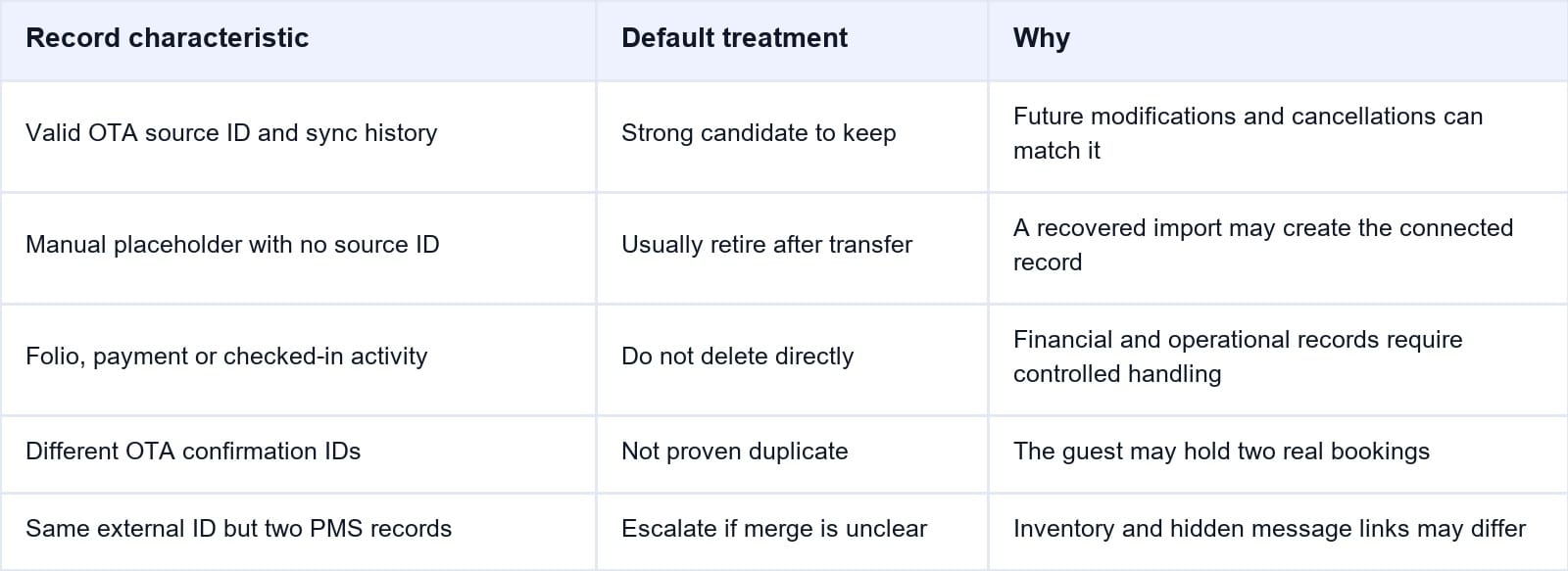
In many retry incidents, the automated record with the valid OTA source ID is the safer canonical record because later modifications and cancellations can match it. A manual placeholder without that source ID is often the record to retire—but only after its useful data has been preserved.
Follow this sequence:
- Freeze additional retries, edits, check-in actions, and payment attempts on both records.
- Select the canonical record based on the valid source link and future update path.
- Preserve or transfer room assignment, guest notes, tasks, folio items, deposits, and authorized payment references.
- Mark the extra record as a duplicate using the PMS-approved status, merge, void, cancel, or delete action.
- Add a cross-reference note to both records when the system retains the duplicate history.
- Reopen the OTA, channel manager, and PMS to confirm that one active operational reservation remains.
Do not cancel the OTA booking merely to clean up the PMS. Do not delete a record that contains posted revenue, payment authorization, a checked-in status, room access, or fiscal documents without finance and management review. Some systems require support to merge safely because the visible reservation is linked to hidden transaction and message records.
Reconcile Inventory, Payments, and Front-Desk Work
Removing a duplicate is not complete until the hotel's operational totals are correct. If both records reduced availability, retiring one may return a room. If only one reduced availability, a manual inventory increase could open an extra room for sale and create an overbooking.
Record availability before the correction, complete the approved duplicate action, and then compare the PMS room count with the channel manager and OTA. The final quantity should reflect one confirmed stay—not zero and not two.
Review payment and folio activity separately. Confirm whether either record contains a deposit, preauthorization, charge, refund, OTA collect balance, virtual-card instruction, tax invoice, or commission basis. Never copy full card or security details into an ordinary reservation note or support email.
Also reconcile the work already triggered by each record. Check guest messages, pre-arrival automation, room assignment, housekeeping notes, airport transfer, meal requests, access codes, and check-in forms. Suppress the duplicate workflow so the guest does not receive two confirmations, two payment requests, or conflicting instructions.
Before night audit, search again by guest name and every external reference. Confirm one active stay, one room assignment, one operational balance, and the correct channel attribution. Preserve the audit trail showing which record was retained and why.
Escalate the Incident and Prevent Another Retry Duplicate
Escalate when the team cannot identify the connected record, when both records contain transactions, or when cancelling one record changes inventory unexpectedly. The PMS or connectivity provider may need to inspect message IDs, delivery acknowledgements, import logs, and retry behavior.
Send support:
- Property ID and connection provider
- OTA, channel manager, and both PMS reservation references
- Original import, error, retry, and duplicate creation timestamps with time zone
- Current statuses, room and rate mapping, and availability before and after
- Screenshots of messages and errors with sensitive payment data hidden
- Actions already taken, including payments, check-in, room assignment, or cancellation
The permanent fix depends on the cause. A missing external source ID requires better ID preservation. A timeout after a successful import requires status checking before retry. A manual placeholder requires a reconciliation flag. A concurrency defect or repeated webhook requires vendor-side duplicate protection rather than another front-desk workaround.
Build the rule into the hotel's incident procedure: no retry until staff confirm whether the first message created a reservation. Test new OTA connections with a new booking, modification, and cancellation. The modification should update the same PMS record, and the cancellation should return inventory once.
Duplicate cleanup is safer when the front desk can see the reservation source, operational status, and room availability together. Smart Order's hotel front desk software gives staff one calendar for the connected booking and its room impact, reducing the chance that a temporary placeholder becomes a second active stay.
Keep Retry Exceptions Visible to Front Desk
Connect OTA source references with the PMS calendar so staff can isolate a duplicate, protect the canonical booking, and verify inventory before night audit.
Frequently Asked Questions
Which duplicate OTA reservation should the hotel keep?
Usually keep the record with the valid OTA source ID and active modification or cancellation link. Before retiring the other record, preserve any payment, folio, room assignment, notes, tasks, and check-in work it contains.
Can front desk simply delete the newer reservation?
No. The newer record may be the automated, connected reservation created by the recovered import. Deleting it could break future OTA updates while leaving an unlinked manual record behind.
Should the hotel cancel one reservation in the OTA extranet?
Not when the OTA shows only one confirmed booking. The duplicate may exist only inside the PMS. Cancelling the real OTA reservation can affect the guest, payment, commission, and cancellation terms.
What if both records already contain charges?
Stop further payment activity and involve the supervisor or finance team. Confirm which charges were authorized, whether any duplicate capture occurred, and whether the PMS requires a void, refund, folio transfer, or vendor-assisted merge.
Why did the retry create a new PMS record instead of updating the first?
Common causes include a missing or changed external reservation ID, an original import that succeeded but returned an error, a manual placeholder without the source reference, overlapping retry processing, or a modification that could not match the first record.
How should the hotel verify the correction?
Confirm one active reservation in the PMS, one confirmed booking in the OTA, one connected reference path, one correct room deduction, and one operational balance. Then test that a future modification would target the retained record.
A safe duplicate fix preserves the guest's real booking before it cleans the database. Identify the connected record, protect money and operations, correct inventory once, and leave an audit trail that prevents the next retry from becoming another front-desk emergency.
