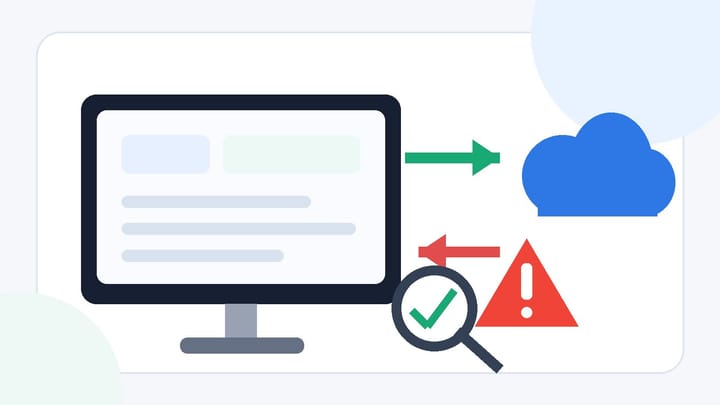
1. A failed channel sync status means a specific update was not confirmed as successfully processed; it does not automatically mean the entire OTA connection is offline.
2. Identify the direction, channel, room or rate plan, date range, and error type before changing anything.
3. Correct mapping or validation errors before resending. After a timeout, verify the OTA first because the original update may already be live.
4. Confirm the final rate, availability, restrictions, and reservation state at both ends before closing the incident.
A failed channel sync status means the hotel PMS or channel manager could not confirm that a particular message reached its intended result. The failed item might be one rate for one date, an availability update, a restriction, or an incoming reservation event. It does not necessarily mean that every room, date, or connected channel is wrong.
That distinction matters. Repeatedly pressing retry can send stale values, create competing updates, or duplicate an incoming reservation. The safer response is to identify exactly what failed, check the destination, fix the cause, and resend only what still needs correction.
What a Failed Channel Sync Status Actually Means
Hotel connectivity is an exchange of messages. A PMS or channel manager sends rates, room availability, and restrictions to an OTA. In the other direction, it receives reservations, modifications, and cancellations. A status such as failed, rejected, timeout, or disconnected describes what happened to one of those exchanges.
The label alone does not prove the business outcome. A rejected update normally means the destination did not accept the data. A timeout means the sender did not receive a final response; the OTA may or may not have applied the update. A partial response can mean some room-rate-date combinations succeeded while others failed.
Official connectivity systems also distinguish different failure classes. For example, an invalid value can produce a validation error, expired credentials can produce an authentication error, and a temporary provider problem can produce a server error. Some batch updates can return an overall successful response while still reporting errors for individual items. The PMS should therefore expose the error detail, not just a red status icon.
Treat the status as the start of diagnosis. The operational question is: which message did not reach a confirmed, correct state?
Identify the Direction and Scope Before Retrying
First determine whether the failed message was outbound or inbound. Outbound failures affect what the OTA can sell: prices, availability, stop-sell controls, minimum stays, closed-to-arrival rules, or other restrictions. Inbound failures affect what hotel staff can see and act on: new reservations, modifications, cancellations, guest details, or payment instructions.
Then narrow the scope. Record the property, channel, room type, rate plan, affected dates, message timestamp, and external identifier. One room plan rejected for one weekend is a different incident from an expired connection affecting the whole property.
Check whether nearby updates succeeded. If the PMS shows later rates as delivered but one earlier date failed, the problem may be a value or configuration specific to that date. If every message to one OTA stopped at the same time, authentication, connection state, rate limiting, or a provider outage becomes more likely.
Smart Order's hotel channel manager keeps rate, inventory, and reservation connections in one workflow, helping hotel teams isolate the affected channel and product before they retry an update.
Make Channel Exceptions Easier to Trace
Keep OTA mappings, inventory, rates, and reservation activity connected so staff can see what failed and verify the correction from one workflow.
Read the Error Type and Choose the Safe Action
Different statuses require different responses. Use the error message and destination state together; interface wording varies by PMS, channel manager, and OTA.
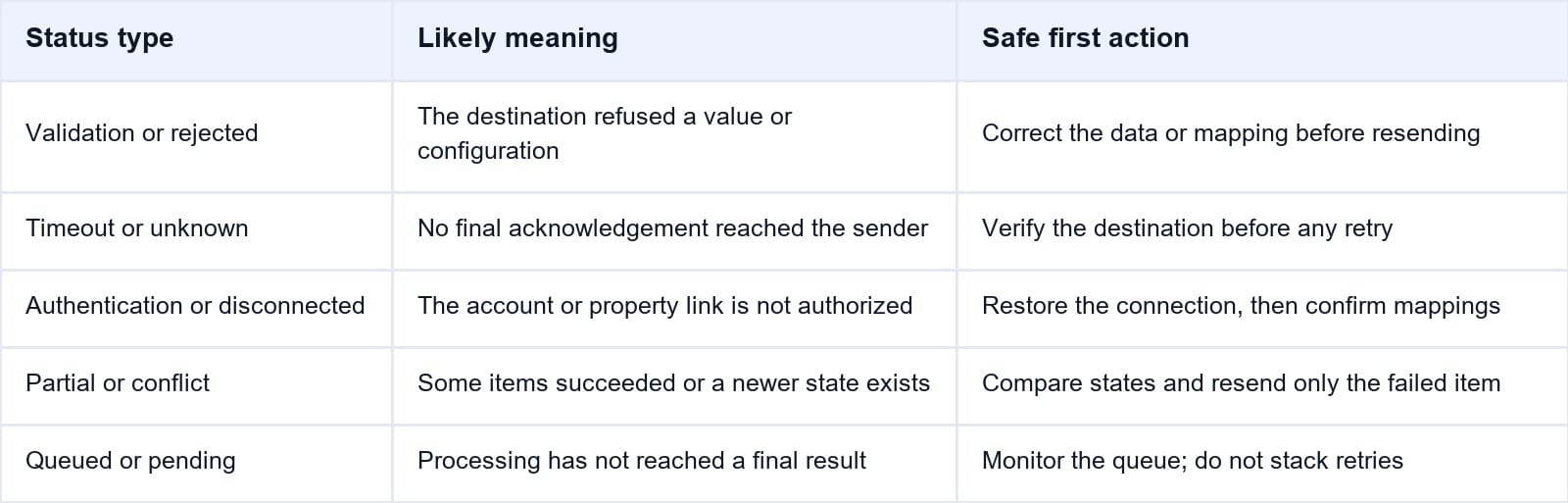
For a validation, mapping, or permission error, retrying the same message usually produces the same result. Correct the invalid rate, occupancy, currency, room-rate mapping, restriction, or account permission first. Then resend only the affected product and dates.
For a timeout or unknown result, do not assume failure. Open the OTA extranet or connectivity log and check whether the intended value is already present. If it is live, another retry may be unnecessary. If it is not live and no later update superseded it, send a controlled retry.
For authentication or disconnection errors, restore the property connection before resynchronizing. Confirm that room and rate mappings still point to active products; reconnecting an account does not repair a bad mapping automatically.
For partial success or version conflicts, compare the last accepted value with the current PMS value. Resend only the failed item. A full refresh can overwrite a newer change or generate a queue of unnecessary updates.
Verify Rates, Inventory, Restrictions, and Reservations
After correcting the cause, verify the business result rather than relying only on a green status. The PMS, channel manager, OTA extranet, and guest-facing listing can represent different stages of the same update.
Use this sequence:
- Capture the current PMS value and the failed message details before making changes.
- Check the OTA extranet for the same room, rate plan, date, occupancy, and restriction.
- Correct the source data or mapping, then resend only the affected scope.
- Wait for a final acknowledgement and confirm that no newer update was overwritten.
- Check the bookable result for representative dates without completing a real booking.
- For an inbound reservation failure, search by the OTA confirmation number before importing or retrying, then confirm inventory changed exactly once.
Rate verification should include currency, taxes, occupancy pricing, derived-rate behavior, and whether the rate plan is open. Inventory verification should confirm the room count and stop-sell state. Restriction verification should cover the exact rules the channel supports, because an unsupported restriction may fail while price and availability still succeed.
Reservation messages need extra caution. A timeout can occur after the first import has already created a PMS record. Search the PMS, OTA, and channel queue before retrying so one real booking does not become two operational records.
Escalate the Failure and Prevent Repeat Incidents
Escalate when the connection cannot be restored, the error returns after a corrected narrow retry, the OTA and PMS disagree about a reservation, or the team cannot tell whether a timed-out update was applied. Contact the system that displays the failed status first; its support team can usually identify the next provider in the message path.
Give support enough evidence to trace one exact transaction:
- Property and channel names, including their account or property IDs
- PMS room and rate plan plus the mapped OTA IDs
- Direction, affected dates, timestamp with time zone, and message or correlation ID
- Full error code and text, with screenshots that hide credentials and payment data
- Expected value, value visible at the destination, and the last known successful update
- Actions already taken and whether a retry, manual edit, booking, modification, or cancellation occurred
Prevention is mostly exception discipline. Assign an owner for failed and pending sync queues, set an escalation time for unresolved errors, and audit mappings whenever a room type or rate plan is added, renamed, replaced, or deactivated. Test each new connection with a rate change, availability change, supported restriction, new reservation, modification, and cancellation.
The Smart Order front desk connects reservation activity with the room calendar, giving staff a clearer place to verify whether a channel exception changed arrivals or room availability.
Keep Sync Problems Visible to Operations
Give front desk and revenue teams one connected view of channel activity, room availability, and reservations before a failed update affects a guest.
Frequently Asked Questions
Does a failed channel sync status mean the OTA is offline?
No. It may affect one update, product, date, or property while other messages continue normally. Check the error, direction, and affected scope before declaring a channel-wide outage.
Should hotel staff retry a failed sync immediately?
Only after identifying the error type. Fix validation, mapping, authentication, and permission errors first. After a timeout, verify the destination before retrying because the original message may already have been applied.
Can a failed sync cause an overbooking?
Yes. If an availability reduction or stop-sell fails, an OTA may continue selling inventory that the PMS considers unavailable. A missed reservation or cancellation can also leave systems with different room counts.
Why would one rate plan fail while others succeed?
That plan may be inactive, unmapped, derived from another plan, restricted to extranet editing, configured with a different pricing model, or receiving a value the OTA does not accept.
Who should the hotel contact about the failure?
Start with the PMS or channel manager showing the failed status and provide the exact message evidence. If the failure originates at the OTA, that provider can route or escalate the case with the relevant identifiers.
How do I know the sync has recovered?
A successful retry is not enough. Confirm the intended value or reservation at the destination, check that later updates are processing, and verify that inventory or reservation records changed exactly once.
A failed status is an exception to investigate, not an instruction to retry blindly. Define the direction and scope, act according to the error type, and close the incident only when both systems show the intended operational result.
