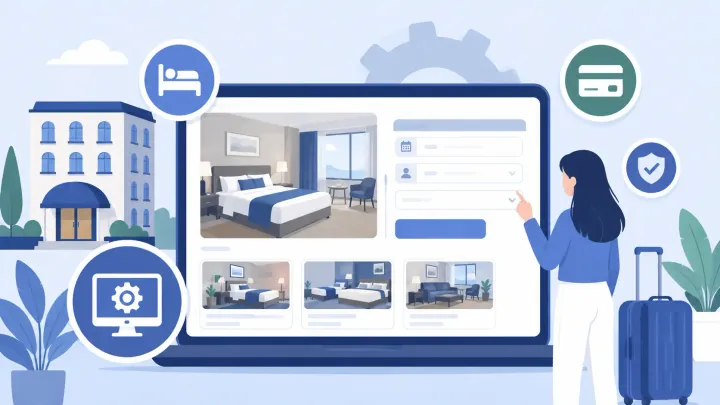
1. Hotel booking engine software lets guests check availability and reserve directly through your property's website or a hosted booking page.
2. The booking engine handles the guest's reservation journey; the PMS manages the stay, and the channel manager updates connected OTAs.
3. A confirmed reservation reduces the available quantity for the booked room type and dates. It does not automatically close every room on every channel.
4. Direct bookings avoid the OTA booking commission, but software, payment processing, website, and marketing costs may still apply.
Hotel booking engine software turns your hotel website into a place where guests can reserve a stay. They choose dates, compare available rooms, review the total price and policies, and complete the steps required to receive confirmation.
For an independent hotel, B&B, guesthouse, or apartment operator, the value continues after the guest confirms the booking. The reservation needs to reach the front desk, reduce the correct inventory, and show whether the guest has paid or still owes a balance.
What Is Hotel Booking Engine Software?
A hotel booking engine is an online reservation tool for a property's direct sales channels. It displays available accommodation, rates, policies, and supported extras so guests can book without using an online travel agency (OTA).
Unlike an inquiry form, a booking engine lets the guest complete a reservation according to the property's booking rules. Payment and confirmation are related, but they are not always the same event: a hotel may require full payment, a deposit, or payment later.
A booking engine can reduce email exchanges and help visitors who already want your property reserve directly. It does not generate demand on its own. Room photos, reputation, website visibility, suitable prices, and clear policies still influence whether guests book.
How a Hotel Booking Engine Works
What the guest does
A useful booking flow gives guests enough information to commit without calling the hotel. Check that each step works on a phone:
- Search dates and occupancy. The guest enters arrival, departure, and the number of adults and children.
- Compare available rooms. Photos, capacity, amenities, and rate differences help the guest choose a suitable room.
- Review the total and policies. Show mandatory charges, meal inclusions, cancellation conditions, and payment requirements before submission.
- Enter details and meet the payment requirement. Depending on the setup, this may mean paying now, providing a guarantee, or agreeing to pay later.
- Receive confirmation. The guest should receive the reservation reference, dates, room details, amount, and relevant instructions.
What the hotel sees next
When hotel booking engine software connects to the property management system (PMS), the reservation enters the calendar staff use for daily operations. The team should see the room type, stay dates, selected rate, guest details, and the payment status supported by that connection.
Suppose three double rooms remain available for a particular night. One confirmed direct reservation should reduce the sellable quantity to two. The channel manager then updates remaining availability on supported OTAs. Only when inventory reaches zero, or the hotel applies a stop-sell, should the relevant offer close.
For a prepaid rate, staff should be able to verify the payment record. For a pay-later rate, confirmation should not be mistaken for proof that money has been collected. If payment happens through a separate link, define how staff check and record the result.
When website bookings arrive separately from the operating calendar, staff must reconcile reservations before selling the remaining rooms. Smart Order's direct booking engine sends reservations into its PMS, where availability and operating records update together. Staff can manage the arrival from the same calendar used for other bookings.
Bring Website Reservations Into Your Hotel Calendar
Connect direct bookings with the room availability and reservation records your front desk uses every day.
Booking Engine vs PMS vs Channel Manager
These tools work together, but each has a different primary job. A booking engine is the guest-facing reservation path: guests view rooms, choose rates, and submit a direct booking.
The PMS manages the operating record of the stay, including reservations, room assignments, arrivals, departures, and guest balances. Its front desk calendar is where staff should find a confirmed booking when preparing for arrival.
A channel manager exchanges supported rates, restrictions, availability, and reservation changes with OTAs. It helps keep the remaining inventory consistent after either a website or OTA booking.
Vendors may combine these tools or connect separate products. Either arrangement needs clear rules for where rates and availability are changed, how booking changes return, and who resolves a failed update. Correct connections reduce overbooking risk; they do not guarantee that mistakes or outages can never occur.
What Your Hotel Booking Engine Needs to Support
Evaluate hotel booking engine software against actual bookings your property accepts. A family booking two rooms with breakfast and a deposit may need a different flow from a solo guest booking one prepaid night.
Check six areas:
- Mobile booking: readable room details, usable buttons, and date changes that do not erase the guest's progress.
- Rates and policies: occupancy, meals, taxes, mandatory fees, cancellation terms, and booking restrictions displayed clearly.
- Inventory connections: the correct room types and dates updated in the PMS, website, and supported OTA connections.
- Payments: the deposit, full-payment, guarantee, currency, and refund arrangements your property uses.
- Guest information: the languages, contact details, and confirmation messages needed for your markets.
- Measurement: a way to distinguish booking attempts, confirmed reservations, cancellations, and revenue.
Do not assume a label such as online payments covers every country, currency, or policy. Similarly, taking payment through a link is different from collecting it inside the booking page. Ask the provider to demonstrate the exact workflow your hotel needs.
Direct booking costs and OTA commission
A reservation completed directly with your property normally avoids an OTA's booking commission. That does not mean every booking engine is commission-free: providers may charge subscriptions, booking fees, or a percentage of reservations.
Compare software, payment processing, website maintenance, advertising, and staff time over the same period. Include cancellations and refunds when assessing revenue. A booking engine does not reduce the contractual commission on bookings that still arrive through an OTA.
Choosing a Hotel Booking Engine Setup
A standalone booking engine can fit a property whose PMS already works well and has a proven connection. Confirm how reservations, cancellations, payment records, and availability move between vendors before committing.
An integrated platform can simplify the workflow for a small team by combining the booking engine, PMS, and channel manager. You still need to check the selected plan, supported channels, payment setup, and training requirements.
The overview below introduces several products and their broad positioning. Use it as a starting point for questions, rather than a ranking or a current price comparison. Suitability depends on the plan and configuration available to your property.
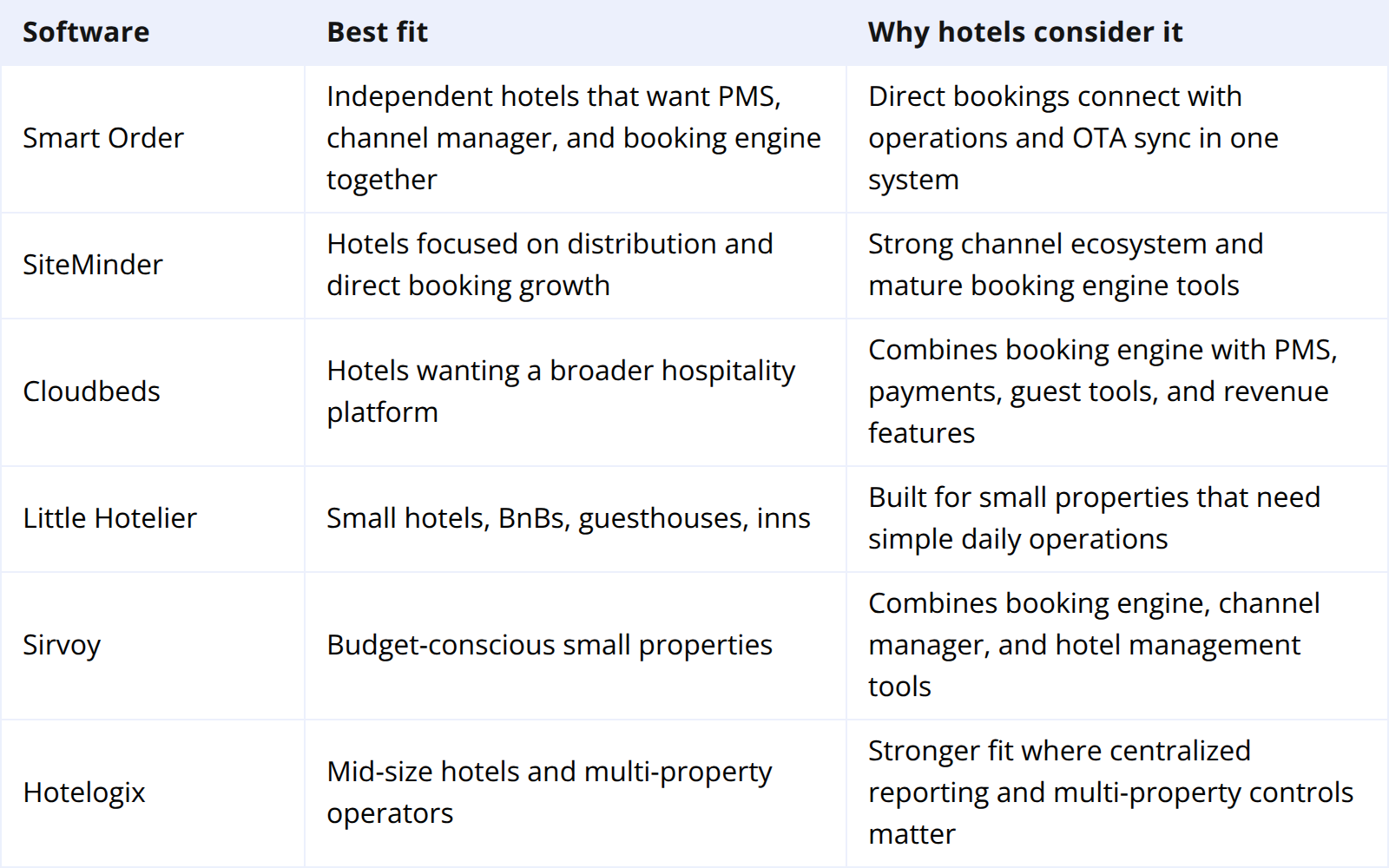
For example, the deciding question may be whether you can retain your current PMS, rather than which provider offers the most features. Ask for a demonstration using your room categories, rate plans, and payment policy before building a shortlist.
What to Test Before Going Live
Test hotel booking engine software as both a guest and a front desk user. Coordinate any test reservation with the provider so you understand the payment and cancellation consequences.
- Complete the mobile journey. Check dates, occupancy, room descriptions, total charges, and policies. Try changing dates before confirming.
- Verify the reservation in the PMS. Match the reference, dates, room type, guest count, amount, and payment status against the confirmation.
- Check remaining inventory. Reopen the website and connected OTA calendars. Include a controlled last-room test where supported.
- Test changes and cancellation. Confirm what happens to the reservation, payment record, and released inventory. A cancellation does not necessarily mean a refund has been issued.
- Assign responsibility for problems. Staff should know how to protect inventory, contact the right support team, and check whether an update has succeeded.
After launch, measure completed reservations against booking-engine sessions using a consistent definition. Review mobile and desktop separately where volume allows. Also track cancellations, failed payments, and direct revenue; a higher booking count does not always mean higher retained revenue.
Frequently Asked Questions
Does a small hotel need booking engine software?
It can help when guests already find the property online and want to reserve directly. Assess existing website demand, manual reservation work, and total cost. Installing a booking engine alone does not guarantee more bookings.
Do I need a website to use a booking engine?
Some providers offer a hosted booking page that can be shared through your own communication channels. Others provide an embedded website flow or a booking button. Confirm which options are included and how guests reach them.
Can guests reserve without paying the full amount immediately?
That depends on the property policy and the booking engine's payment setup. Some arrangements support deposits, guarantees, or payment later. Check the confirmation rule, outstanding balance, and follow-up process before offering a rate.
Do all booking engines offer commission-free direct bookings?
No. Providers use different charging models. Smart Order's Direct Booking Engine is commission-free, while software subscriptions, payment processing, and marketing remain separate cost considerations. Compare the complete arrangement you will use.
Can a booking engine replace a PMS?
A booking engine handles direct reservations, while a PMS manages the stay and daily operations. A product may include both, but a booking page alone does not provide the full front desk workflow.
Can hotel booking engine software prevent overbookings?
It can reduce risk when reservations and remaining availability update correctly across the PMS and connected channels. Incorrect room matching, manual overrides, separate inventory allocations, or connection failures can still cause mismatches. Keep an exception-checking process after launch.
Choose the setup around a complete reservation: what the guest sees, what the front desk receives, how payment is recorded, and where the remaining room can still be sold. Testing that sequence gives your team a practical basis for running direct bookings.
