
1. A hotel channel manager connects a property's room inventory with multiple online travel agencies and booking channels.
2. It sends supported rates, availability, and restrictions to connected channels, then returns reservations and cancellations to the hotel system.
3. It reduces manual work and double-booking risk, but correct mapping, testing, and connection monitoring still matter.
4. A channel manager handles distribution; it does not replace the PMS, booking engine, or revenue management system.
A hotel channel manager is software that helps a hotel, B&B, hostel, serviced apartment, or vacation rental manage room sales across multiple booking channels. Instead of changing rates and availability in each OTA extranet, the property makes supported updates from its hotel system or channel manager.
The result is a more consistent inventory record across Booking.com, Expedia, Agoda, Airbnb, Trip.com, regional OTAs, and the property's direct booking engine—subject to the channels and fields supported by the chosen connection.
What Is a Hotel Channel Manager?
A hotel channel manager connects the inventory a property controls with the booking channels where guests shop. Its primary job is distribution: sending room rates, availability, and restrictions out, then returning booking changes to the hotel.
Consider a 20-room hotel selling the same deluxe room type on three OTAs. If a guest books the last deluxe room on one channel, the channel manager should return that reservation to the hotel system and reduce the remaining availability sent to the other connected channels. The front desk no longer has to close the room manually in three separate extranets.
This process reduces the time between a booking and the next inventory update. It also gives the hotel one place to review its channel connections, room mappings, and failed or pending updates.
How a Hotel Channel Manager Works
The exact workflow depends on whether the channel manager is built into the PMS or connected as a separate product. In either setup, the hotel needs a defined place for managing inventory and a connection for each active booking channel.
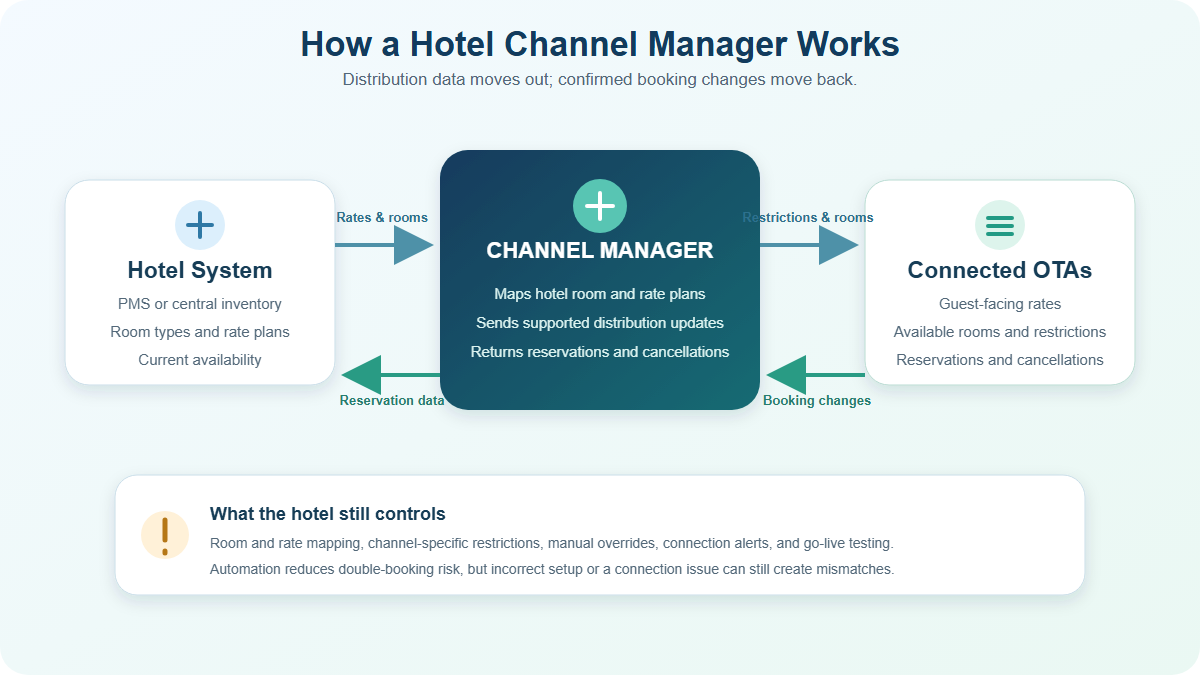
A typical two-way workflow follows five steps:
- The hotel changes a room rate, available quantity, or restriction in the system it uses to manage distribution.
- The channel manager translates that update into the format supported by each connected channel.
- The booking channel processes the update and displays the current sellable offer to guests.
- When a reservation, modification, or cancellation occurs, the channel sends the booking change back through the connection.
- The hotel system records the change and recalculates the inventory that should be distributed next.
“Two-way” means information can move in both directions. A one-way connection may only send availability or calendar changes, so staff may still need to process reservations or other fields manually. Two-way connectivity is usually more suitable for a hotel selling several room types and rate plans, but the exact supported data must be checked channel by channel.
No provider should be evaluated only by a claim such as “instant sync.” The practical questions are which fields the channel accepts, how quickly exceptions become visible, and what staff should do when an update is rejected or delayed.
When inventory changes in one tool but OTA reservations arrive in another, every handoff creates another place to miss an update. Smart Order connects its hotel channel manager with the PMS reservation calendar, so OTA bookings and the remaining room availability can be managed from the same operating record.
Connect OTA Distribution With Your Hotel Calendar
Manage OTA reservations, rates, and room availability with the PMS record your team uses each day.
What It Syncs—and What It Does Not
Channel manager software commonly exchanges several types of distribution data, but support varies by OTA, connection, property setup, and rate plan. Before going live, confirm whether the connection covers:
- Room availability and sellable inventory
- Daily rates and occupancy-based pricing
- Minimum stays, closed-to-arrival dates, and other restrictions
- Reservations, modifications, and cancellations
- Room-type and rate-plan mapping
- Taxes, fees, meal plans, payment details, and guest messages where supported
A channel manager does not create a complete distribution strategy for the hotel. The property still decides which channels to use, how much inventory to sell, which rate plans to publish, and whether a promotion is profitable after commission and operating costs.
The value of a hotel channel manager is therefore not the number of channel logos on a sales page. It is whether the supported connections match the rooms, rate plans, restrictions, and reservation workflow the property actually operates.
It also cannot eliminate every overbooking. Incorrect room mapping, manual overrides, duplicated allotments, disconnected rate plans, or an OTA processing issue can still cause a mismatch. The safer promise is that a correctly configured connection reduces the risk and shortens the amount of manual reconciliation required.
Channel Manager vs PMS vs Booking Engine vs RMS
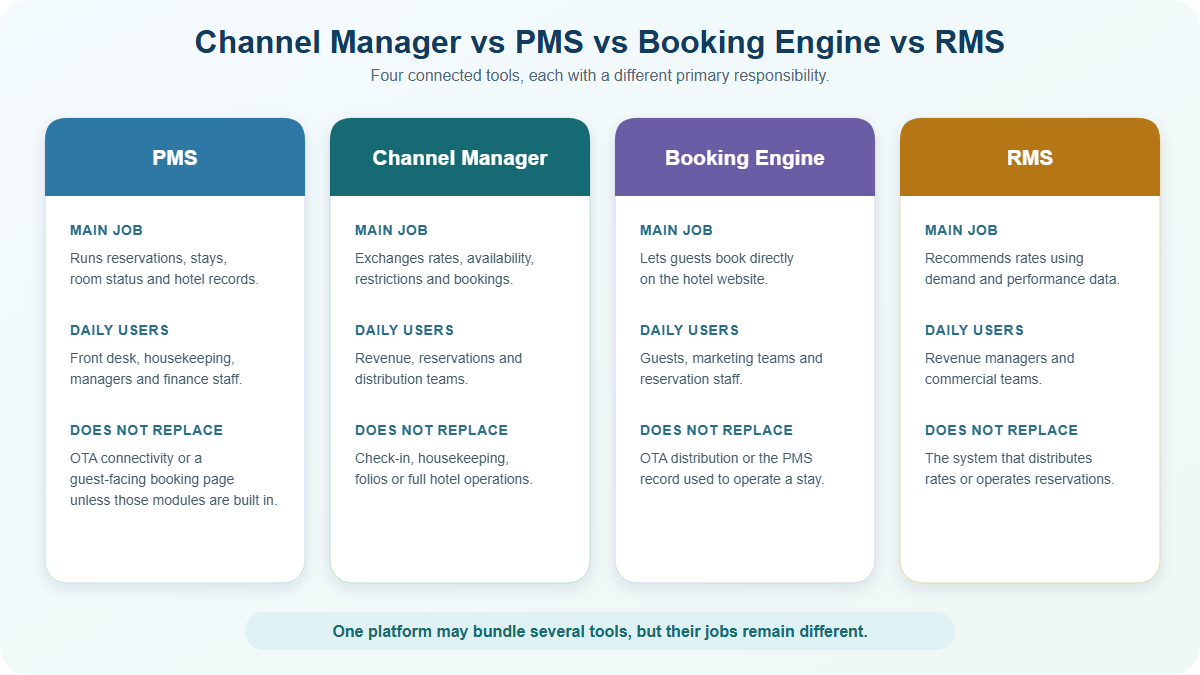
These tools often work together, and one platform may include several of them. Their responsibilities are still different.
Property Management System (PMS)
The PMS manages the operating record of a stay: reservations, arrivals, departures, room assignments, room status, guest details, folios, and reports. A PMS may include a channel manager, but the PMS role is broader than OTA distribution.
Channel Manager
The channel manager exchanges distribution data between the hotel and connected booking channels. It does not replace front desk, housekeeping, payment, or complete reservation-management workflows.
Booking Engine
A hotel booking engine displays rooms and rates on the property's website and accepts direct reservations. It should share current inventory with the PMS and channel manager so a direct booking reduces availability across the connected channels.
Revenue Management System (RMS)
An RMS uses demand and performance data to recommend or automate pricing decisions. The channel manager distributes supported rate changes, but it should not be described as an RMS simply because it can send prices to OTAs.
When Does a Hotel Need a Channel Manager?
A property usually benefits from a channel manager when it sells the same inventory on more than one online channel and manual updates are becoming difficult to control. The need depends more on distribution complexity than room count.
A hotel channel manager becomes useful when a new booking or rate change would otherwise require staff to repeat the same update across several extranets.
A small guesthouse using two OTAs can face the same last-room risk as a large hotel. A larger property may still have a simple workflow if it uses only one channel and a direct booking engine. Look at how often rates change, how many room and rate combinations need mapping, and how much time staff spend comparing extranets.
Warning signs include delayed availability updates, repeated rate differences, reservations entered by hand, uncertainty about which calendar is current, and staff logging into several extranets after every booking. These are operating problems a channel manager can reduce, provided the property completes its setup and monitors connection warnings.
How to Choose and Test a Hotel Channel Manager
Start with the channels and workflows that already generate bookings. A long connection list has little value if it excludes the regional OTA, restriction type, or payment workflow your property actually uses.
When comparing a hotel channel manager, ask the provider to demonstrate your own room types, rate plans, and high-volume channels instead of relying only on a generic product tour.
Ask each provider to confirm six points:
- The exact OTAs and regional channels available for your market
- Which rates, restrictions, booking changes, and payment details each connection supports
- Whether the PMS, channel manager, and booking engine share one inventory record or rely on separate integrations
- How room types and rate plans are mapped, tested, and changed later
- Who handles rejected updates, missing reservations, downtime, and escalation
- The total cost for required rooms, properties, channels, onboarding, support, and add-ons
Before opening every channel, test a limited setup with real room and rate structures. Create or use an approved test reservation, confirm it reaches the PMS, verify that availability changes on the other connected channels, then test a modification and cancellation. Reopen each guest-facing calendar and check the price, restrictions, and remaining inventory that a traveler can actually book.
Add channels according to source market, net revenue, payment flow, and the team's capacity to maintain mappings and promotions. There is no universal rule that every independent hotel needs the same number or combination of OTAs.
FAQ About Hotel Channel Managers
How does a hotel channel manager work?
It sends supported room rates, availability, inventory, and restrictions from the hotel's distribution system to connected channels. It also returns supported reservation changes so the PMS or central inventory can recalculate what remains available.
What information does a channel manager sync?
Common fields include availability, rates, restrictions, reservations, modifications, and cancellations. Taxes, fees, payment data, guest messages, content, and promotions vary by channel and connection.
Can a channel manager prevent overbookings?
It can significantly reduce the risk by updating shared inventory after a booking. It cannot guarantee zero overbookings because mapping errors, manual overrides, separate allotments, or connection issues can still create incorrect availability.
Do small hotels need a channel manager?
A small hotel can benefit when it sells the same rooms through multiple channels. The decision should be based on channel complexity, update frequency, staff workload, and overbooking exposure rather than room count alone.
How much does a hotel channel manager cost?
Providers may charge per room, per property, per channel, per booking, or as part of a bundled PMS plan. Compare the complete cost for the connections, booking engine, PMS, onboarding, support, and add-ons the property actually needs.
Is a channel manager the same as a PMS?
No. A channel manager handles external distribution, while a PMS manages reservations and day-to-day property operations. Some platforms combine both in one system.
How should a hotel test a channel manager?
Verify room and rate mappings, publish a controlled update, check the guest-facing channels, and follow a reservation through creation, modification, and cancellation. Confirm who receives an alert and what the team should do if any step fails.
A hotel channel manager works best when the property treats it as part of a controlled booking workflow, not a set-and-forget connection. Choose the channels that fit your guests, test the complete reservation path, and keep staff responsible for monitoring exceptions after launch.
