
1. Front desk software should carry forward live reservation, room, payment, message, and task status without asking staff to rewrite facts already held in the PMS.
2. A handover should focus on exceptions: what remains unresolved, what was promised, who owns the next action, when it is due, and when escalation is required.
3. The incoming employee should acknowledge priority items; the outgoing shift should not close with unassigned payment, room, safety, or guest-service risks.
4. General handover notes should exclude card details, access codes, identity documents, and unnecessary sensitive guest information.
Hotel front desk software should make a shift change a transfer of responsibility, not a transfer of memory. The incoming employee needs the current operational position and a short list of exceptions that still require action.
Verbal handovers fail because hotel conditions change quickly. A room becomes ready, a booking changes, a payment fails, or a guest replies elsewhere. A free-text shift note forces employees to reconstruct the hotel every time the desk changes hands.
The stronger model combines live system facts with structured human context. Software supplies the current reservation, room, folio, and communication status. Staff add the promise, decision, next action, owner, and deadline that the system cannot infer safely.
What a Front Desk Handover Must Accomplish
A handover is complete when the incoming shift can identify every material open risk without asking the outgoing employee to retell the day. That includes arrivals or departures needing intervention, room discrepancies, unsettled money, unresolved guest communication, and tasks that cross the shift boundary.
Routine facts should stay in their source records. Do not copy the entire arrival list into a handover note when the PMS already updates it. Surface only the exceptions: an unassigned arrival, an unconfirmed early check-in, a no-show decision awaiting approval, or a reservation changed outside the normal workflow.
Every exception needs five fields: linked reservation or room, current status, next action, named owner, and due time. Add an escalation rule when delay could affect room assignment, money, safety, or a promise made to a guest.
Hotel Front Desk Software Handover Control Matrix
The matrix below separates facts the system should populate automatically from judgment the outgoing employee must record. It also defines the condition required before an item can be closed.
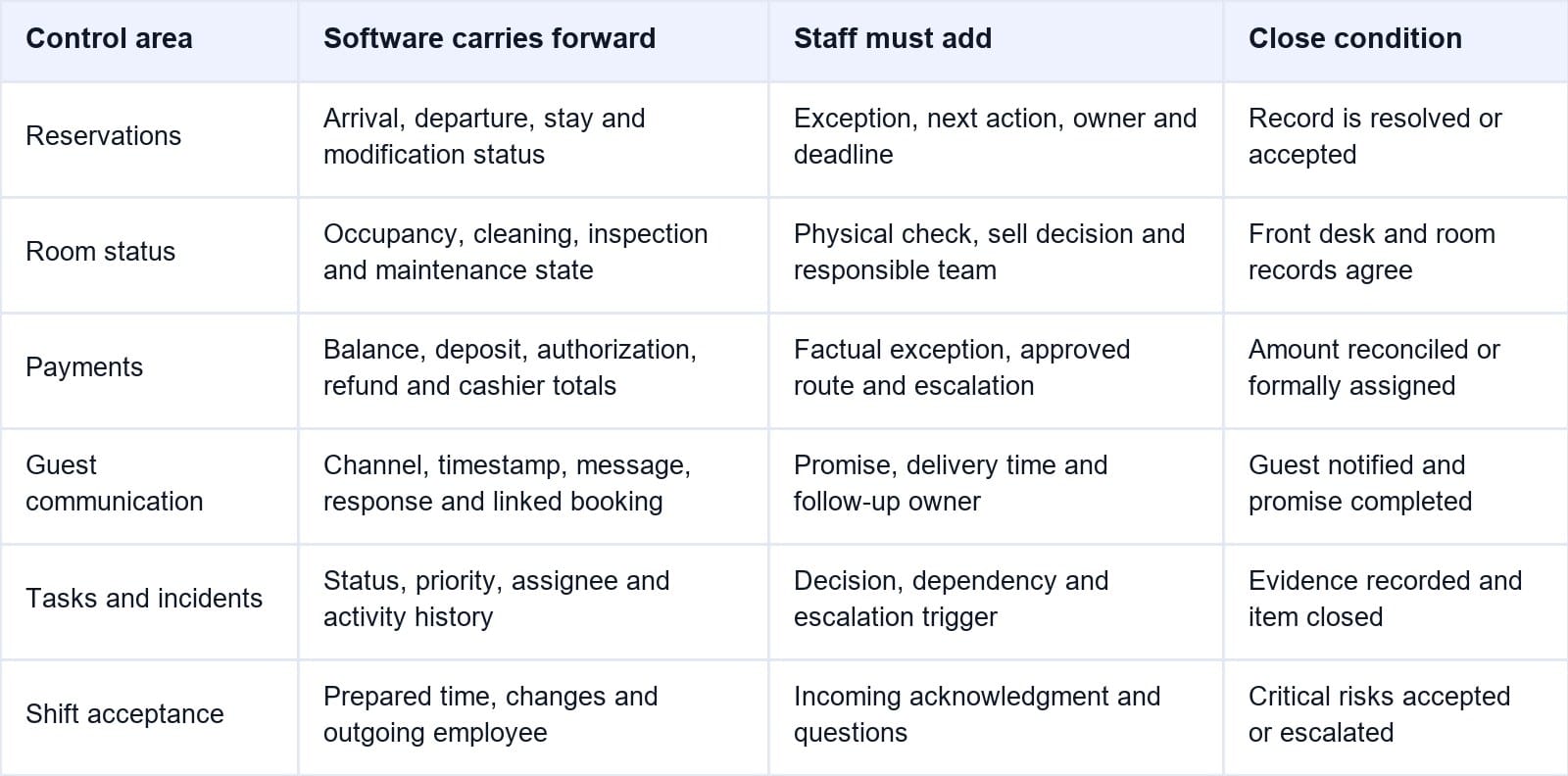
The handover view should show when each fact last changed and by whom. Stale status without a timestamp is not a reliable control.
When shift notes sit apart from reservations and room status, the next employee still has to investigate each line. Smart Order's hotel front desk software connects the reservation, room, payment status, and guest record, so the outgoing agent can attach the unresolved action to the operating record and the incoming agent sees the latest position before acting.
Give Every Shift One Live Operating Record
Keep arrivals, room status, balances, guest notes, and pending actions visible at the front desk without rebuilding the handover from separate tools.
Carry Forward Unfinished Reservation Work
The software should automatically show arrivals not checked in, departures not checked out, in-house stays, no-shows not processed, room moves in progress, unassigned rooms, modified bookings, and cancellations that require follow-up. Employees should not type these lists again.
The handover note explains the exception. For an early arrival, record whether the request was confirmed or only requested, which room is being prioritized, who is coordinating with housekeeping, and the time promised to the guest. For a late arrival, show the guarantee or payment position, access plan, communication status, and cut-off for escalation.
Record Room Status and Every Discrepancy
The PMS should supply front-office occupancy, housekeeping status, inspection status, out-of-order blocks, maintenance holds, room moves, and priority arrivals. The handover should emphasize conflicts and exceptions rather than repeat the complete room board.
A room marked vacant by the front desk but occupied by housekeeping is a control failure, not a casual note. The same applies when a reservation is checked in but the room appears vacant, a room is marked ready before inspection, or maintenance work exists without a sell restriction.
For each discrepancy, record what was physically verified, who must correct the authoritative status, and whether the room can be assigned. Keep the warning open until the room and reservation records agree.
Keep Payment Exceptions Separate and Auditable
Front desk software should automatically show open folio balances, deposits, pre-authorizations, failed payment attempts, refunds, charge corrections, invoice requests, cash postings, and cashier-shift totals according to employee permissions.
The handover must state the unresolved financial action without exposing sensitive credentials. Record the amount, approved payment route, factual failure or discrepancy, whether the guest was informed, responsible employee, deadline, and manager approval required. Never paste full card numbers, security codes, payment links, passwords, or identity documents into a general shift log.
Cashier closure and operational handover are related but not interchangeable. The cashier process reconciles postings, takings, drops, and differences for one user or shift. The handover explains any open operational consequence, such as a departure folio awaiting correction or a refund that accounting must verify.
Preserve Guest Communication as an Open Commitment
Guest communication should enter the handover from the reservation inbox or guest record where possible. The software should show the channel, timestamp, sender, reservation, latest message, response status, and assigned employee. This reduces the risk that an OTA message, email, phone request, or in-person promise disappears in a separate chat.
The important field is the commitment created. Record what the hotel promised, its deadline, the department, next check, and owner. A complaint also needs its recovery status and escalation point.
Preferences for a future stay should remain in the guest profile. Immediate work belongs in the active task or reservation. Keeping those purposes separate prevents permanent profiles from becoming crowded with short-lived operational notes.
Require Ownership, Acknowledgment, and an Audit Trail
An open item without an owner is not handed over. The system should require one responsible role or employee, a due time, priority, and status such as open, waiting, escalated, or completed. “Front desk” is too vague when several employees share the desk.
The incoming shift should acknowledge the handover and read back critical items. Software should retain who created, changed, assigned, acknowledged, escalated, and closed each item with timestamps. Managers then have evidence of the transfer and can identify repeated process failures.
Do not let staff close an item by deleting it. Completion should preserve the final action and time. Reopened work should keep its earlier history instead of appearing as a new unrelated task.
Run a Ten-Minute Shift Handover
A concise handover can follow five steps:
- Reconcile the live arrival, departure, in-house, room, and payment views before the shift ends.
- Filter for unresolved or discrepant items and remove anything already completed.
- Assign an owner, deadline, next action, and escalation rule to every remaining exception.
- Have the incoming employee review and acknowledge priority items, asking questions while the outgoing shift is present.
- Close the cashier shift and handover separately, then escalate any unaccepted critical risk to the duty manager.
Prepare throughout the shift instead of writing everything at the final minute. A structured record created when the event occurs is more accurate than a summary reconstructed from memory.
If the incoming employee must search multiple screens to discover a room block, unpaid balance, and unanswered promise, the handover is not truly connected. Smart Order's hotel PMS keeps these operational records linked, while role-based visibility lets the next shift focus on exceptions that require a decision.
Make Open Work Survive the Shift Change
Connect reservation, room, payment, and guest context so every unresolved action has a visible status and owner.
Test Front Desk Software With Real Handover Scenarios
A product demo should not stop at a clean arrival list. Ask the vendor to show what happens when an early-arrival room is still dirty, a payment authorization fails, a guest complaint remains open, and the outgoing employee leaves before resolution.
Check whether the incoming employee can see the current facts, the promise, the owner, and the deadline without opening a notebook or group chat. Change the room status or payment position after the handover is prepared and confirm that the view updates without preserving a stale duplicate.
Also test permissions and failure recovery. Employees should see enough to act but not unnecessary sensitive data. Managers need overdue or critical escalations, plus a documented contingency process for outages.
Frequently Asked Questions
What should a hotel front desk handover include?
It should cover unresolved arrival and departure exceptions, room-status discrepancies, payment or folio follow-up, open guest requests and complaints, maintenance or safety issues, owners, deadlines, and escalation requirements. Routine data should come from the live PMS.
What should front desk software record automatically?
It should populate reservation status, room assignment, housekeeping and maintenance status, folio balance, payment state, message history, task status, timestamps, and user activity where supported. Staff should add context and decisions the system cannot infer.
Is a verbal shift handover enough for a small hotel?
No. Conversation helps clarify urgent work, but it does not create a durable, searchable, acknowledged record. Even a small property needs written ownership for unresolved guest, room, payment, and safety issues.
How long should a front desk shift handover take?
The live briefing can often fit within ten to fifteen minutes when staff update exceptions during the shift. A long briefing usually indicates that the team is reconstructing events at the end rather than maintaining current records.
What information should not appear in a shift log?
Do not include full payment-card data, security codes, passwords, key or access codes, identity-document images, medical detail, or personal narratives that are unnecessary for the next action. Link to the approved restricted record instead.
The Handover Is a Control, Not a Conversation
Good hotel front desk software carries live facts forward automatically and asks staff to document only the exceptions that need judgment. Every open item should explain what remains, who owns it, when it is due, and what happens if the deadline is missed.
That structure reduces oral omissions without turning the shift log into another inbox. The result is operational continuity: rooms remain assignable only when their status is trustworthy, money stays reconcilable, guest promises remain visible, and the next shift starts with responsibility instead of detective work.
