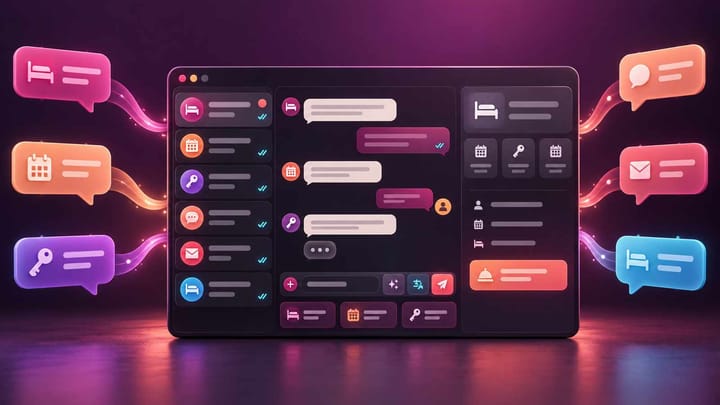
1. A unified inbox should let staff read and reply to OTA and direct-booking conversations without opening several extranets.
2. Translation, templates, reservation context, ownership, alerts, and history matter more than the number of channels shown in a sales demo.
3. Test the software with a real reservation, a foreign-language question, a shift change, and an unresolved message before buying.
4. The best system reduces missed messages without hiding which employee replied or which channel delivered the conversation.
Hotel guest messaging software should make the next reply easier, faster, and safer for the person running the property. It should not become another inbox that staff have to monitor alongside Booking.com, Airbnb, Trip.com, email, and direct-booking messages.
That is why a feature list is not enough. A hotel owner needs to understand how a message enters the system, which reservation appears beside it, who is responsible, what happens during a shift change, and whether the reply returns through the correct channel. These nine workflow features provide a practical comparison.
1. One Queue for OTA and Direct Conversations
Start by asking what the vendor means by a unified inbox. A useful system brings supported OTA conversations and direct guest messages into one working queue. Staff should not have to read a message centrally and then open the OTA extranet to answer it.
Check the channels your property actually uses. A long integration list is less valuable than reliable coverage for the OTAs producing your arrivals. Smart Order's unified OTA messaging inbox brings together conversations from Booking.com, Airbnb, Trip.com, direct bookings, and other supported channels so the front desk can work from one view.
During a demonstration, ask the vendor to receive and answer a test message. The reply should remain attached to the correct guest, reservation, property, and channel.
2. Reservation Details Beside Every Conversation
A guest may write, “Can we arrive after 10?” The employee should immediately see the arrival date, room, number of guests, booking source, status, and relevant notes. Without that context, staff waste time searching or risk answering the wrong stay.
Compare how much reservation information appears beside the message and whether employees can open the full booking without losing the conversation. For multi-property operators, the property name must be unmistakable. Two guests with similar names should never be confused because the software shows only a contact profile.
The best layout supports a complete action: read the question, check the booking, record a note if needed, and reply from the same workspace.
3. Replies That Return Through the Original Channel
Central reading is only half the workflow. Confirm that staff can respond from the shared inbox and that the reply is delivered through the original OTA conversation where supported.
Ask how the software handles channel limits, attachments, automated notices, closed conversation windows, and messages that cannot be delivered. A failed reply must show a visible status and recovery action. It should not look sent when the guest never received it.
Also check whether the original channel reference remains visible. This helps managers investigate disputes and prevents staff from moving an OTA conversation to an unapproved contact method without realizing it.
4. Two-Way Translation With the Original Preserved
Translation should reduce language friction without erasing what the guest wrote. Staff need to see the original message and the translated version together, then review the outgoing reply before it is sent.
Test the languages that matter to your property, including short operational phrases, dates, room names, access instructions, and dietary requests. A system may support many languages yet still struggle with property-specific wording. Keep critical instructions simple and confirm unusual requests with the guest when meaning is uncertain.
Smart Order supports translation across more than 100 languages in its unified inbox. Employees can read the original alongside the translation and write in their preferred language while the response is translated for the guest.
When international messages, reservation details, and reply status sit in one place, the front desk can resolve routine questions without switching systems or copying guest data between tools.
Bring Guest Conversations Into One Working Inbox
Handle supported OTA messages, translations, reservation context, and reusable replies from the same Smart Order workspace your team uses for daily operations.
5. Templates With Safe Dynamic Fields
Templates are useful when they save typing without sending the wrong details. Compare whether the software can insert approved reservation fields such as property name, guest name, arrival date, check-in time, and access instructions.
Managers should control the master template while staff can personalize the reply. The system should show the completed message before sending, especially when it contains a door code, payment instruction, cancellation condition, or late-arrival process.
Test what happens when a field is empty. A guest should never receive “Your check-in code is [CODE]” because the template sent before the value existed. Smart Order Quick Replies support reusable templates and dynamic variables, helping teams standardize common answers while keeping each conversation connected to its reservation.
6. Clear Ownership and Shift Handover
A shared inbox can still lose messages when everyone assumes someone else will reply. Compare assignment, unread, pending, resolved, and follow-up controls. At minimum, staff need to see who owns the conversation and what remains unfinished.
For shift handover, the incoming employee should be able to filter unresolved arrival questions, payment issues, room requests, and complaints without reading every thread from the previous shift. Managers also need a way to reassign work when an employee is absent.
This feature is particularly important for small teams. A simple ownership marker often prevents more mistakes than a complicated chatbot.
7. Automation That Keeps Staff in Control
Automation should handle predictable messages while leaving judgment to employees. Useful triggers include a new reservation, a set number of days before arrival, check-in day, checkout, or a reservation-status change.
Compare whether managers can choose the channels, properties, rate plans, and reservation conditions that qualify. Staff should be able to pause an automation for a specific guest and see which message was generated by a rule.
Avoid systems that make every reply automatic. Complaints, refund requests, accessibility needs, and unusual arrival arrangements require human review. The purchasing question is not “Does it use AI?” but “Can the team see, stop, and correct what will be sent?”
8. Alerts and Escalation for Messages That Matter
Not every unread message has the same urgency. A request for restaurant recommendations can wait; a guest locked outside at midnight cannot. Compare overdue alerts, priority markers, mobile notifications, and escalation rules.
Set a realistic test: send an urgent message outside normal office hours and observe who is notified, how quickly, and what happens if the first person does not respond. If managers work away from the desk, a connected hotel mobile app can help them review time-sensitive reservations and guest needs without relying on a shared computer.
Alerts should be adjustable. Too many notifications train employees to ignore all of them.
9. Conversation History, Permissions, and Team Review
Managers need a reliable record of incoming messages, translations, templates used, replies, delivery status, assignments, and timestamps. This history helps resolve guest disputes and coach employees without relying on memory.
Compare user permissions as well. A seasonal employee may need to answer arrival questions but should not change sensitive reservation or payment information. The hotel management software and messaging layer should use consistent property access so an employee sees only the hotels and records required for the role.
Useful management measures include unanswered conversations, first-response time, overdue items, and message volume by property or shift. Treat those figures as workload signals, not as pressure to send rushed answers.
Run a 30-Minute Workflow Test Before Buying
Create one controlled reservation and send four questions: a normal arrival question, a foreign-language request, an urgent issue, and a message that must be handed to the next shift. Ask staff to process them using only the proposed inbox.
Watch where they hesitate. Check whether the reservation context is correct, the translation preserves meaning, the template fills properly, the reply returns through the channel, and the unresolved item survives the shift change. Then review the history as a manager.
Software that passes this test is more valuable than a product with more features but an unclear daily workflow.
Frequently Asked Questions
What is hotel guest messaging software?
It is a workspace for receiving, organizing, and replying to guest conversations. Connected systems can combine supported OTA and direct-booking messages with reservation details, templates, translation, assignments, and automation.
Is a unified inbox the same as automated messaging?
No. A unified inbox organizes conversations from several sources. Automated messaging sends selected messages according to reservation dates or status. A good platform may provide both, but hotels should test them separately.
Should a hotel use automatic translation for every message?
Translation is useful for routine communication, but staff should review critical details such as dates, payment requests, cancellation terms, accessibility needs, and emergency instructions before sending.
How many templates should a hotel create first?
Start with the questions staff answer repeatedly: check-in time, directions, parking, luggage storage, payment instructions, Wi-Fi, and checkout. Add templates only when the team can keep the information current.
What is the most important buying test?
Confirm that an employee can receive a real channel message, see the correct reservation, translate if needed, reply successfully, assign follow-up, and leave a complete history without opening another system.
