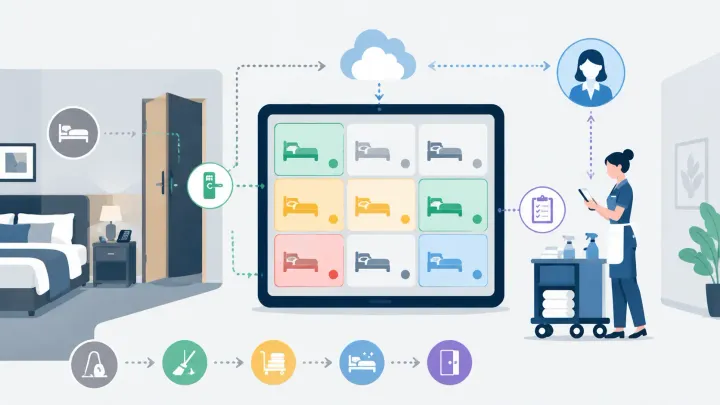
1. Manual housekeeping coordination — paper lists, radio calls, whiteboard updates — breaks down during the arrival window when front desk and housekeeping need the same information simultaneously
2. A PMS maps room status through five defined states: Checked-Out, Cleaning, Inspect, Ready, and Maintenance — each triggered by a recorded action, not a phone call
3. The transition from Inspect to Ready is where most arrival delays happen; automating that handoff clears rooms for guests minutes faster on every turn
4. The front desk gains a live view of which rooms are available now, which are in progress, and which are blocked — without calling housekeeping once
Where the Manual System Breaks
It is Friday afternoon. Fourteen guests are checking in between 2pm and 4pm. At 1:45pm, the front desk has seven rooms confirmed clean. The other seven are somewhere in the housekeeping process — but no one at the desk knows exactly where.
The housekeeper is on the fifth floor. The supervisor is completing inspections on the third. The front desk calls to ask which rooms are done. The supervisor steps out of a room to answer. A guest arrives at the desk. The front desk checks them into the first available room on the list, which turns out to have a maintenance issue the housekeeper flagged but had not communicated yet.
This is not an edge case. It is what happens when room status exists in too many places at once — a printed list, a radio call, a whiteboard, a note on the supervisor's clipboard — and none of those places update in real time.
A PMS with housekeeping automation replaces that chain of separate communications with a single live status that everyone sees simultaneously.
The Five Room Status States
Room status in a PMS-managed housekeeping system moves through five defined states. Each state is triggered by a recorded action and visible to every user with access to the dashboard.
Checked-Out
When a guest completes departure — processed at the front desk or when the PMS marks a reservation as departed — the room automatically updates to Checked-Out. This is the trigger that places the room into the housekeeping queue.
Properties using key card systems or door code software can link departure to physical key return, making the transition automatic. On properties without that integration, the front desk marks the departure from the reservation screen and the status change flows to the housekeeping view immediately.
Cleaning in Progress
Once a housekeeper is assigned to a Checked-Out room and begins work, the status updates to Cleaning. On properties using a housekeeping app, the housekeeper triggers this when they start the room. On properties using front-desk-managed assignments, a staff member updates the status from the dashboard.
The Cleaning status does one immediate thing: it removes the room from the unassigned queue and adds it to the in-progress view. The front desk knows the room is being worked on and does not send a second housekeeper to it, and does not tell an arriving guest it will be ready in ten minutes without a basis for that estimate.
Inspect
When cleaning is complete, the housekeeper marks the room Inspect. This triggers the next step: a supervisor or team lead is notified that the room is ready for quality review.
The Inspect status is often skipped on busy days or when staffing is thin. Removing it removes the error-catching step. Without a formal Inspect state, rooms advance from Cleaning to Ready without a second set of eyes — which is where missed items, incomplete restocking, or unresolved defects reach the next guest rather than being caught before check-in.
Ready
After the inspection passes, the supervisor marks the room Ready. This is the status the front desk is waiting for. A room in Ready status can be assigned to an arriving guest without any confirmation call to housekeeping — the status itself is the confirmation.
See Live Room Status Without Calling Housekeeping
When a room changes status in Smart Order — from Checked-Out through Cleaning to Ready — the front desk dashboard updates in real time. Staff assign arriving guests to confirmed-ready rooms without radio calls or manual check-ins with the housekeeping team.
Maintenance
If a problem is found during Cleaning or Inspect — a broken fixture, a stained carpet, a faulty door lock — the room is flagged to Maintenance rather than advanced toward Ready. The Maintenance status blocks the room from being assigned to new arrivals and creates a record of what needs resolving.
This is where automation provides the most direct cost prevention. Without a Maintenance flag in the PMS, a room with a problem either gets assigned and generates a guest complaint, or gets quietly held back with no documented record of the issue or how long it has been open. A formal Maintenance status creates a persistent record that stays visible until the problem is resolved and the room is returned to the clean queue.
Three Delays the Status Chain Prevents
Late checkout ripple. A guest requests late checkout at 10am for a room originally due at checkout at 11am. In a manual system, the housekeeper often arrives at 11am, finds the room still occupied, and has to return later — losing their place in the cleaning sequence and pushing a downstream room past check-in time. When the PMS handles the late checkout, the room's status remains occupied until the extended departure time, and the housekeeping queue adjusts automatically.
Maintenance caught before check-in. A housekeeper finds a broken shower fitting during a Friday afternoon turn. In a manual system, that information may not reach the front desk before the next guest is already checked in. With a PMS status update, the room immediately shows Maintenance, the desk skips it for the next arrival, and a work order exists before a guest ever sees the problem.
Priority rooms for early arrivals. When a guest is confirmed for early check-in before the standard window, the front desk can flag their assigned room for priority cleaning. The housekeeping team sees the priority in their queue. When that room reaches Ready, the desk receives the update and completes the check-in without repeatedly asking housekeeping for a status estimate.
What the Front Desk Sees
With live room status from the PMS, the front desk dashboard shows a real-time breakdown of every room by current state: how many are Ready, how many are in Cleaning, how many are pending Inspect, how many are held in Maintenance.
During the check-in window, this view replaces every confirmation call to housekeeping. The desk does not need to ask what is clean — they can see it. As rooms move from Inspect to Ready, the dashboard updates without any action from the desk. A room in Cleaning at 1:50pm that reaches Ready at 2:12pm is visible to the front desk the moment the supervisor marks it.
The outcome is not just faster individual check-ins. It is a more predictable arrival window. When every status transition happens in the system rather than through separate communication channels, the information is accurate, shared, and acted on by the right people at the right time.
Manage the Check-In Window With Live Housekeeping Data
For properties handling multiple arrivals in a short window, Smart Order's live room status view shows which rooms are ready, which are being inspected, and which have maintenance holds — so the front desk works through arrivals with current information, not a static printout from the morning.
FAQ
How does hotel housekeeping automation work with a PMS?
A PMS with housekeeping automation maps room status through defined states — Checked-Out, Cleaning, Inspect, Ready, and Maintenance. Each state is triggered by a staff action recorded in the system: a checkout processed at the desk, a housekeeper marking a room complete, a supervisor passing inspection. The front desk sees these updates in real time on a shared dashboard rather than receiving information through radio calls or a paper list that was accurate at the time it was printed.
What are the room status types in hotel management?
The standard housekeeping status chain includes five states. Checked-Out means the guest has departed and the room needs cleaning. Cleaning means a housekeeper has been assigned and is working the room. Inspect means cleaning is complete and the room is awaiting supervisor review. Ready means the room has passed inspection and can be assigned to the next arrival. Maintenance means an issue was found during cleaning or inspection that blocks the room from new assignments until it is resolved.
How do hotels prevent guests from checking into unclean rooms?
The most reliable prevention is requiring a formal Inspect state between Cleaning complete and Ready. Without a dedicated inspection step, rooms are returned to the available queue directly by the housekeeper — meaning no second set of eyes verifies the result. With an Inspect status, a supervisor must actively clear the room before it becomes assignable. The inspection step catches missed items, incomplete restocking, and minor damage before they become a guest complaint.
What causes check-in delays at hotels during peak arrival times?
Most check-in delays come from room status uncertainty: the front desk does not know which rooms are confirmed clean when guests start arriving. This happens when housekeeping tracks status separately from the front desk system — on a paper list, a whiteboard, or through radio communication. A late checkout that shifts the cleaning sequence, a maintenance issue discovered after a room was already marked available, or a miscommunication about which rooms were prioritized all produce the same outcome: guests waiting while staff try to establish what is actually ready.
Can a PMS automatically assign housekeeping tasks by room priority?
Some PMS systems can flag specific rooms for priority cleaning when they reach Checked-Out status — pushing them to the front of a housekeeper's queue based on rules like confirmed early arrivals, VIP bookings, or room type demand. Others require manual prioritization but display the assignment queue from live status data so the supervisor works from current information rather than a fixed plan made at the start of the shift. The value of priority assignment is most visible during peak check-in windows when the sequence of which rooms are cleaned first directly affects how many guests can be processed on time.
