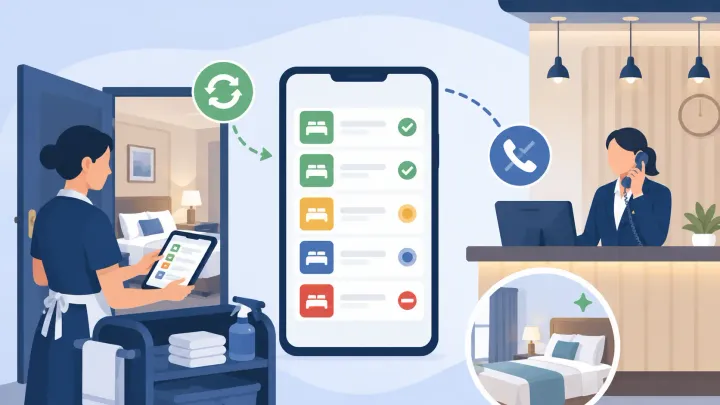
1. A housekeeping PMS app replaces the communication chain that runs between housekeeping and the front desk — radio calls, phone updates, and paper lists that become inaccurate the moment something changes
2. The four workflows that move from manual communication to app-based records are: room status updates, shift task assignment, maintenance handoff, and lost-and-found logging
3. The front desk benefit is passive — they stop receiving calls about room status because the app delivers the same information directly to the dashboard
4. For a property handling ten or more turnovers in a single afternoon, the number of calls eliminated during the check-in window is the clearest measure of the app's value
The Communication Problem the App Solves
On a busy turnover day, the front desk needs to know which rooms are clean before they can check in arriving guests. In a property without a housekeeping app, getting that information requires asking for it: a call to the housekeeping supervisor, a radio to the floor housekeeper, a check of the whiteboard in the back office that may or may not reflect the current state.
Each touchpoint interrupts someone mid-room-turn. The supervisor answers a question they will answer again in fifteen minutes. The whiteboard in the back office is updated when someone has time to update it, which is not always now.
A housekeeping app connected to the PMS routes every status update through a phone screen rather than a verbal channel. The calls that were interruptions become status fields that update without anyone asking.
Room Status on a Phone Screen
The five room states that drive housekeeping workflow — Checked-Out, Cleaning, Inspect, Ready, and Maintenance — are the same whether managed on a wall whiteboard or a phone screen. What changes is when updates happen and who sees them.
On a paper or whiteboard system, a room moves from Cleaning to Ready when someone physically updates the record — which may happen when the housekeeper finishes, or when they pass the supervisor in the corridor, or when they return to the base station. On a phone app, the update happens at the room door, the moment the housekeeper decides the room is done.
The housekeeper taps the new status in the app. The change appears on the front desk dashboard before they have moved to the next room. No call, no relay, no record to update later.
The same applies to the Inspect status. When a housekeeper marks a room Inspect, the supervisor receives a notification that the room is waiting for review. The supervisor checks the room and marks it Ready. The front desk sees Ready without being part of the conversation between the housekeeper and the supervisor at all.
Task Assignment Without a Morning Briefing
Traditional housekeeping assignment starts with a morning briefing: the supervisor reviews the departure list, assigns rooms to each housekeeper, prints or writes out the assignments, and distributes them before the team begins. When something changes — a late checkout extends a guest's stay, an early arrival needs a room prioritized — the plan requires manual update and manual communication.
A PMS housekeeping app pushes assignments to each housekeeper's device by shift. The housekeeper sees their room queue when they log in, ordered by priority. When the front desk flags a room for early arrival priority, the queue on the housekeeper's phone updates without a phone call or a revised paper list.
This matters most mid-shift. A late checkout at 11am for a room originally due at checkout creates a gap in the cleaning sequence. On a paper system, the housekeeper arrives at the room, finds it still occupied, and returns to the supervisor for a revised plan. On the app, the late checkout updates the queue before the housekeeper reaches the room, and the sequence adjusts around it.
Real-Time Room Status Without Radio Calls or Paper Lists
Smart Order's housekeeping view updates room status from Checked-Out through Cleaning to Ready in real time — so the front desk sees which rooms are available without calling the floor, and housekeeping staff work from a live queue rather than a morning printout.
Maintenance Handoff: From a Find to a Work Order
A housekeeper who finds a problem during a room turn — a broken shower fitting, a faulty door lock, a stained carpet that needs attention before the next guest — has two options in a manual system: tell someone, or leave a note. Both require someone else to receive the information and act on it before it becomes a front desk problem.
On a PMS app, the maintenance handoff is a status change. The housekeeper taps Maintenance rather than Inspect or Ready, and the room immediately blocks from new guest assignments. The front desk dashboard reflects the block in real time. A maintenance notification reaches whoever is responsible for repairs without the housekeeper making a separate call.
The record the app creates matters as much as the immediate notification. In a verbal handoff, the detail of what was found ("the hot water tap is loose") lives in whoever heard it. If the maintenance person is unavailable and the message is relayed, detail gets lost. In the app, the description, the room number, and the timestamp are attached to the Maintenance status and visible to anyone with access — including the manager reviewing open maintenance items at the end of the shift.
Some PMS apps allow housekeeping staff to add a photo to the maintenance flag. A photo of the broken fitting communicates more precisely than a description and gives the maintenance person a clear picture of what they are walking into before they arrive.
Lost-and-Found Logging in the App
A guest who calls after checkout to report a forgotten item needs one thing: confirmation that the item is there and that someone can identify which room it was found in. In a property without a systematic lost-and-found log, this depends on whether the housekeeper who found the item reported it, whether the report reached someone with access to the information, and whether any record was made at all.
A housekeeping app with a lost-and-found feature allows the housekeeper to log an item at the moment of discovery: room number, item description, date and time, and optionally a photo. The log is searchable. When a guest calls, the front desk checks the log rather than calling the floor to ask if anyone remembers finding something.
The log also protects the property. A guest who claims an item was taken can be met with a specific record of what was found, when, and by whom. Without that record, the dispute rests on memory.
What the Front Desk Sees
The front desk benefit from a housekeeping app is visible most clearly during the check-in window — the two to three hours when arriving guests and departing rooms are most active simultaneously.
Without the app, the front desk's view of room availability is always a step behind: they know the departure list from the morning, but they cannot know which rooms have been cleaned without asking. During a busy window, that question reaches housekeeping repeatedly, and each answer is already out of date by the time the next guest arrives.
With the app, the front desk dashboard shows the current status of every room without anyone asking. A room that moved to Ready two minutes ago is visible on the dashboard immediately. The desk assigns it to the next arriving guest without calling the floor to confirm it is clean.
The calls that stop happening are a signal to housekeeping staff that their updates are trusted — that when they mark a room Ready, the desk acts on it. That trust makes the app function as a coordination tool rather than a parallel record no one fully relies on.
Connect Housekeeping and Front Desk Through One Live Dashboard
Smart Order's housekeeping module syncs room status across housekeeping app and front desk dashboard — so what housekeeping records is what the desk sees, in real time, without radio calls or manual updates.
FAQ
How does a hotel housekeeping app reduce front desk calls?
A housekeeping app allows housekeeping staff to update room status directly from a phone screen — marking rooms as Cleaning, Inspect, Ready, or Maintenance in real time. The front desk dashboard reflects these updates immediately, so the desk can see which rooms are ready for arriving guests without calling the floor. The radio calls and verbal check-ins that interrupt housekeeping during a busy turnover disappear when the status information is available on screen.
What is the difference between a paper room assignment list and a PMS housekeeping app?
A paper assignment list is fixed at the time it is printed. When something changes — a late checkout, an early arrival that needs priority, a room moved to maintenance — the paper list does not update, and the housekeeper does not know until someone tells them. A PMS housekeeping app pushes real-time updates to the housekeeper's device. When the front desk flags a room for priority cleaning, the queue on the housekeeper's phone changes without any verbal communication.
How should hotel housekeeping staff log maintenance issues?
In a PMS with a housekeeping app, maintenance issues are logged by changing the room's status to Maintenance directly in the app, with an optional description and photo of the problem. This immediately blocks the room from new guest assignments, notifies the maintenance team, and creates a timestamped record that is visible to management. The record persists until the issue is resolved and the room is returned to the clean queue — unlike a verbal report, which depends on being received and relayed correctly.
Can a housekeeping app handle lost-and-found records?
Yes. A housekeeping app with a lost-and-found feature allows housekeeping staff to log found items at the point of discovery — room number, description, date, and optional photo. The log is searchable from the front desk, so when a guest calls to ask about a forgotten item, the front desk can check the record immediately rather than calling the floor to ask if anyone remembers finding something. The log also creates a defensible record if a guest disputes what was or was not found.
What does a front desk dashboard show when connected to a housekeeping app?
The front desk dashboard shows each room's current status — Checked-Out, Cleaning, Inspect, Ready, or Maintenance — updated in real time as housekeeping staff record changes in the app. During the check-in window, the desk can see exactly how many rooms are Ready, how many are still in progress, and which are blocked for maintenance — without any communication with the housekeeping team. This view replaces the confirmation calls that otherwise interrupt housekeeping throughout the busiest part of the day.
