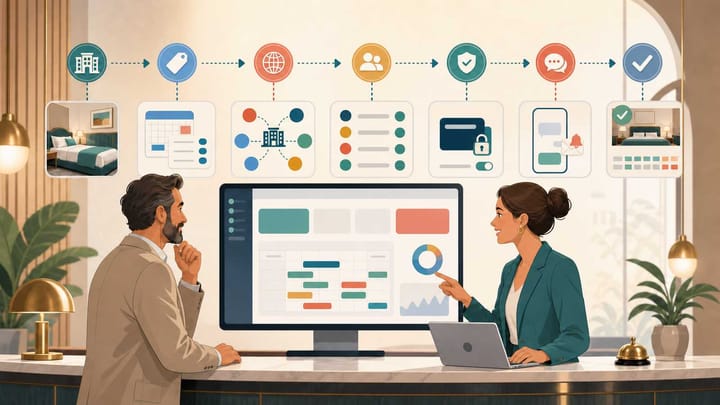
1. Days 1–3 should establish the property’s operating truth: policies, room types, physical rooms, inventory, rates, taxes, and restrictions.
2. Days 4–5 should connect OTA products, create staff users, set permissions, and configure payment, messaging, and housekeeping workflows.
3. Days 6–7 should run full test reservations, reconcile every result, document support and rollback procedures, and go live only after critical tests pass.
Hotel PMS application onboarding should turn the hotel’s real operating rules into a system employees can trust. The first seven days are not a race to connect every feature. They are a controlled sequence in which rooms must be correct before rates, rates before OTA mapping, and configuration before live reservations.
Seven focused days can establish a baseline for a straightforward property. Complex migrations or integrations may need longer. Treat day seven as a readiness decision, not a mandatory deadline.
This plan gives the owner one required output and one pass-or-stop gate for each day.
Before Day 1: Name the Owner and Collect the Source Files
Assign one hotel-side owner to approve rooms, rates, policies, users, and go-live. Vendors can configure the application, but hotel policy remains the property’s decision.
Prepare a working folder with:
- Property details, currency, time zone, taxes, policies, invoice requirements, and payment methods
- Physical rooms, room types, occupancy, out-of-order rooms, and housekeeping statuses
- Rate plans, inclusions, derived-rate logic, length-of-stay restrictions, cancellation terms, and deposit rules
- OTA property IDs, room and rate names, active promotions, future inventory, and connection contacts
- Users, roles, access needs, future reservations, and required old-system exports
Do not configure from memory. The approved files become the reference when the team validates what the PMS displays.
The 7-Day Hotel PMS Application Onboarding Plan
The plan below follows configuration dependencies. Moving ahead with an unresolved earlier stage usually creates more testing work later.
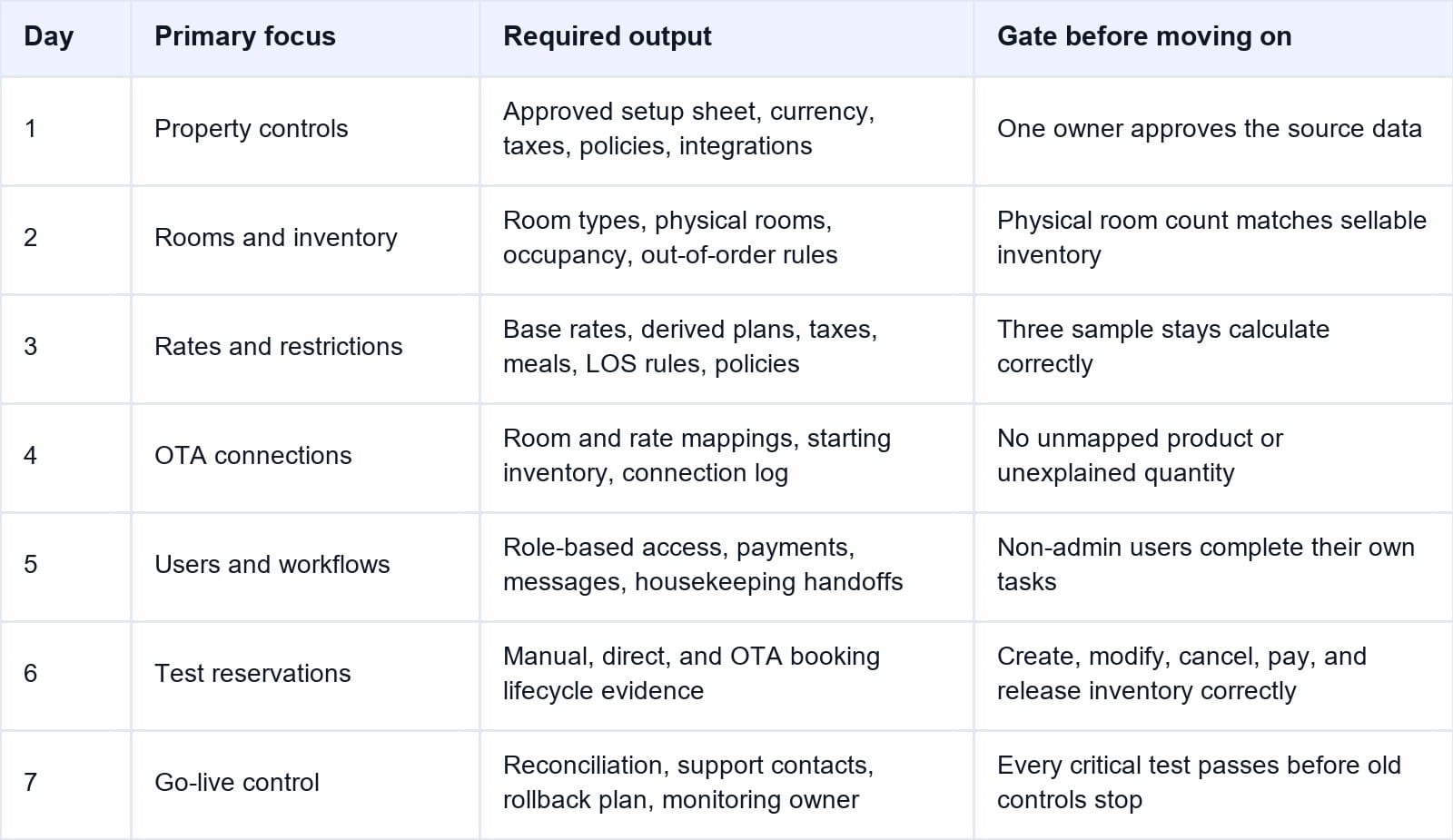
The first milestone is a PMS record that matches the physical hotel. The final milestone is a tested booking lifecycle with evidence and an exception-recovery path.
Smart Order’s hotel PMS brings room setup, reservations, users, operational status, payments, and reporting into the same workflow. That lets the onboarding team test one connected record instead of reconciling separate tools after launch.
Build the First Week Around Verified Workflows
Configure rooms, reservations, staff access, and daily controls in one PMS before opening live OTA inventory.
Day 1: Confirm Property Rules and the Source of Truth
Begin with the property profile: legal and trading name, address, contact details, local time zone, default currency, languages, tax handling, check-in and checkout times, invoice requirements, and operating policies.
List required integrations and confirm who supplies credentials and supports each connection.
Decide which system controls rooms, rates, restrictions, availability, and reservation changes. Multiple editing points without one owner create conflicts.
Day 1 output: one approved setup sheet and an issue log.
Do not continue if: currency, taxes, room count, integration ownership, or the final approver remains unclear.
Day 2: Build Room Types, Physical Rooms, and Inventory
Create physical rooms first, then group only interchangeable rooms into sellable room types. Record location, bed setup, occupancy, accessibility, and status.
The physical-room count must reconcile to room-type inventory. A hotel with six Deluxe Kings cannot expose seven because an old OTA listing or inactive room remains in the setup. Define how out-of-order rooms, owner use, maintenance blocks, and room moves affect sellable inventory.
Import future reservations only after room approval. Check dates, room, source, rate, balance, guest, and external confirmation ID.
Day 2 output: an approved room matrix and reconciled inventory count.
Do not continue if: the PMS cannot explain every physical room, sellable unit, or blocked room.
Day 3: Configure Rates, Taxes, Policies, and Restrictions
Create a base rate for each sellable room type, then add only the rate plans the hotel actively uses. For every plan, record whether pricing is fixed or derived, the adjustment from its parent, inclusions, occupancy pricing, cancellation terms, deposit timing, taxes, and selling dates.
Configure length-of-stay rules, closed dates, booking windows, occupancy charges, meals, packages, and supported restrictions. Not every OTA accepts every rule.
Run three manual calculations: a one-night base stay, a multi-night stay crossing a date or rate change, and a booking with occupancy charges or inclusions. Compare the PMS total with the approved policy.
Day 3 output: a rate-and-restriction matrix with verified sample totals.
Do not continue if: a derived rate, tax, inclusion, cancellation term, or sample total is unexplained.
Day 4: Connect OTAs and Approve Every Mapping
Connect the hotel channel manager only after rooms and rates are stable. Map each PMS room type to the equivalent OTA product, then map each active rate plan and supported restriction.
Similar names are not enough. Confirm inventory, occupancy, room promise, inclusions, cancellation terms, and the pool behind each product. Close, delete, or map every active product.
On safe future dates, compare rates, availability, minimum stays, and closures in the PMS, extranet, and public page. Never leave two channel managers controlling the same inventory.
Day 4 output: a signed mapping sheet, screenshots, timestamps, and delivery-status record.
Do not continue if: any active OTA product is unmapped or any public rate, restriction, or inventory quantity cannot be reconciled.
Day 5: Create Users and Configure Daily Workflows
Create a separate account for each employee. Assign the minimum permissions required for the role. Front desk, housekeeping, reservations, finance, revenue management, maintenance, and owners should not automatically share administrator access.
Test access to revenue, guest exports, rate overrides, refunds, configuration, payments, and audit history. Remove unnecessary permissions and keep two authorized administrators.
Configure confirmation and modification messages, housekeeping statuses, payment methods, deposit reminders, failure alerts, folio behavior, and end-of-day controls. Smart Order’s hotel payment solution can connect payment activity to the reservation balance, but the hotel still needs approved rules for collection, refunds, and exceptions.
Day 5 output: user-access matrix and approved workflow settings.
Do not continue if: employees require shared logins, ordinary users can change critical configuration, or payment and room-status ownership is unclear.
Day 6: Run End-to-End Test Reservations
Testing must follow the same paths as real business. Create a manual booking, direct booking, and one test booking from each major OTA or distinct inventory connection.
Capture starting inventory and rate. Confirm the PMS receives the correct room, rate, guest, dates, source, taxes, policy, external ID, payment, and balance, then verify reduced channel availability.
Modify dates, change room or rate, add a charge, record payment, check in, move rooms, check out, complete housekeeping, test a refund, cancel another booking, and verify released inventory.
Record expected result, actual result, timestamp, screenshot, reservation ID, responsible person, and resolution. A green connection indicator is not test evidence.
Day 6 output: completed test register with every critical path marked pass or fail.
Do not continue if: inventory, price, policy, payment, room status, or cancellation fails to complete the expected round trip.
Day 7: Reconcile, Train, and Decide Whether to Go Live
Start by comparing future reservations, room counts, rates, restrictions, balances, and OTA availability with the approved source files. Resolve differences rather than accepting them as launch-day cleanup.
Have two non-admin users complete real tasks without the specialist driving. Test front desk, housekeeping, maintenance blocking, and the manager’s daily report.
Document support, escalation, integration owners, backups, manual channel control, payment fallback, and pause procedures. Name someone to monitor the first live shifts.
Day 7 output: signed go-live checklist, named monitoring owner, support plan, and rollback procedure.
Go live only if: all critical tests pass, future bookings reconcile, employees can complete core work, and the hotel can recover from a failed connection.
What Should Wait Until After the First Week
Do not delay core readiness to perfect every report, template, upsell, package, CRM segment, dynamic pricing rule, or optional integration. First-week scope should protect reservations, inventory, rates, payments, rooms, and staff access.
Move noncritical work into a dated backlog. Add automation only after the team produces clean live data and understands the manual workflow.
Review the setup after the first live week and again after the first month. Audit failed updates, manual overrides, mapping changes, user access, disputed payments, report differences, and employee workarounds.
Common First-Week Onboarding Mistakes
Connecting OTAs Before Room and Rate Structure Is Stable
Every later room or rate change can break or duplicate mappings. Approve the internal structure first.
Giving Everyone Administrator Access
This hides responsibility and increases financial, privacy, and configuration risk. Use named accounts and role-based access.
Testing Only a New Reservation
Real failures often appear during modifications, cancellations, refunds, room moves, restrictions, and inventory release.
Treating Day Seven as an Unmovable Deadline
A delayed launch is cheaper than going live with unexplained inventory, tax, payment, or mapping problems.
Frequently Asked Questions
Can a hotel PMS application be onboarded in seven days?
Yes, for a straightforward independent property with clean source data and available decision-makers. Complex migrations and integrations may take longer. Seven days should be a controlled first cycle, not a guaranteed deadline.
Who should own PMS onboarding?
One hotel-side owner should approve operating decisions, coordinate employees and vendors, maintain the issue log, and sign the go-live checklist. Technical setup can be delegated; hotel policy cannot.
When should OTAs be connected?
After room types, physical rooms, inventory, rate plans, taxes, and restrictions are approved. Connecting earlier exposes unstable configuration to live channels.
How many test reservations are needed?
Test every distinct booking path and physical inventory pool. At minimum, include manual, direct, and each major OTA connection, plus modification, cancellation, payment, checkout, housekeeping, and inventory-release scenarios.
Should the old PMS be turned off on day seven?
Only if future reservations reconcile, integrations pass, employees can complete core work, and the cutover plan permits it. Preserve required exports and follow the agreed parallel-run or transition procedure.
The First Seven Days Should Produce Evidence
Successful hotel PMS application onboarding is not a completed settings screen. It is evidence that the system represents the physical hotel, calculates what the hotel intends to sell, connects the correct OTA products, limits user access, and processes a reservation from creation through cancellation or checkout.
Use the plan as seven gates. If a critical stage fails, stop, correct it, and retest. A verified launch is safer than an unproved connection.
