
1. Confirm the booking in the OTA extranet before treating a guest email or screenshot as proof.
2. Trace the reservation from OTA to channel manager or CRS, then to the PMS and arrivals view.
3. Search by confirmation number, dates, property, status, and room mapping—not only the guest name.
4. If arrival is imminent, protect the guest and inventory without creating an uncontrolled duplicate.
An OTA reservation missing from the PMS arrivals list is an operational incident, not just a search problem. The booking may be confirmed at the OTA but delayed or rejected before it reaches the Property Management System (PMS). It may also exist in the PMS under another date, status, property, or guest name.
Front desk should first prove the reservation, then locate the last system that received it. That sequence prevents two expensive mistakes: turning away a valid guest and creating a duplicate reservation that later consumes inventory twice.
First Confirm the Reservation Is Real and Due
Do not rely only on the guest's phone screen, forwarded email, or bank charge. Open the OTA partner extranet and locate the reservation for the correct property. Confirm that its status is confirmed, not pending, cancelled, rejected, payment-only, or a booking request awaiting approval.
Collect the minimum facts needed to search every system:
- OTA name, property, and confirmation number
- Guest name, arrival date, departure date, and booking time
- Room type, occupancy, rate plan, and reservation status
- Last modification or cancellation time
- Payment model, without copying card or virtual-card details into notes
Check the calendar date carefully around midnight. The guest may say they are arriving “today” while the reservation begins after the night audit date changes. Also confirm that a multi-property account did not receive the booking under another hotel with a similar name.
If the OTA extranet cannot find a confirmed reservation, stop the PMS investigation. The issue is then between the guest and the OTA, the wrong property or dates, or an incomplete booking. Front desk should not create an OTA-priced reservation until the booking is verified.
Trace the Booking From OTA to PMS
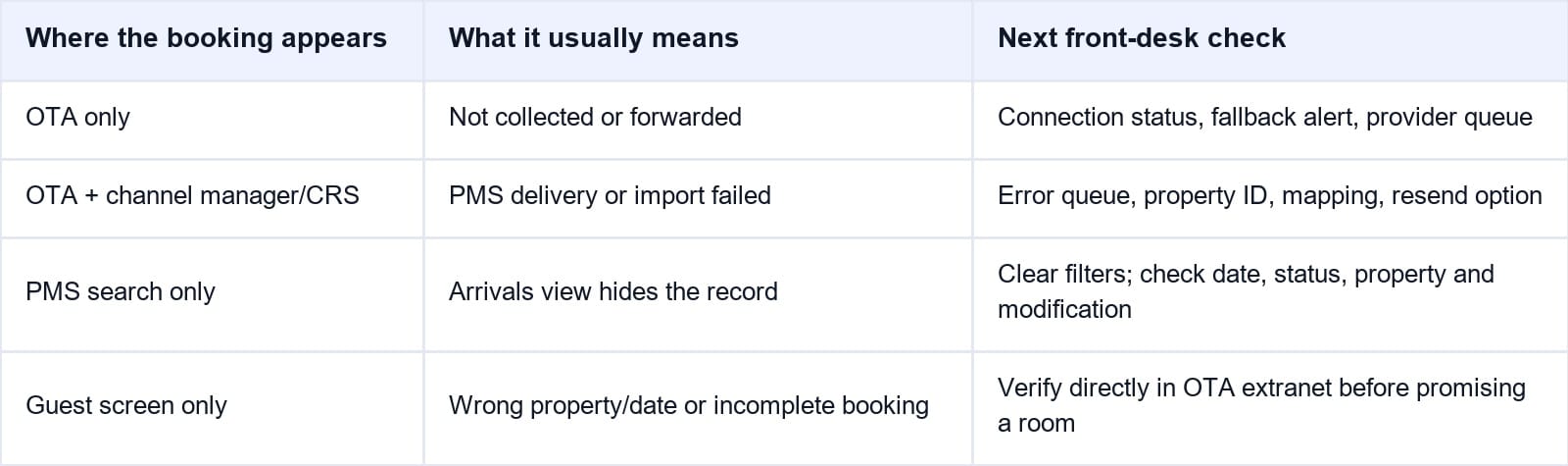
A connected reservation normally follows a simple path: the OTA confirms the booking, the channel manager or central reservation system receives it, and the PMS creates the operational reservation. The arrivals list is only the final view of that chain.
The table below helps front desk identify where the booking stopped.
Check the OTA First
Record the OTA confirmation number, status, creation time, last-change time, and exact room and rate plan. Look for a fallback email, connection warning, or delivery alert sent to the property. A modification or cancellation may be the latest message even when the original confirmation email still looks valid.
Check the Channel Manager or CRS
If the booking appears in the OTA but not in the intermediary system, check the channel connection, property ID, reservation queue, and error log. The issue is upstream of the PMS. If the intermediary received it, record its own reservation reference because that identifier may differ from the OTA confirmation number.
Search the PMS Beyond Arrivals
Search all reservations, not only today's arrivals. Use the OTA reference, intermediary reference, guest surname, arrival date, booking date, and room type. Include cancelled, modified, unassigned, waitlisted, imported, and error statuses where the PMS supports them.
When Smart Order receives a connected OTA reservation, the booking record enters the PMS, the mapped room availability changes, and front desk sees the stay in the operational calendar. Its hotel channel manager keeps the reservation source and inventory response in the same workflow, making it easier to see which handoff needs attention.
Keep OTA Reservations and Arrivals in One Workflow
Connect incoming bookings, mapped room inventory, and front-desk visibility so staff can trace a missing reservation without reconciling separate calendars.
Check Why the Reservation Is Hidden or Rejected
Arrivals Filters and Business Date
Clear property, building, room, market, source, and status filters. Compare the PMS business date with the calendar date, especially after night audit. A reservation can be valid in the database but absent from the arrivals list because the view is showing another property, date, or status.
Guest Name and Confirmation Numbers
OTA bookings may arrive under the lead guest, booker, transliterated surname, or a modified spelling. Search by external confirmation number whenever possible. Do not assume the number shown to the guest is identical to the channel manager or PMS reference.
Room and Rate Mapping
An unmapped room type, inactive rate plan, wrong property ID, or unsupported occupancy can prevent the PMS from creating the reservation correctly. Compare the OTA room and rate codes with the active mappings. Do not remap a live product during a busy shift unless the authorized integration owner approves the change.
Modification and Cancellation Sequence
The original booking may have arrived, followed by a date change, room change, name change, or cancellation that failed separately. Check the latest OTA status and the message sequence rather than reading only the first confirmation. A modification can also move the stay out of today's arrivals.
Protect the Guest Without Creating a Duplicate
When the guest is standing at the desk, keep verification and recovery separate. First confirm the reservation directly in the OTA extranet. Then decide whether the hotel can safely hold inventory while the missing PMS record is investigated.
If the OTA shows a confirmed stay and normal recovery will not finish before check-in, follow the hotel's approved exception procedure:
- Notify the supervisor and hold the correct room inventory.
- Create a controlled manual record only when hotel policy permits it.
- Add the OTA and intermediary confirmation numbers and mark the record pending sync reconciliation.
- Copy dates, room, occupancy, rate, tax basis, meal, and cancellation terms exactly.
- Retrieve payment or virtual-card details only through the authorized secure portal.
- Flag the record so staff check for a later automated duplicate before night audit.
Do not cancel the OTA reservation to “start again,” and do not process the stay as an ordinary walk-in. The original booking may arrive later with payment, commission, messaging, and cancellation data that the manual record does not contain.
If no room is available, escalate immediately under the hotel's overbooking or relocation procedure. Front desk should not promise compensation, cancel on the guest's behalf, or move the guest without checking the OTA agreement and manager authorization.
Escalate With Evidence and Prevent a Repeat
Support can investigate faster when the hotel identifies the last successful handoff. Send operational evidence, not a general message saying that “the booking is missing.”
Include:
- Property ID, room and rate codes, and connection provider
- OTA confirmation number and channel manager or CRS reference
- Booking, modification, arrival, and error timestamps with time zone
- Screenshots of status and error messages with payment details hidden
- PMS search terms, filters cleared, and current mapping status
- Whether inventory was held or a controlled manual record was created
Never send full card numbers, virtual-card details, security codes, passwords, or guest identity documents in an ordinary support email. Use the vendor's secure support channel when sensitive information is required.
After recovery, reconcile the automated and manual records, release duplicate inventory, and preserve the correct external reference. Review why the exception happened: mapping change, disconnected property, expired credentials, queue failure, unsupported field, night-audit date, or staff filter.
A daily arrival check is most useful when it compares OTA confirmations with the PMS before guests reach the desk. Smart Order's hotel front desk software connects the reservation calendar with live room availability, so the team can investigate an exception while there is still time to correct inventory and prepare the arrival.
Catch Missing OTA Arrivals Before Check-In
Give front desk one view of incoming reservations and room availability, with the references needed to investigate exceptions before the guest arrives.
Frequently Asked Questions
Why is an OTA reservation confirmed but missing from the PMS?
The reservation may not have reached the channel manager, may have failed between the channel manager and PMS, or may be hidden by filters, dates, status, property selection, or mapping. Locate it in each system in order rather than assuming the PMS is the first failure point.
Should front desk manually enter a missing OTA booking?
Only after confirming the booking in the OTA, checking for an existing PMS record, and following the hotel's approved exception procedure. Add external references and a reconciliation flag because the automated record may arrive later.
Can the OTA reservation appear after a manual record is created?
Yes. A delayed queue, resend, or recovered connection can deliver it later. That is why the manual record must be clearly marked and checked for duplicates before night audit.
What if the booking is in the OTA but not the channel manager?
Check the OTA connection status, property ID, delivery alerts, and provider queue. Escalate to the channel or connectivity provider with timestamps and the OTA confirmation number because the booking has not yet reached the PMS path.
How can a hotel prevent missing reservations from reaching the desk?
Reconcile upcoming OTA arrivals daily, monitor failure alerts, keep room and rate mappings current, test new connections with real reservations, and document who owns after-hours escalation.
The front desk objective is not merely to find a name. It is to prove the confirmed stay, protect the guest and room inventory, and leave enough evidence to repair the failed connection without producing another booking error.
