
1. RevPAR means revenue per available room. It shows how much room revenue your hotel generates for every room available to sell.
2. RevPAR formula: total room revenue / available room nights. You can also calculate it as ADR x occupancy rate.
3. A hotel with 70% occupancy and a $120 ADR has a RevPAR of $84.
4. RevPAR is useful for pricing and revenue management, but it does not show profit, OTA commission, labor cost, or total guest spend.
Live Hotel RevPAR Calculator
Choose your preferred formula below to instantly calculate your Revenue Per Available Room.
RevPAR Calculator
Use this simple calculator format for one night, one month, one quarter, or a full year.
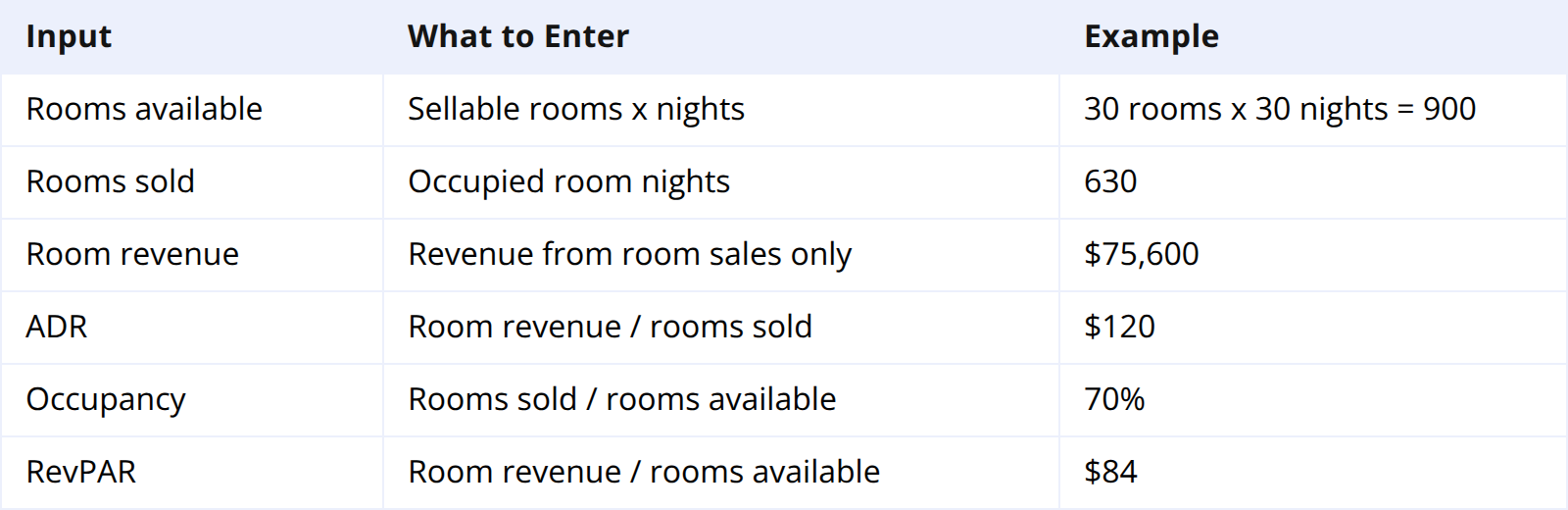
Using the example:
$75,600 / 900 available room nights = $84 RevPAR
The same result comes from the second formula:
$120 ADR x 70% occupancy = $84 RevPAR
RevPAR uses room revenue, not total hotel revenue. Do not include restaurant sales, parking, spa, resort fees, or event revenue unless you are calculating a broader metric such as TRevPAR.
What Does RevPAR Mean?
RevPAR stands for revenue per available room. It measures how much room revenue a hotel generates from every room it could have sold, whether the room was occupied or empty.
ADR only looks at sold rooms. Occupancy only looks at how many rooms were filled. RevPAR combines both, which makes it one of the most useful hotel revenue metrics.
If your RevPAR rises, the hotel is usually doing one of two things: selling more rooms, charging a higher average rate, or both. If RevPAR falls, the issue may be weak demand, low pricing, poor OTA visibility, too many empty rooms, or a mix of all four.
RevPAR is especially helpful because it makes properties of different sizes easier to compare. A 20-room hotel and a 100-room hotel may have very different total revenue, but RevPAR shows how efficiently each property turns available room inventory into revenue.
RevPAR Formula
There are two standard RevPAR formulas. They produce the same result when the inputs are correct.
Formula 1: Room Revenue / Available Rooms
RevPAR = total room revenue / available room nights
Use this formula when you already know total room revenue and total sellable room nights.
Example:
A 40-room hotel has all rooms available for 30 days.
Available room nights:
40 x 30 = 1,200
Room revenue:
$126,000
RevPAR:
$126,000 / 1,200 = $105
Formula 2: ADR x Occupancy
RevPAR = ADR x occupancy rate
Use this formula when you already track ADR and occupancy.
Example:
ADR: $150
Occupancy: 70%
RevPAR:
$150 x 0.70 = $105
Both formulas are valid. The first is easier when working from accounting or PMS revenue reports. The second is easier when reviewing revenue dashboards because ADR and occupancy are usually already visible.
Real RevPAR Examples
RevPAR becomes more useful when you compare different pricing and occupancy scenarios.

The discount strategy fills the most rooms, but it has the lowest RevPAR. The premium strategy sells fewer rooms but produces the highest revenue per available room.
This does not automatically mean the premium strategy is best. A hotel still needs to consider market demand, labor scheduling, guest mix, channel cost, and profitability. But the table shows why occupancy should not be judged alone. A full hotel can still underperform if the rate is too low.
RevPAR vs ADR vs Occupancy
ADR, occupancy, and RevPAR answer different questions.

ADR can rise while RevPAR falls if occupancy drops too much. Occupancy can rise while RevPAR falls if the hotel discounts too aggressively. RevPAR helps combine both effects into one number.
For example, a hotel increases ADR from $120 to $150, but occupancy falls from 80% to 55%. RevPAR moves from $96 to $82.50. The rate increase looked good on ADR, but the hotel earned less per available room.
The opposite can also happen. A hotel reduces ADR from $150 to $135 during a soft weekday period, but occupancy rises from 50% to 75%. RevPAR moves from $75 to $101.25. The lower rate worked because it filled enough additional rooms.
What Is a Good RevPAR for a Hotel?
There is no universal good RevPAR. A good number depends on market, property type, room count, service level, season, and competitor set.
A $90 RevPAR may be excellent for a limited-service roadside hotel in a low-cost market. The same RevPAR may be weak for a boutique hotel in a major city. The best benchmark is your own history plus a realistic competitive set.
Compare RevPAR by:
- Same weekday last month
- Same period last year
- Similar room types
- Similar channels
- Nearby comparable hotels where data is available
RevPAR should also be read with profit margin. A booking from a high-commission OTA may raise RevPAR but lower net profit. A direct booking at a slightly lower ADR may produce better contribution after commission.
How Hotels Can Improve RevPAR
The fastest way to improve RevPAR is to find where either occupancy or ADR is underperforming.
If occupancy is low, the hotel may need better OTA visibility, stronger direct booking offers, weekday packages, local partnerships, or more accurate availability across channels. Empty rooms produce zero RevPAR, so demand generation matters.
If ADR is low while occupancy is high, the hotel may be underpriced. Selling out too early is often a sign that rates were too conservative. During high-demand dates, protect rate before all inventory disappears.
If RevPAR varies by channel, look at commission and booking quality. A channel that delivers high occupancy but low net ADR may be useful for slow dates but harmful on peak nights. Restrict expensive channels when demand is already strong and protect availability for direct or higher-margin bookings.
Smart Order helps hotels act on RevPAR while there is still time to change results. When a reservation arrives from Booking.com, Airbnb, Agoda, or the direct booking engine, availability and revenue update in one dashboard. Managers can see occupancy, ADR, RevPAR, and channel revenue together, then adjust rates or restrictions before the booking window closes.
Track RevPAR Without Spreadsheet Work
Smart Order connects reservations, OTA channels, direct bookings, and reporting so hotels can compare occupancy, ADR, RevPAR, and channel revenue in one dashboard.
FAQ
What is RevPAR in hotels?
RevPAR means revenue per available room. It shows how much room revenue a hotel generated for each available room during a selected period.
How do you calculate RevPAR?
Use total room revenue / available room nights. You can also calculate RevPAR as ADR x occupancy rate. Both formulas produce the same result when the inputs match.
What is the difference between ADR and RevPAR?
ADR measures the average rate for rooms that were sold. RevPAR measures revenue across all available rooms, including rooms that stayed empty.
Does RevPAR include food and beverage revenue?
Standard RevPAR uses room revenue only. If you want to include all hotel revenue, use TRevPAR, which means total revenue per available room.
Is higher RevPAR always better?
Higher RevPAR usually means stronger room revenue performance, but it does not show profit. Always compare RevPAR with commission cost, labor cost, guest mix, and profit margin.
