
1. Keep the normal Expedia room rate in the system assigned to control rates; do not reduce it to imitate a promotion.
2. In Partner Central, choose the promotion type that matches the demand problem, then restrict its audience, products, booking window, and travel dates.
3. Compare only like-for-like offers when checking rate disparity: the same room, plan, occupancy, cancellation terms, taxes, currency, device, and member status.
4. Reopen the promotion after creation, test one eligible search and one ineligible search, and record the final checkout price.
Learning how to set promotion on Expedia is not simply choosing a discount percentage. The offer may apply only to members, mobile users, a market, a package, or selected dates. It can also interact with a rate plan or another discount.
The safest process begins with an approved price floor. The hotel then creates a narrowly targeted offer in Expedia Partner Central, keeps its parent rate stable, and verifies the final price under matching search conditions.
Decide Whether the Price Difference Is Intentional
A public rate difference is a problem only after the hotel compares equivalent offers. A One Key member price can legitimately differ from a logged-out rate. A mobile-only promotion can differ from desktop, and a package rate is not comparable with a hotel-only rate.
Before creating anything, define the demand problem. Early Booking is useful when weak dates need more advance pickup. Same-day or last-minute offers address close-in gaps. Members Only Deals fence a price to eligible One Key members. Value Add promotions can add benefits such as parking or food and beverage credit without reducing the room rate.
Expedia also separates hotel-funded promotions from campaigns, Accelerator, and TravelAds. A promotion changes the offer. A campaign adds a time-limited merchandising opportunity. Accelerator and TravelAds are visibility tools with different commercial models. Do not select one merely because it appears beside Promotions in the Marketing area.
Write down the target travel dates, booking window, audience, rooms, plans, discount, blackout dates, minimum stay, and lowest acceptable hotel revenue. This makes it possible to recognize both an intended fenced price and a genuine disparity.
Calculate the Lowest Possible Expedia Price
Start with the parent rate distributed to Expedia, not the price seen in a single public search. Then identify every adjustment that could apply to the same guest and product: the new promotion, a Members Only Deal, a mobile or geographic fence, a length-of-stay adjustment, a campaign, and any derived-rate calculation.
Expedia's connectivity guidance warns providers not to send an already discounted rate and then apply a promotion to it. For example, if a $100 parent rate should receive a 10% promotion, keep the source rate at $100. Sending $90 while the promotion remains active can expose the guest to a second reduction.
Use the control table before activation.
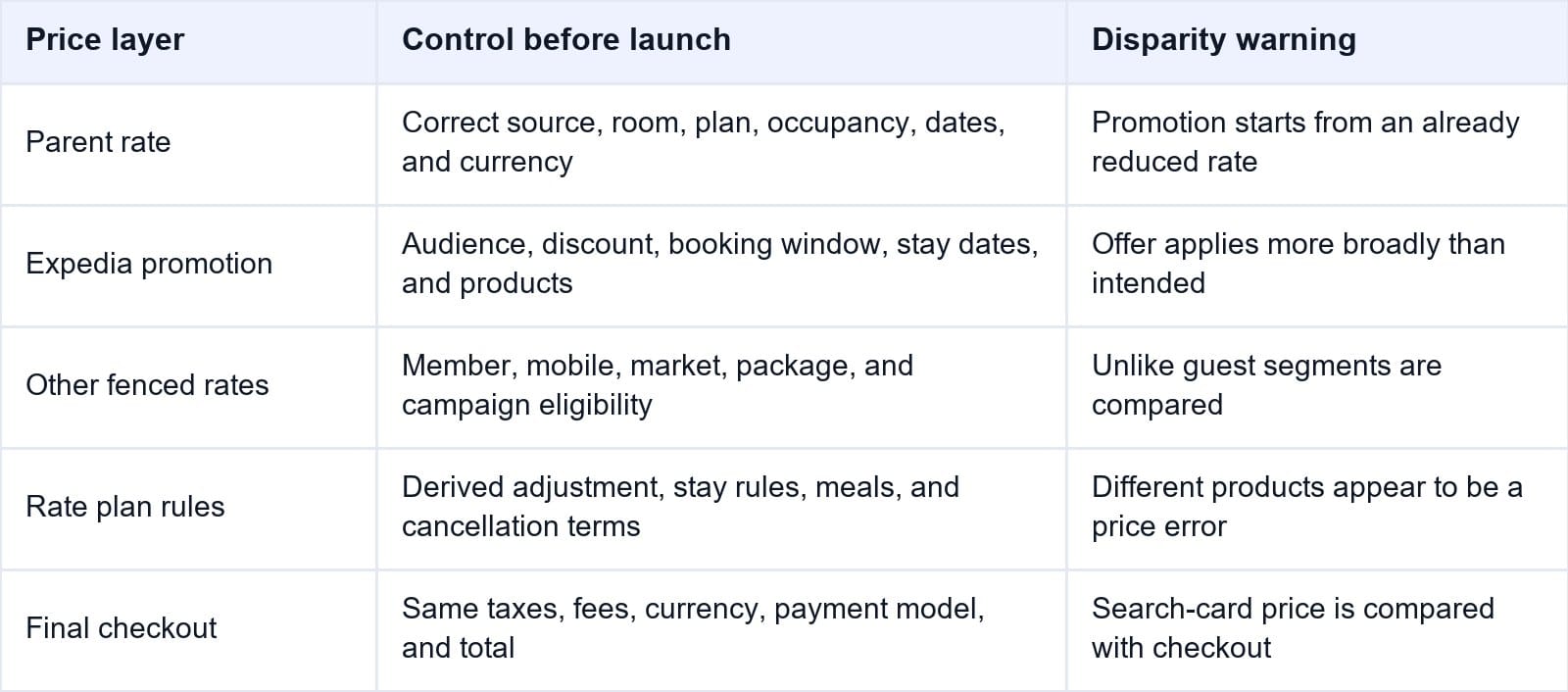
Calculate the expected property amount after hotel-funded discounts, Expedia compensation under the property's agreement, payment costs, and variable stay costs. If the result is below the approved floor, narrow the audience, products, or dates instead of manipulating the source rate.
Smart Order's hotel reporting software lets managers compare Expedia ADR, room nights, occupancy, and channel revenue. The hotel can assess whether an offer filled weak inventory or displaced bookings that were likely to arrive at the normal price.
Measure Expedia Promotion Performance
Compare Expedia revenue, ADR, occupancy, and room nights so the next offer is based on demand and margin rather than booking volume alone.
How to Set a Promotion in Expedia Partner Central
Menu labels and available promotion cards vary by market, property, contract, eligibility, and user permission. Current hotel workflows commonly begin at Marketing > Promotions > Create a promotion.
Use this controlled sequence:
- Sign in to Expedia Partner Central, select the property, and confirm its Expedia property ID.
- Open Marketing, select Promotions, and review active, scheduled, and recently ended offers.
- Select Create a promotion. Choose Create your own for a general hotel-defined offer, or choose an available type such as Early Booking, Same-day, Members Only, or a campaign.
- Define the audience. Confirm whether the price is public or fenced by membership, device, country, package eligibility, or another condition.
- Enter the discount or benefit. Compare the preview with the hotel's approved parent rate and price floor.
- Set booking dates and travel dates separately. Booking dates control when the reservation can be made; travel dates control which stays qualify.
- Add advance-booking, minimum-stay, weekday, or blackout conditions where the selected promotion supports them.
- Restrict the offer to the intended room types and rate plans. Exclude premium or already-discounted products that should retain their current price.
- Enter a clear internal promotion name that identifies purpose and scope. Confirm whether any traveler-facing description is also required.
- Review the summary: audience, discount, products, booking window, travel dates, blackouts, stay conditions, and cancellation terms.
- Select Create, Activate, or the equivalent action. Reopen the promotion and record its status, owner, creation time, and settings.
If an option is missing, check the selected property and the user's permissions. Some offers require eligibility, specific commercial terms, or support from the property's Expedia representative. Menu labels may vary by property type and account configuration.
Keep PMS and Channel Manager Responsibilities Clear
Expedia says compatible connectivity software may manage promotions, but only when the provider has developed and enabled that capability. A connection that sends rates and availability does not automatically prove that it can create or edit every Expedia promotion type.
Assign one owner for each layer. The PMS, CRS, or channel manager may own the parent rate, availability, and supported restrictions. Partner Central may own Expedia-specific promotions that the provider does not support. Record this boundary in the hotel's distribution checklist.
Do not build the same discount in both systems. If the channel manager sends a lower rate while Partner Central applies an equivalent offer, the final selling price may be lower than either team intended. A later source update can also make the disparity appear intermittent.
With Smart Order's hotel channel manager, mapped rates and availability can remain controlled in one operational calendar. The team can maintain a stable Expedia parent rate while separately checking any Expedia-specific promotion.
Keep the Expedia Parent Rate Stable
Send mapped rates and availability from one workflow, then verify Expedia-specific promotions without creating a second discounted source rate.
Verify the Final Selling Rate Without False Comparisons
First reopen the promotion in Partner Central. Confirm it is active and check its discount, booking dates, travel dates, rooms, rate plans, audience, stay rules, blackouts, and cancellation conditions. Confirm the parent product is open and has inventory.
Next run an eligible Expedia search. Match property, stay dates, room count, adults and children, market, currency, device, and login status. Compare the same room, rate plan, meal, cancellation terms, payment model, and tax treatment. Continue to the last step before payment because a search card may not show the complete total.
Record the reference or strikethrough price, nightly price, taxes and fees, total, and any promotion badge. Then repeat the search with one condition deliberately made ineligible, such as a logged-out session, desktop device, excluded date, shorter stay, or different booking window.
Use a private browsing session carefully: it can remove member eligibility but may also change currency, market, or localization. Change one variable at a time. Otherwise, the test cannot identify which condition caused the price difference.
For a high-risk or deeply discounted launch, create one authorized cancellable test booking on a low-demand date. Confirm the reservation reaches the PMS with the correct room, plan, dates, guest total, property amount, payment model, and promotion information. Cancel it within policy and confirm inventory returns once.
Diagnose a Real Rate Disparity
Capture the exact search before changing anything. Save the date and time, device, member status, point of sale, currency, occupancy, room, plan, cancellation policy, taxes, and final total.
Work backward from checkout. Confirm the parent rate in its source, then inspect the rate plan and every eligible Expedia promotion. Check member, mobile, geographic, package, campaign, and length-of-stay conditions. Review derived rates, occupancy pricing, taxes, fees, currency conversion, and payment timing.
If the public price is too low, pause the new offer when possible and protect high-demand dates while investigating. If the promotion is missing, check status, inventory, product eligibility, booking window, travel dates, blackouts, lead time, and minimum stay.
When escalating, send Expedia Partner Support or the connectivity provider the property ID, promotion name, product IDs, search conditions, screenshots, source rate, expected calculation, observed checkout total, and relevant timestamps. Do not report only that “the rates do not match.”
Frequently Asked Questions
Where are hotel promotions created in Expedia Partner Central?
The common route is Marketing > Promotions > Create a promotion. Available cards and labels depend on the property's market, contract, eligibility, and permissions.
Which Expedia promotion should a hotel choose?
Choose the narrowest offer matching the demand problem. Early Booking supports advance pickup, same-day or last-minute offers target close-in gaps, Members Only Deals fence discounts, and Value Add promotions add benefits without cutting the room rate.
Can an Expedia promotion create a double discount?
Yes. A common cause is sending an already reduced parent rate from a PMS or channel manager and then applying an Expedia promotion. Other eligible fenced offers or rate adjustments may also affect the same search.
Is a member price different from the public rate a disparity?
Not automatically. Compare identical eligibility, device, market, room, plan, dates, occupancy, cancellation terms, currency, taxes, and payment conditions before treating the difference as an error.
Can a channel manager create Expedia promotions?
Some providers can, but only if they support and enable Expedia's promotion capability. Confirm exactly which promotion types and fields the connection manages before assigning it as the source.
How do I know the Expedia promotion is live?
Confirm Active status in Partner Central, then reproduce an eligible public search through final checkout. Also run an ineligible search to prove the audience and date restrictions work.
An Expedia promotion is operationally complete only when the hotel can explain the parent rate, every applicable adjustment, the final guest total, and the expected property amount. Create narrowly, keep one source for the parent rate, and test eligibility from both sides.
