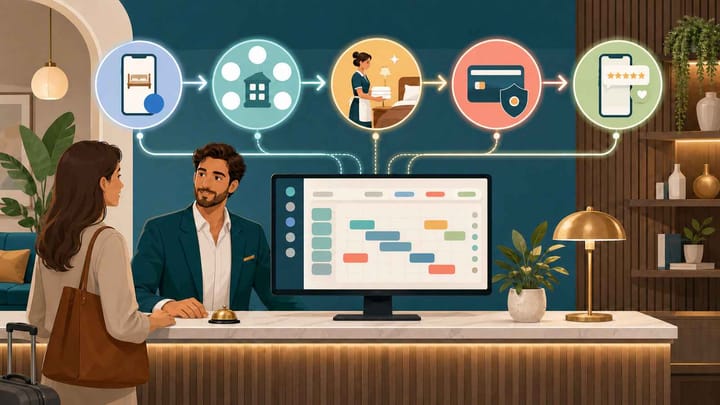
1. Start with automatic booking confirmations because they are repetitive, time-sensitive, and relatively easy to verify.
2. Put availability sync in the same first phase; if you sell on multiple OTAs, it should come before messaging because inventory errors create direct revenue and guest risk.
3. Add housekeeping handoffs next, then policy-based payment reminders and collection, and automate review requests last.
Small hotel automation without staff expansion should remove predictable work, not remove human judgment. A lean property needs software to handle routine events while showing employees the exceptions that still require a decision.
The best first automations sit close to the reservation record. A new booking can trigger a confirmation, reduce channel availability, enter the arrival plan, and later create a cleaning task.
This guide ranks five practical automations for an owner who cannot add another front-desk or administrative employee. The ranking balances time saved, error risk, setup effort, and the damage caused when a rule is wrong.
How to Prioritize Small Hotel Automation Without Staff
Start with work that is frequent, rule-based, easy to audit, and costly when missed.
Score each candidate task against four questions:
- Does the task happen several times per week?
- Can one clear event trigger it?
- Can the system use reliable PMS data to complete it?
- Will an exception be visible before it harms a guest, room, or payment?
When employees must resolve conflicting information, approve a refund, judge room quality, or recover a serious failure, alerts can help but the decision should remain human.
Small Hotel Automation Priority Ranking
This ranking is the default for a small independent property. Hotels selling the same inventory on several online travel agencies (OTAs) should move availability sync to rank one and implement confirmations immediately after it.
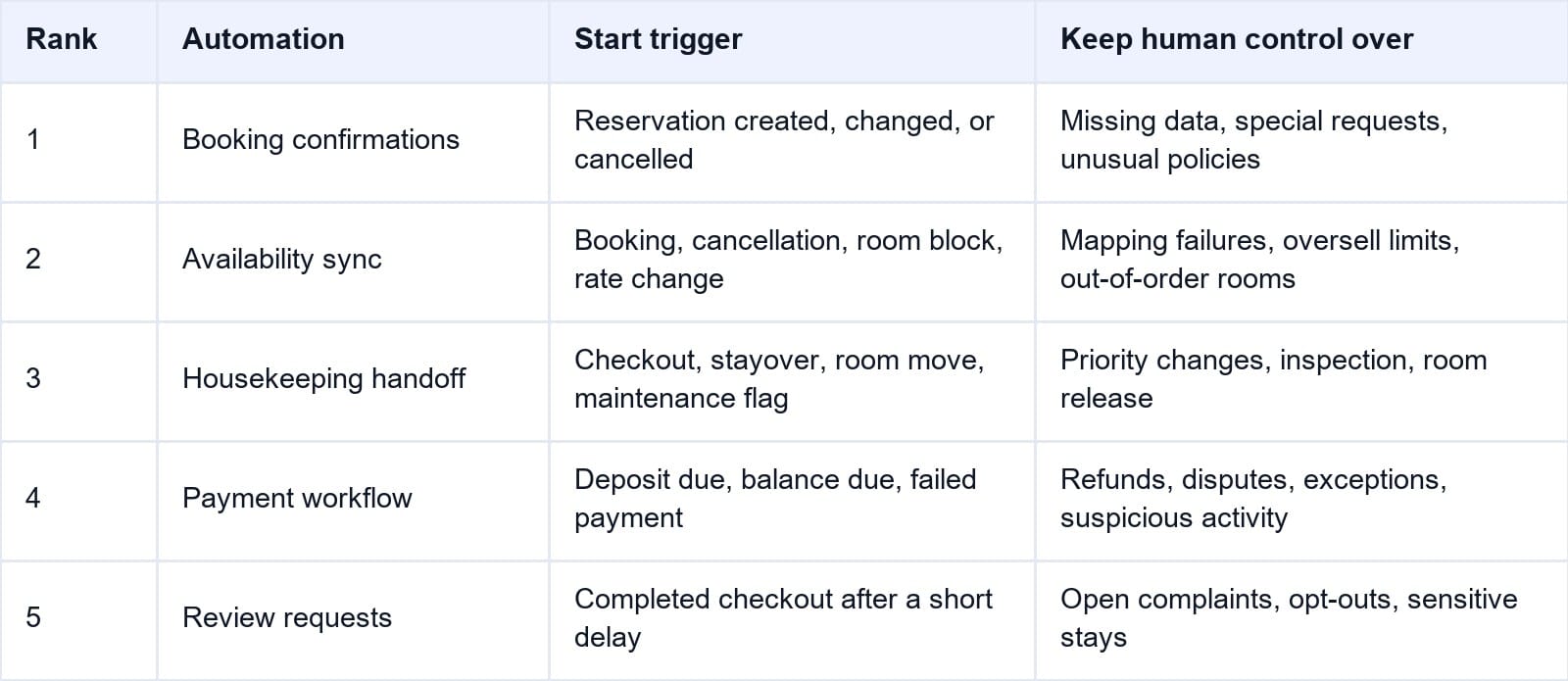
The sequence first protects the booking and sellable room, then coordinates room delivery, handles money, and finally requests feedback. Test each stage before enabling the next.
For hotels where reservations and room availability still live in separate tools, Smart Order’s hotel PMS provides the shared record that these automations depend on. The booking, room type, stay dates, source, balance, and status can move through one operating flow instead of being copied between inboxes.
Build Automation on One Reliable Reservation Record
Connect bookings, room availability, housekeeping status, and payment activity before adding more manual work to a lean team.
1. Automate Booking Confirmations First
Every confirmed reservation needs an immediate, accurate response. Manual sending can be delayed by a busy arrival or phone call, prompting the guest to contact the hotel again.
Use reservation status as the trigger. A new confirmed booking should send the guest’s name, hotel name, stay dates, room or room type, rate, included items, payment status, cancellation policy, check-in information, and a contact path. Changes and cancellations need separate templates; they should never reuse the original confirmation.
Before launch, test a direct booking and every major OTA. Modify dates and room type, then cancel and restore a booking. Confirm each message uses current data and sends once.
Keep exceptions visible. A missing email address, failed delivery, duplicate profile, special request, or reservation awaiting payment should create a staff task rather than disappear inside the automation log.
This is usually the fastest small hotel automation without staff hiring because the workflow is frequent and the result is easy to inspect.
2. Automate Availability Across Every Selling Channel
Availability sync has a higher risk payoff than messaging. If the hotel sells across OTAs and its website, one reservation should reduce the same inventory everywhere.
A connected hotel channel manager receives the reservation, updates the PMS calendar, and pushes the revised availability to connected channels. Cancellations, room blocks, out-of-order rooms, and inventory releases should follow the same controlled path.
The difficult part is mapping. The PMS room type, each OTA room type, and the attached rate plans must point to the correct inventory. A working connection logo does not prove the mapping is correct.
Run two near-simultaneous test bookings against low inventory. Check the PMS, OTA extranets, direct path, delivery logs, and alerts. A failure must identify the affected channel and required manual action.
Do not automate overselling until the hotel has defined its risk policy. For a small property with few substitute rooms, a deliberate oversell limit of zero is often safer than copying a larger hotel’s strategy.
3. Automate the Housekeeping Handoff
Housekeeping automation should begin with room status, not complex workforce optimization. A checkout can mark the room dirty and place it on the cleaning list. Stayovers, early arrivals, room moves, and maintenance blocks should change its priority or instructions.
The handoff needs the room, cleaning type, priority, relevant request, owner, status, and expected completion in an interface housekeepers will update.
Separate “cleaning complete” from “room ready.” A cleaner can finish the task, but inspection or maintenance may still be open. Front desk should release the room only after the property’s required control has passed.
Test a departure, stayover, early arrival, room move, and maintenance issue. An out-of-order room must leave sellable inventory, not only the cleaning list.
This stage makes small hotel automation without staff expansion visible to guests: the same team can prepare arrivals with fewer calls, paper lists, and repeated status checks.
4. Automate Payments Carefully
Payment automation saves follow-up time, but a wrong rule affects money and trust. Start with secure links, due-date reminders, successful-payment recording, and failure alerts.
Use the reservation’s rate plan and policy. A refundable booking, non-refundable booking, OTA virtual card, pay-at-property reservation, and group booking may require different timing. One universal charge rule is unsafe.
Smart Order’s hotel payment solution can connect payment activity with the reservation balance so employees see what was requested, collected, failed, refunded, or remains due.
Keep refunds, disputes, unusual amounts, duplicates, changed stays, and suspected fraud under human review. Reminders must stop after payment or cancellation.
Test in a safe environment or with approved small-value transactions. Verify deposit, balance, failure, cancellation, refund, and reconciliation before expanding the rule.
5. Automate Review Requests Last
Review requests do not protect today’s inventory, room readiness, or cash, so they follow operational automation.
Trigger the request after a completed checkout and a short delay. Use the guest’s preferred language when available, keep the message concise, and provide one clear review path. Suppress duplicates, employee test stays, opt-outs, and reservations without valid consent.
Do not send a routine review request while a serious complaint, refund dispute, safety issue, or unresolved service recovery is open. The system should flag the case for personal follow-up.
Track delivery and results where possible, but do not repeatedly message non-responders. One well-timed request is enough.
Connect the Automations Instead of Building Five Silos
The five automations should share one sequence:
Booking created → confirmation sent → availability updated → arrival and housekeeping work prepared → payment status tracked → checkout completed → review request scheduled
When systems are disconnected, staff become the integration: copying guest details, updating OTA inventory, messaging housekeeping, checking payments, and exporting review lists.
Connected automation reuses the reservation ID, dates, room, policy, contact, balance, and status, reducing duplicate work and stale actions.
Integration does not remove oversight. Owners still need a daily exception view showing failed messages, unsent channel updates, rooms not ready, overdue balances, and suppressed review requests.
A Safe Four-Week Rollout
Do not activate everything on the same day. A short staged rollout makes errors easier to trace.
- Week 1: Document the current workflow, clean room and rate mappings, prepare templates, define payment policies, and name the owner of every exception.
- Week 2: Enable confirmation messages and availability sync. Test new, changed, cancelled, failed, and duplicate events.
- Week 3: Add housekeeping status and payment reminders. Observe real shifts before enabling broader payment collection.
- Week 4: Add review requests, audit all five workflows, and compare manual touches with the baseline.
Keep a rollback method. Staff should know how to pause a rule, send a manual message, block inventory, override a room status, or stop a payment request when the source data is wrong.
Measure Time Saved and Exceptions Created
The goal is not the largest number of automated actions. Track whether the system reduces manual touches without creating more corrections.
For each workflow, record volume, previous minutes per event, successful actions, exceptions, corrections, and incidents avoided. Review after 30 days.
For example, 120 confirmations at three manual minutes each represent six hours of repetitive work. If automation completes 114 correctly and six require review, the owner can compare the saved time with the time spent on exceptions.
Also monitor channel failures, overbookings, premature room releases, overdue deposits, payment disputes, opt-outs, and complaints messaged incorrectly.
Small hotel automation without staff growth succeeds when the existing team handles the same demand with fewer routine interruptions and clearer exceptions—not when every decision becomes automatic.
Frequently Asked Questions
What should a small hotel automate first?
Start with booking confirmations and availability sync. Confirmations provide a quick, low-risk time saving. Multi-channel hotels should prioritize availability first because stale inventory can create overbookings.
Can a small hotel automate operations without reducing service?
Yes. Automate predictable system work and keep personal judgment for exceptions, complaints, unusual payments, room-quality decisions, and service recovery. Good automation creates more time for guest-facing work.
Does hotel automation require separate software for every task?
No. A PMS may include or connect confirmations, channel management, housekeeping, payments, and reporting. An integrated setup usually creates fewer handoffs, but each workflow still requires configuration and testing.
Should hotels automate payment collection?
Only after rate plans and payment policies are accurately configured. Begin with links, reminders, success recording, and failure alerts. Keep refunds, disputes, suspicious activity, and exceptions under human control.
When should review requests be automated?
After checkout, once the hotel can suppress open complaints, sensitive cases, duplicates, and opt-outs. Review automation should follow stable reservation and guest-data workflows.
Automate Routine Work, Escalate the Exceptions
The best small hotel automation plan does not imitate a large chain. It identifies five repeatable workflows, connects them to current reservation data, and gives the lean team one exception queue.
Begin with confirmations and availability, then connect housekeeping, payments, and review requests. Test every change, cancellation, failure, and override before expanding. That sequence protects the guest and the hotel while giving employees time back where it matters.
