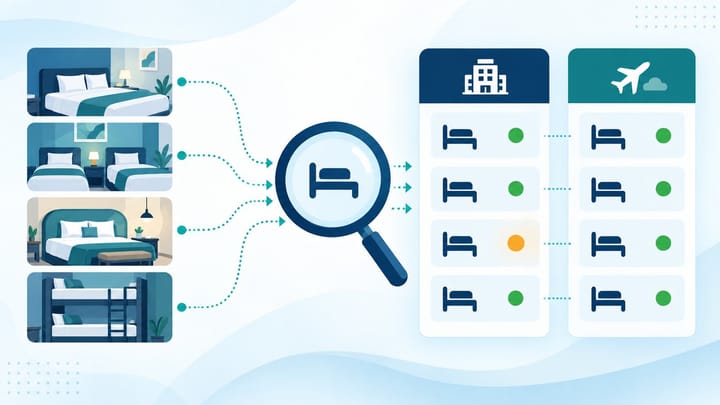
1. Audit one property, date range, room type, rate plan, and occupancy at a time.
2. Compare physical sellable rooms, PMS availability, TERA inventory, and the live Traveloka offer.
3. Correct the system that controls the channel, then retest every affected room before closing the incident.
A Traveloka availability mismatch exists when the number or type of rooms guests can buy does not match what the hotel believes is sellable in the PMS. The mismatch may affect one room, one rate plan, one date, or the whole property.
The fastest safe response is not a property-wide inventory change. It is a room-by-room audit that identifies where the numbers first separate.
This guide does not cover a confirmed Traveloka reservation missing from the PMS. It focuses on the inventory shown for sale before a new booking is made.
Define the Audit Before Changing Inventory
Choose a short date range that includes the problem date and at least one nearby date that appears correct. Use one standard guest search, including the same number of rooms, adults, children, and nights.
Record the time of the audit. Availability can change after a booking, cancellation, manual adjustment, or room block, so comparisons made at different times can produce a false mismatch.
If the hotel is sold out or at immediate overbooking risk, temporarily protect only the affected room and dates. Record any emergency manual action so it can be removed after the normal connection is restored.
Audit Every Traveloka Room in 7 Steps
Complete the audit for one room type before moving to the next. This makes the first incorrect number easier to find.
- Confirm the physical sellable count. Start with the rooms the hotel can actually honor. Remove rooms that are out of order or committed outside the PMS only if those blocks are valid and current.
- Check the PMS room type. Note total rooms, occupied rooms, confirmed arrivals, departures, maintenance blocks, owner blocks, and the final available quantity for each stay date.
- Match the Traveloka room name. Confirm which TERA room maps to the PMS room type. Similar names, renamed rooms, or a recently added room can point to the wrong inventory pool.
- Check every connected rate plan. A room-only, breakfast, refundable, non-refundable, or promotional offer may remain available even when another plan is closed. Confirm whether all plans share the same room inventory.
- Compare TERA inventory date by date. Look for one night with a different quantity, an open/closed status that does not match, or a manual value that was entered after the last PMS update.
- Reproduce the live guest search. Use the same dates and occupancy. Confirm which room, plan, and quantity Traveloka actually offers. A room can be visible without being bookable, so continue only far enough to confirm availability without placing a real booking.
- Record the first point of difference. State the mismatch precisely: for example, "PMS shows zero Deluxe Twins on November 12, TERA shows one, and the flexible breakfast plan is bookable." This becomes the correction target.
Repeat the same seven steps for every affected room. Do not assume that one repaired mapping corrected the rest of the property.
When managers compare each room manually across several screens, it is easy to miss the one plan that retained inventory. Smart Order connects PMS availability with channel distribution, giving the team one place to review room counts and the result of each update before reopening sales.
Keep Room Availability Aligned Across Channels
Manage connected room inventory from one hotel workspace and catch mismatches before they turn into avoidable overbookings.
Read the Mismatch Pattern
If only one room type is wrong, inspect that room's mapping, rate plans, and recent manual edits. A property-wide connection problem is less likely when every other room matches.
If all rooms are wrong for the same dates, check whether the property connection is paused, the controlling system stopped sending updates, or a user changed inventory directly in TERA.
If only one occupancy or package appears, the base room inventory may be correct while an attached offer has separate settings. Follow the live offer back to its room and rate plan before changing the main room count.
If the mismatch begins on one exact date, review bookings, cancellations, room blocks, and bulk updates around that time. A single later manual value can override an earlier correct update.
Correct the Source, Not Every Screen
First identify which system is responsible for sending Traveloka availability. If the channel manager controls the connection, correct the room count or mapping there and allow it to send the update. A manual TERA edit may be useful for immediate protection, but it should not become the permanent fix.
If the PMS count is wrong, correct the reservation, room block, or maintenance status that caused the count. Do not force TERA to match a number the hotel cannot explain.
If TERA shows a room or rate plan that has no valid PMS mapping, keep it closed until the product is mapped and tested. Reopening an unidentified offer invites the mismatch to return.
Make one controlled correction at a time. Several simultaneous edits make it difficult to know which action worked and can cause the next update to reverse the fix.
Retest the Property Room by Room
After the update, repeat the same guest search and TERA check for every affected room type. Confirm the original problem date, the dates on either side, and at least one future date where the room should be open.
The audit is complete when physical sellable rooms, PMS availability, TERA inventory, and the live Traveloka offer tell the same story. A success message alone does not close the incident.
Remove any temporary manual closure only after the normal connection has sent a correct value. Record the final counts, screenshots, corrective action, and the person who approved reopening.
Prevent the Next Availability Mismatch
Review the room map whenever a room type is added, renamed, split, combined, or removed. Test every rate plan after a mapping change, not only the base plan.
Give staff a clear rule for manual TERA edits. Emergency changes should include the room, dates, reason, owner, and time they must be reviewed or reversed.
Run a short room-by-room spot check after bulk inventory updates, connection interruptions, and high-volume cancellation periods. Small checks are faster than resolving an overbooking after the guest arrives.
Frequently Asked Questions
Why does Traveloka show more rooms than the PMS?
Common causes include a wrong room mapping, a separate rate-plan allotment, a manual TERA value, a room block that did not reduce sellable inventory, or an update that did not reach the channel.
Should the hotel set every Traveloka room to zero?
Only when the entire property is genuinely unavailable or the hotel cannot identify which products are safe to sell. Otherwise, protect the smallest affected room and date range.
Can a promotion create an availability mismatch?
A promotion normally changes the offer, but it may expose a rate plan or occupancy that staff did not include in the original check. Trace the promotional offer to its underlying room and inventory source.
Is TERA or the PMS the source of truth?
The answer depends on the hotel's connection setup. The operational source should be the system assigned to control Traveloka inventory. The physical sellable room count remains the final business constraint.
How do we know the mismatch is fixed?
Confirm the corrected quantity in the PMS, TERA, and the live guest search for the same room, dates, and occupancy. Then check adjacent dates and remove any temporary manual override.
