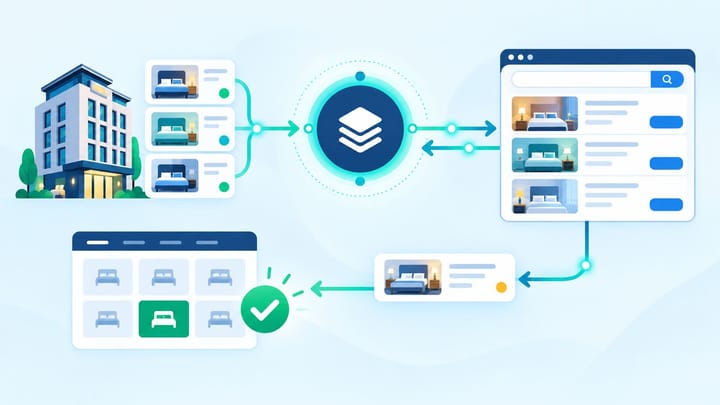
1. Prepare the live Trip.com eBooking property, room structure, rate plans, and payment settings before requesting a connection.
2. Map products by capacity, inclusions, policy, and inventory pool rather than by similar names.
3. The first test passes only when one booking reaches the PMS once, deducts inventory once, and matches the Trip.com record.
A safe Trip.com channel manager setup has two parts: connecting the correct products and proving that the first booking completes the full hotel workflow. A green connection label is useful, but it does not prove that rates, inventory, reservations, and payments are aligned.
This guide is written for an owner or manager overseeing the launch. It avoids integration jargon and focuses on the checks the hotel can approve and verify.
The article is distinct from guides about changing Trip.com rates, fixing a missing booking, reconciling settlements, or repairing a reservation modification. Its goal is to prevent those problems during the initial connection.
Prepare eBooking and the Hotel System
The property should be approved and accessible in Trip.com eBooking. Confirm the contract, property ID, room content, at least one sellable room, and the payment or settlement details required for the account.
Clean the room and rate structure before connecting. Remove outdated duplicate products or keep them closed, and confirm capacity, bedding, meal inclusions, cancellation policy, occupancy, taxes, and payment timing.
Choose one hotel launch owner. This person should approve mappings and the go-live decision, even when the channel manager provider or Trip.com account contact performs part of the activation.
The exact connection route can vary by market, provider, and property account. Trip.com may coordinate the link through the property's account or market contact after the listing is live. Keep the operational sequence below even when menu labels differ.
Complete the Trip.com Channel Manager Setup
Work through the setup in a controlled order. Do not open the full calendar until every relationship has an owner and a test result.
- Confirm the provider and property IDs. Make sure the channel manager supports the correct Trip.com property and that nobody is connecting a duplicate or former listing.
- Build the room mapping sheet. Pair each PMS room with the equivalent Trip.com room using capacity, bedding, amenities, and physical inventory pool. Leave any uncertain product closed.
- Build the rate-plan mapping sheet. Match meal inclusion, cancellation policy, payment terms, occupancy, and pricing relationship. A room-only flexible rate must not feed a breakfast or non-refundable offer.
- Assign control of each selling field. Decide where staff change rates, availability, stop-sell, minimum stay, and other supported restrictions. Record which Trip.com-specific promotions or content remain managed in eBooking.
- Approve the connection. Complete the provider and Trip.com activation steps available to the account. Do not assume the link is active until test data is accepted.
- Send a limited test range. Use future low-risk dates, a small inventory quantity, and a recognizable rate. Keep unrelated rooms and dates closed during the first test.
- Verify rates, inventory, and restrictions. Check the same room, plan, dates, and occupancy in the channel manager, eBooking, and the live Trip.com guest view.
- Prepare the first-booking test. Choose a refundable or easily reversible test product where permitted, identify who will place it, and tell front desk and finance how it will be handled.
The setup stage is complete only when the hotel can explain every live Trip.com offer and trace it back to one PMS room and one intended rate plan.
The first booking is where mapping and daily operations meet. Smart Order keeps the connected room inventory and incoming reservation in one hotel workspace, letting managers verify the booking and stock movement before expanding Trip.com sales.
Test Trip.com Before Opening the Full Calendar
Review mapped availability and the first incoming reservation in one operating view before scaling channel sales.
Place the First Test Booking Safely
Use a date far enough in the future to avoid disrupting current operations. Select the exact room and rate plan used in the setup test, and keep enough spare inventory to recover if the booking is delayed or duplicated.
Capture the guest-facing room name, rate-plan terms, occupancy, final price, taxes, payment method, and cancellation terms before confirming. These details become the expected result in the PMS.
Place one booking only. Repeated clicks or several simultaneous test reservations can make a normal delay look like a duplicate-import problem.
Record the confirmation number and booking time. Do not manually create a PMS reservation while waiting unless the hotel's test plan specifically requires it.
Verify the Booking From End to End
Open the reservation in eBooking and confirm it is active. Then find the same booking in the channel manager and PMS using the Trip.com confirmation number rather than relying only on the guest name.
The PMS record should match the property, room type, rate plan, arrival and departure dates, occupancy, guest details available to the property, total and currency, payment arrangement, cancellation terms, and booking source.
Check inventory separately. The booked room should reduce by one for every stay date and should not affect an unrelated room type. Confirm the quantity in the PMS, channel manager, eBooking, and live guest search.
If the booking appears twice, inventory drops twice, or the wrong product is attached, stop the launch. Preserve both records and investigate before deleting or merging anything.
Test One Change After the First Booking
A new reservation proves only the initial delivery path. It does not prove that later guest changes will reach the hotel correctly.
Where the approved test process allows it, make one controlled change such as adjusting the stay dates or cancelling the refundable test booking. Wait for Trip.com to confirm the new status, then verify that the original PMS reservation is updated rather than duplicated.
After a cancellation, confirm inventory returns once. After a date change, confirm the old dates are released and the new dates are deducted once.
Do not test payment collection with a method that creates an unrecoverable charge or a real accounting problem. Finance should approve how the test booking will be paid, cancelled, and documented before it is placed.
Decide Whether Trip.com Can Go Live
Approve full launch only when room and rate mappings are signed off, the live offer is correct, the first reservation arrives once, inventory moves once, and any tested change updates the original booking.
Record known limits, manual tasks, emergency closure steps, support contacts, and the person responsible for monitoring the first days. Staff should know whether to act in the PMS, channel manager, or eBooking when something needs attention.
Expand the selling window in stages. Recheck peak dates, sold-out dates, different occupancies, and each mapped room before opening the entire calendar.
For the first 72 hours, compare every Trip.com booking with the PMS and inventory result. Early review catches a wrong mapping before it affects several guests.
Frequently Asked Questions
Can every hotel connect Trip.com to a channel manager?
Trip.com works with many channel managers, but availability and activation depend on the provider, market, property status, and account arrangement.
Should the hotel open all rooms before testing?
No. Use a limited date range, small inventory, and one known product. Expand only after the expected rate, restriction, and reservation results are confirmed.
What is the most important first-booking check?
Confirm that one Trip.com reservation creates one PMS booking and removes one unit from the correct room for every stay date.
Should staff create the test booking manually in the PMS?
No. The purpose is to prove automatic reservation delivery. Manual entry can hide a failed connection or create a duplicate.
When is the connection ready for normal sales?
It is ready when mappings are approved, test selling controls work, the live offer is correct, and the first booking and one permitted follow-up change complete without unexplained manual repair.
