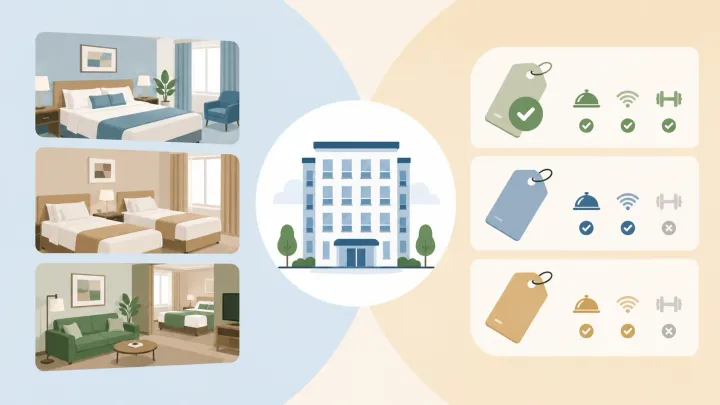
1. Room type = the physical room — bed configuration, size, tier, and view describe what the guest is sleeping in
2. Rate plan = the pricing and conditions attached to a booking — it describes how and what the guest pays
3. The same room type can have multiple rate plans: flexible BAR, non-refundable, advance purchase, breakfast included
4. One room type multiplied by four rate plans creates four distinct bookable products on every OTA — without adding a single physical room
5. Your PMS is where room types are defined once and rate plans are layered on top — that combination is what gets pushed to OTA channels via your channel manager
What Is a Hotel Room Type?
A room type describes the physical attributes of a hotel room — what the guest is actually booking. It covers four dimensions: bed configuration (twin, queen, king), occupancy (single through quad), layout (standard, suite, studio, connecting), and tier or positioning within the property (standard, deluxe, executive).
Despite wide variation in how individual hotels label their rooms, almost every inventory structure traces back to three core categories:
- Standard Room — the most common room in the property, typically 20–30 square meters. Basic amenities: private bathroom, TV, Wi-Fi, desk. Usually one king or two double beds. Priced at the entry level for the property.
- Deluxe Room — a step above standard in space, views, floor position, or furnishings. A deluxe room with a city view or a higher floor can command a meaningfully higher rate than a standard room with an identical bed configuration simply because of its location within the building.
- Suite — a separate living area alongside the sleeping area, typically 50 square meters and above. Suites subdivide further: a junior suite integrates a sitting area within a single large room; an executive suite adds a proper workspace; a presidential or penthouse suite is reserved for the highest-tier inventory.
Supporting categories fill specific demand segments. Family rooms configure for parents and children — larger beds, possibly a bunk, sometimes a kitchenette. Accessible rooms meet mobility requirements with roll-in showers and wider doorways. Connected rooms serve groups who need separate sleeping spaces with internal access. View categories (ocean view, mountain view, courtyard view) create differentiation within the same tier without changing the physical room size.
The practical rule: limit what guests see publicly to five to seven distinct categories. More than that creates booking friction — guests stop being able to evaluate options and conversion drops.
What Is a Hotel Rate Plan?
A rate plan is the set of pricing and conditions attached to a booking. It describes how much the guest pays, when they pay, what is included, and what happens if they cancel.
Every rate plan has four core components:
- Base price — the nightly rate for the room under this plan, typically expressed as a percentage of BAR (Best Available Rate) or as a fixed markup or discount from it.
- Cancellation policy — whether the guest can cancel without penalty, up to what point, and what the penalty is if they cancel after the deadline.
- Payment timing — whether payment is collected at booking, at check-in, or at checkout.
- Inclusions — whether any services are bundled into the rate: breakfast, airport transfer, parking, spa access.
The most important thing to understand about rate plans is that they are not rooms. A Standard Room is a physical thing. A rate plan is a commercial arrangement. The same Standard Room can be sold under a flexible rate, a non-refundable rate, an advance purchase rate, and a bed-and-breakfast rate simultaneously — four distinct products, one physical room, four different guest experiences depending on which they choose.
How Room Types and Rate Plans Work Together
This is where most of the operational value sits. A hotel with three room types (Standard, Deluxe, Suite) and four rate plans (flexible BAR, non-refundable, advance purchase, bed and breakfast) has twelve distinct bookable products — without having added a single room.
Each of those twelve combinations appears as a separate option on OTA listings. A guest on Booking.com can book a Standard Room at the flexible rate or the non-refundable rate. A guest who wants breakfast included can find that option at the Deluxe Room tier. A guest booking three months out can access the advance purchase discount at whatever room type they prefer.
From a revenue management perspective, this matrix is the mechanism that lets a single property serve multiple guest segments simultaneously. Price-sensitive guests who commit early go to advance purchase. Business travelers who need flexibility pay the BAR. Guests who are certain of their dates take the non-refundable discount. Leisure guests who prefer everything included choose the breakfast package.
A concrete example: a 30-room hotel with three room types and four rate plans is effectively selling 120 unique product-and-price combinations on each OTA it connects to — all derived from the same physical inventory.
The Main Rate Plan Types Hotels Use
These are the categories that form the foundation of most hotel rate structures. The decision of which to activate and how to price them is separate from understanding what they are.
BAR (Best Available Rate) is the publicly visible, fully flexible rate — no restrictions, no advance payment required, cancellable up to the standard deadline. BAR adjusts dynamically with demand. Every other rate plan is typically expressed as a percentage of BAR, so when BAR moves, the whole structure moves with it without manual updates.
Non-Refundable Rate offers a discount — typically 8–12% below BAR — in exchange for full prepayment and no cancellation rights. Guests who are certain of their dates take this rate. Hotels get guaranteed revenue regardless of what happens between booking and check-in.
Advance Purchase / Early Bird discounts BAR by 10–25% for guests who book significantly ahead — commonly 30 to 180 days out. Locks in committed revenue early and improves operational planning.
Meal-Inclusive Rates bundle food service into the room price. Bed and Breakfast (BB) is the most common. Half Board (HB) adds dinner. Full Board (FB) covers all meals. All-Inclusive is standard in resort contexts where guests are expected to stay on-property.
Length of Stay (LOS) offers a lower nightly rate in exchange for a minimum number of nights. Fills shoulder periods and motivates longer bookings during low-demand windows.
Corporate Rate is a negotiated flat rate for companies with recurring travel volume. Covers the need for predictable billing and often includes perks like flexible cancellation or guaranteed availability.
For a detailed breakdown of how to set and manage flexible versus non-refundable rate strategy — including discount thresholds, BAR derivation, and common mistakes — see the How Hotels Use Flexible and Non-Refundable Rate Plans guide.
Define your room types and rate plans once — distribute everywhere
Smart Order's PMS lets you configure room types and rate plans in one place, then pushes every combination to Booking.com, Agoda, Airbnb, and your direct booking engine automatically.
How to Set Up Room Types and Rate Plans in Your PMS
Your Property Management System is the single source of truth for both room types and rate plans. Everything else — OTA listings, your direct booking engine, your revenue reports — derives from what you configure there.
The setup logic follows a simple hierarchy. Room types are created first: you define the physical inventory, name each category, set the bed configuration and occupancy, and describe the attributes. This is the foundation. Room types do not change frequently. A Standard Room stays a Standard Room.
Rate plans are built on top of room types. For each rate plan, you define the base pricing logic (BAR percentage or fixed amount), the cancellation policy, the payment timing, and any inclusions. Then you assign rate plans to the room types they apply to. Not every rate plan applies to every room type — a corporate rate might only apply to Standard and Deluxe, not the presidential suite.
Once configured, your channel manager takes over. Smart Order's integrated channel manager reads every active room type and rate plan combination and pushes it to every connected OTA simultaneously. When a guest books a non-refundable Deluxe Room on Booking.com, that booking appears in your Smart Order dashboard instantly, the room closes across every other connected channel in real time, and the rate plan conditions — full prepayment, no cancellation — are recorded against the reservation.
When you adjust a rate plan in Smart Order — moving BAR up for a high-demand weekend, activating an advance purchase promotion — the change propagates to Booking.com, Agoda, Airbnb, and your direct booking engine at once. There is no logging into individual extranets, no risk of one OTA showing a stale rate while another is updated.
Common Setup Mistakes
Inconsistent room type naming across channels. If your PMS calls it "Deluxe King" but your Booking.com listing says "Superior Double," you have a mapping problem. Housekeeping assigns the wrong room. Revenue reports split the same inventory into two categories. OTA availability shows as incorrect. Name room types once in the PMS and map them cleanly to each OTA's category structure.
Too many rate plans visible publicly. Internally you can run fifteen rate plan configurations for different channels, segments, and seasons. What guests see on any single OTA should be capped at three to five options. Research consistently shows booking conversion drops when guests face more choices than they can meaningfully evaluate.
Fixed prices instead of BAR-derived rates. Setting each rate plan as a standalone fixed number means every demand shift requires updating every plan manually. A hotel running seven rate plans across five OTAs has thirty-five manual updates to make every time pricing should change. Derive all plans as percentages of BAR so one adjustment cascades through the entire structure automatically.
Configuring rate plans directly in OTA extranets. Some hotels bypass their PMS and set rate plans manually in Booking.com or Agoda's extranet. This works until you need to change something — at which point the change exists only on that one platform. The clean setup is always: configure in the PMS, distribute via channel manager, never touch the extranet directly for standard rate management.
One place to manage your room types, rate plans, and OTA distribution
Smart Order's PMS and integrated channel manager keep your room inventory and rate plans in sync across every channel — no manual extranet work required.
FAQ
What is the difference between a hotel room type and a rate plan?
A room type describes the physical attributes of a room — bed configuration, size, view, and tier. A rate plan describes the pricing and conditions of a booking — how much the guest pays, the cancellation policy, payment timing, and what is included. The same room type can be sold under multiple rate plans simultaneously, creating distinct bookable products from the same physical inventory.
Can the same room type have multiple rate plans?
Yes. This is the standard setup. A Standard Room, for example, can be available as a flexible BAR rate, a non-refundable discounted rate, an advance purchase rate, and a bed-and-breakfast rate — four separate products on every OTA you connect to. Each attracts a different guest segment at a different price point.
How many rate plans should a hotel offer?
Start with two to three: a flexible BAR rate and a non-refundable rate cover most guest segments. Add advance purchase once those are running consistently. Cap what guests see publicly at three to five options. Internal configurations for specific channels, corporate accounts, or seasonal promotions can exceed that without adding visible complexity to the guest booking experience.
What is BAR and why do rate plans derive from it?
BAR stands for Best Available Rate — the publicly visible, fully flexible room rate that adjusts dynamically with demand. It is the anchor from which all other rate plans are expressed as percentages. When BAR moves, every plan connected to it adjusts automatically. Setting rate plans as fixed numbers instead of BAR percentages creates manual update overhead every time demand changes.
Where are hotel room types and rate plans configured?
Both are configured in your Property Management System (PMS). Room types define the physical inventory; rate plans define the pricing structure layered on top. A PMS connected to a channel manager then distributes every active room type and rate plan combination to your OTA channels automatically, ensuring consistent availability and pricing across Booking.com, Agoda, Airbnb, and your direct booking engine.
