1. Agoda Partner Portal is the current accommodation-partner backend; many hotel teams still call it YCS or the Agoda Extranet.
2. Returning users can open the official portal, enter their credentials, and complete any requested authentication.
3. First-time users or staff taking over a property may need Agoda Accommodation Support to link their username to the property.
4. If a login link or code does not arrive, check the registered inbox, spam filtering, cookies, and account access before requesting support.
Hotel owners and managers use Agoda Partner Portal to manage reservations, rates, availability, property content, and account settings. The same backend is still widely described as the Agoda Extranet or YCS, so you may see all three names in hotel procedures and search results.
To access your property, open the official Agoda Partner Portal. Confirm that the address belongs to `agoda.com` before entering your password or verification code. Never send login credentials or a one-time code to an unknown contact.
Agoda Partner Portal, YCS, and Extranet: Are They the Same?
For accommodation partners, these names generally refer to the same operational relationship with Agoda. Partner Portal is Agoda's current name for the property-management backend. Agoda Extranet is the general industry term, while YCS is the older name many hotel teams still use.
This distinction matters when you search for help. A procedure labeled "YCS login" may lead to the current Partner Portal, and a colleague may call the same screen the Agoda Extranet. Use the official portal rather than an unofficial login page.
The traveler account on Agoda.com is different from property access. A consumer username may exist without permission to manage a hotel. If the username has not been linked to the property, entering the correct password will not create that access automatically.
How to Log In to Agoda Partner Portal
Returning partner login
Use this process when your username is already connected to the property:
- Open the official Agoda Partner Portal.
- Enter the email address and password linked to your Agoda partner account.
- Complete any additional authentication requested by Agoda. The method can vary by account and may use email or phone verification.
- Select the correct property if your username can access more than one listing.
- Confirm the property name and Agoda property ID before changing reservations, rates, or availability.
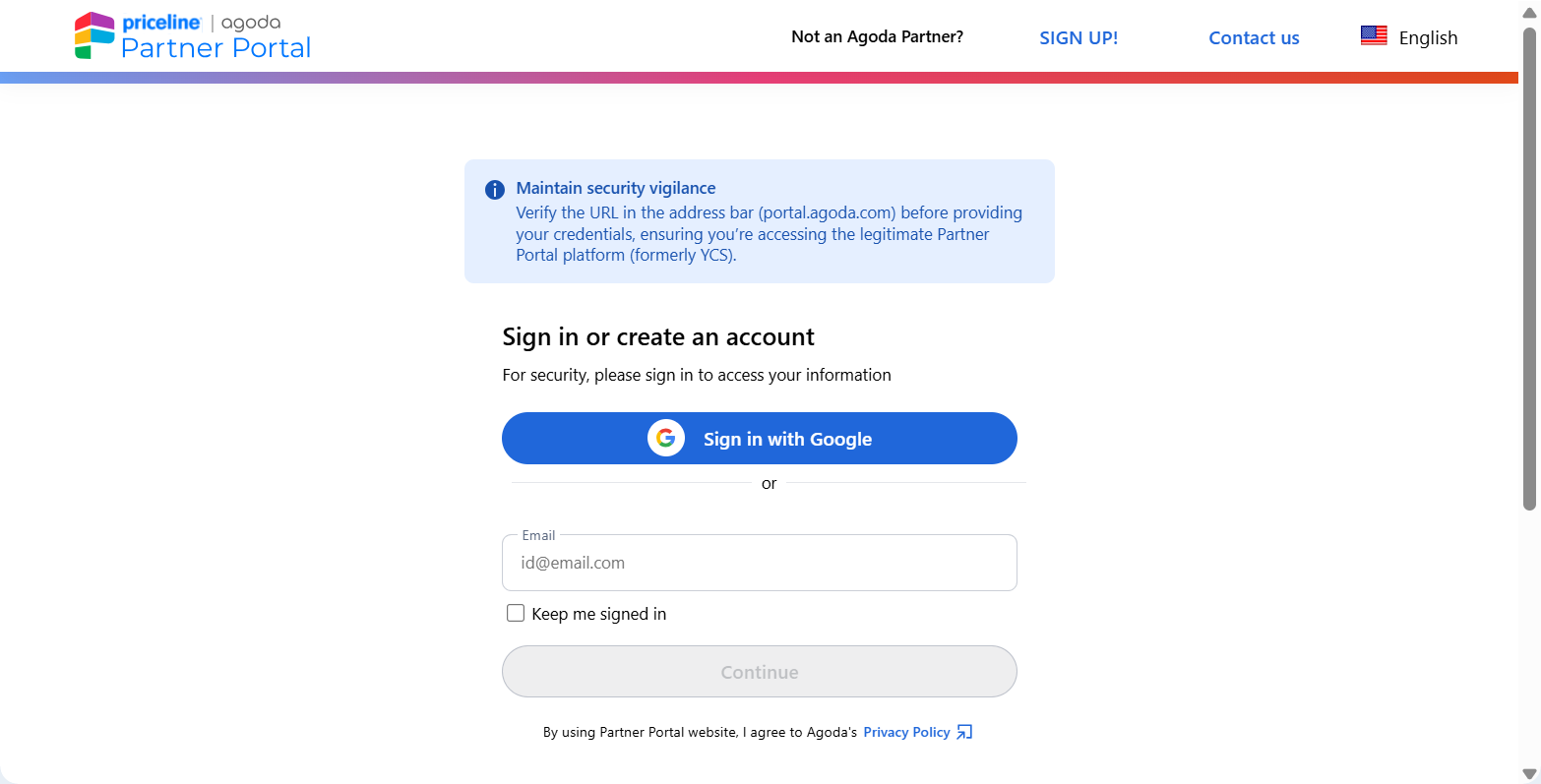
If the portal shows a recently used account, verify the email before selecting it. A shared front-desk computer can retain another employee's username.
First login or a username not linked to the property
A first login may include a secure link sent to the registered email address. Follow the link from that inbox and complete the authentication requested on the official Agoda page.
Creating an Agoda.com username does not necessarily link it to an existing property. A new employee, management company, or property owner may need Agoda Accommodation Support to associate the new username with the listing. Agoda may request the user's role, email address, and written authorization from the owner or management company.
Do not continue using a former employee's login. Ask Agoda to add the correct username and remove access that is no longer authorized.
When an Agoda reservation reaches Smart Order through a supported connection, it enters the PMS and updates availability from the same inventory source used for connected channels. This reduces repeated reservation, rate, and inventory work, but Partner Portal is still required for Agoda account access, property content, support, and settings outside the connection. Follow the Agoda connection guide when you are ready to connect the property.
Keep Agoda Reservations and Availability Connected
Use Smart Order to manage supported Agoda reservation, rate, and inventory updates from the same hotel operating system.
What You Can Manage After Logging In
Partner Portal is the control point for Agoda-specific work. Depending on the property type, account permissions, and connection setup, hotel teams may use it to review reservations, maintain property content, manage availability and rates, inspect promotions, update contacts, and request support.
Before making a change, confirm which system controls the field. If a connected hotel channel manager is the source for rates or availability, make the update there and use Partner Portal to verify the result. Editing the same dates in both systems can cause a later synchronization message to overwrite a manual change.
A channel manager does not eliminate Partner Portal. Keep working access for account administration, Agoda-only settings, finance tasks, listing content, verification, and support cases.
Why You Cannot Log In to Agoda Partner Portal
Password reset is not working
Use Forgot Password with the email address registered to the account. Check that the reset message belongs to Agoda and opens an `agoda.com` page.
If no account is found, the team may be using a different registered email, or the username may not be linked to the property. Ask the property administrator to confirm the approved login instead of creating several replacement accounts.
Secure link or verification code does not arrive
Check the registered inbox, spam or junk folder, mail filters, and quarantine. Add Agoda's sending address to the safe-sender list if your hotel's email system blocks automated messages. Request a new link or code only after confirming that the previous one has not arrived, because older links can expire when a newer request is issued.
If your account offers another approved authentication method, use the option shown on the login page. Do not ask a colleague to forward a one-time code through an unsecured channel.
A saved account is missing or incorrect
Recent-account login depends on browser cookies, the remember-me setting, and normal browsing mode. Private or incognito windows do not retain the same saved-account information.
If the wrong username appears, remove it from the recent-account list and enter the approved property login. On a shared device, sign out when the shift ends and do not save a password in a common browser profile.
The username is not linked to the property
This often appears after staff turnover, a management-company change, or a new owner taking control. The correct password may open an Agoda account without showing the hotel.
Contact Agoda Accommodation Support and request that the username be linked to the property. Be ready to provide the property name and ID, the user's name and role, the new email address, and authorization from the owner or management company. Finance access may require an additional permission decision.
The session expired or a feature is unavailable
Agoda states that an idle Partner Portal session can expire after six hours. Sign in again and complete any new authentication request.
If you can access the property but cannot see a specific function, check the selected property and user permissions before assuming the portal is unavailable. Menu labels and available controls can vary by property type, region, agreement, and connection setup.
How to Contact Agoda Partner Support
If you can log in, select Need Help in Partner Portal, review the suggested help articles, and submit a request when they do not resolve the problem. Include the property ID, username email, error message, time of the attempt with time zone, browser, and a screenshot with guest and payment data hidden.
If you cannot access Partner Portal, use Agoda's property-partner support guide to find the available support route or local phone number. Do not use traveler customer support for a property-account problem.
For a management handover, describe the ownership or operating-company change clearly and attach only the authorization documents Agoda requests. Never include a password, one-time code, or full payment credential in an ordinary support message.
Frequently Asked Questions
Is Agoda Partner Portal the same as YCS?
Partner Portal is the current name for Agoda's accommodation-partner backend. YCS and Agoda Extranet are older or general names still used by many hotel teams.
What is the official Agoda partner login?
Use `portal.agoda.com` or the Partner Portal link provided by Agoda Partner Hub. Check the domain before entering credentials.
Why can I log in but not see my hotel?
Your username may not be linked to that property, or you may have selected another listing. Confirm the account and property first; then ask Agoda Accommodation Support to add or correct access.
Why am I not receiving the Agoda login link or code?
Check the registered inbox, spam folder, mail filters, and safe-sender settings. Request a fresh link only after checking for the previous message, and use another authentication option only when Agoda displays it for your account.
Can several employees use Agoda Partner Portal?
Hotels can request access for the people who need it, but each person's authorization should match their role. Do not share one former employee's password across the team. Agoda may require management authorization when linking a new username.
Do I still need Partner Portal if I use a channel manager?
Yes. Use the channel manager for supported reservation, rate, and availability workflows, and keep Partner Portal for verification, Agoda-specific settings, listing content, account administration, finance tasks, and support.
A reliable Agoda login procedure should identify the correct portal, the approved username, the selected property, and the authentication method before staff change live inventory or guest records. Document who owns account access and review it whenever hotel management or team responsibilities change.
