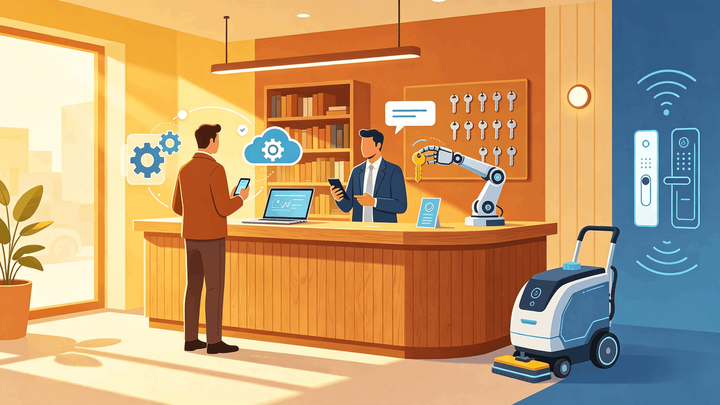
1. Airbnb automation works best when it covers repeatable tasks: messages, calendar sync, cleaning handoffs, check-in instructions, pricing reviews, and reporting.
2. Independent hotels and B&Bs should automate workflows, not hospitality. Guest exceptions, complaints, refunds, and reviews still need human judgment.
3. Start with Airbnb's built-in scheduled messages and Smart Pricing, then connect Airbnb to your PMS or channel manager when you manage multiple rooms or OTAs.
Airbnb automation is not about removing people from hospitality. It is about removing repeated manual work that causes delays, missed messages, calendar errors, and inconsistent stays.
For independent hotels and B&Bs, the challenge is different from a single vacation rental. You may have several rooms, changing availability, housekeeping teams, same-day turnovers, direct bookings, and other OTAs.
This guide explains how to automate Airbnb management without losing control of the guest experience.
What Airbnb Automation Actually Means
Airbnb automation means setting up systems that handle predictable tasks without manual action every time.
Common examples include automated Airbnb messages, scheduled check-in instructions, cleaning task alerts, calendar synchronization, smart lock access, pricing suggestions, and revenue reporting.
Airbnb itself supports some automation. Its Help Center explains that hosts can create scheduled quick replies based on triggers such as a new reservation, check-in, or checkout. Airbnb also offers Smart Pricing, which can adjust nightly prices within a minimum and maximum range.
Those tools are useful, but they are only part of the workflow. Hotels and B&Bs also need room readiness, OTA inventory, payment status, staff tasks, and guest exceptions.
Step 1: Automate Guest Messages
Messages are the easiest place to start because many guest questions repeat.
Create scheduled Airbnb messages for the key stay moments: confirmation, pre-arrival details, check-in instructions, mid-stay check-in, checkout reminder, and post-stay review request.
Keep each message short. Long automated messages are easy to ignore, especially on mobile. Use Airbnb's scheduled quick replies for simple stays, and a PMS or guest messaging tool if you need templates across Airbnb, Booking.com, email, and direct bookings.
The goal is consistency. Every guest should receive the right information at the right time, even when the front desk is busy.
Step 2: Automate Calendar and Availability Sync
Calendar automation is more important than message automation for hotels and B&Bs.
If you list the same room inventory on Airbnb, Booking.com, Agoda, and your own website, every booking must close availability everywhere else. Manual updates create a window where two guests can book the same room.
iCal sync can help with basic date blocking, but it is not the same as real-time channel management. Hotels with multiple rooms or same-day bookings should use a channel manager or PMS connection that updates availability as soon as a reservation is confirmed.
This is especially important for B&Bs that sell by room type. If one room sells on Airbnb but your direct booking engine still shows it, the automation gap becomes an overbooking risk.
Step 3: Automate Cleaning Handoffs
Airbnb automation should include housekeeping, not just guest messaging.
When a checkout is confirmed, the cleaning team should know which room needs turnover, when the next arrival is scheduled, and whether the guest left special notes. For hotels and B&Bs, this works best when cleaning status is tied to the reservation calendar.
Useful cleaning automation includes assigning rooms after checkout, marking priority turnovers, flagging maintenance issues, and notifying the front desk when a room is ready.
Do not automate the judgment. If a cleaner finds damage or a maintenance issue, the system should flag it, but a manager should decide how to handle the guest, claim, or room assignment.
Step 4: Automate Check-In Without Hiding Support
Self check-in can save time, but it needs a clear support path.
For B&Bs and small hotels, automated check-in may include scheduled arrival instructions, smart lock codes, keypad access, digital registration forms, or payment reminders. The guest should know where to go, what code to use, and who to contact.
The mistake is sending access details too early or too vaguely. Many hosts send general check-in information before arrival and the final access code closer to check-in time.
Keep one human fallback. A guest who cannot open the door at midnight does not care that the message was automated.
Step 5: Automate Pricing Carefully
Airbnb Smart Pricing can adjust rates based on demand for similar listings. Airbnb says hosts can set minimum and maximum prices and override Smart Pricing in the calendar.
That control matters. Independent hotels and B&Bs should not let pricing automation run without boundaries. Set a minimum rate, protect event dates, and review whether automated pricing improves both occupancy and revenue.
For properties listed on multiple channels, pricing also needs rate parity awareness. If Airbnb adjusts rates but Booking.com and your direct booking engine do not move with it, guests may see inconsistent prices.
Pricing automation should suggest and distribute better prices. It should not quietly underprice your best nights.
Step 6: Automate Reporting
Automation only helps if you can see whether it improved operations.
Track these signals monthly:
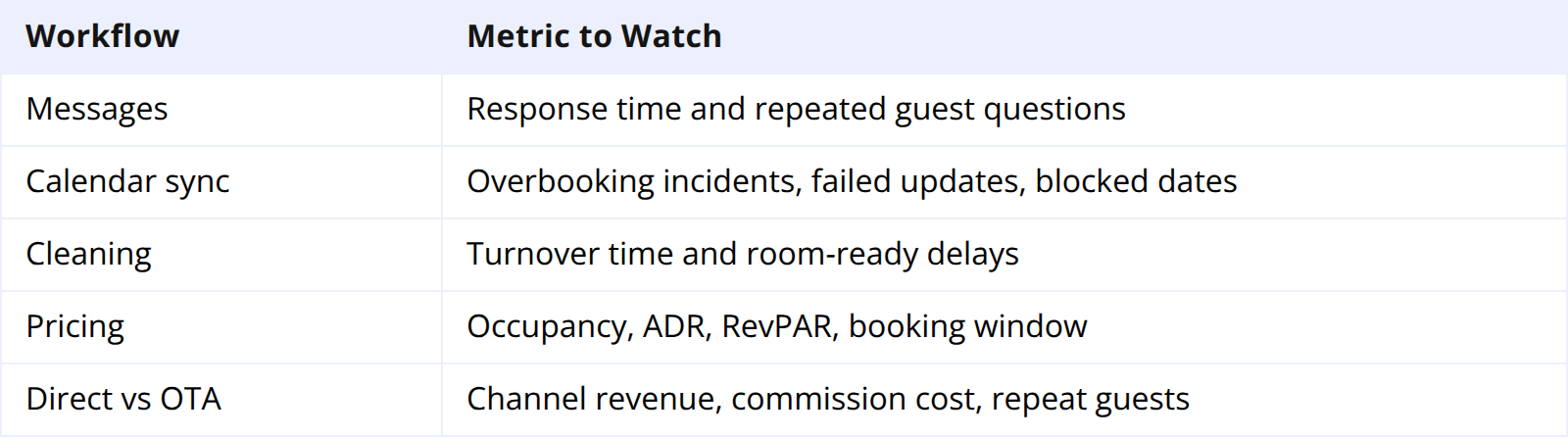
The point is not to automate everything. The point is to reduce repetitive work while making exceptions easier to spot.
What Not to Automate
Some Airbnb management tasks should stay human-led.
Do not fully automate guest complaints, refund decisions, damage claims, review responses, or unusual requests. A template can help the first response, but the final decision needs context.
Also avoid automation that violates platform rules or creates a poor guest experience. Do not scrape Airbnb, move guests off-platform before a confirmed booking, or use vague automated responses for safety issues.
The safest rule is simple: automate routine timing, not sensitive judgment.
How Smart Order Fits Airbnb Automation
Airbnb automation breaks down when the reservation, cleaning handoff, and channel calendar sit in different tools. A booking arrives, but the cleaner does not know the room changed. A direct booking comes in, but Airbnb stays open.
Smart Order connects Airbnb reservations, OTA availability, and housekeeping status in one workflow. When a booking is confirmed, availability updates across connected channels, the reservation appears in the PMS calendar, and the team works from live room status instead of separate inboxes.
Automate the Airbnb Workflow Behind the Stay
Smart Order connects Airbnb reservations, OTA availability, and housekeeping status so independent hotels and B&Bs can reduce manual updates without losing guest control.
FAQ
How do I automate Airbnb messages?
Use Airbnb's scheduled quick replies for booking confirmations, pre-arrival details, check-in instructions, checkout reminders, and post-stay review requests. For multi-channel properties, use a PMS or messaging tool that can send templates across Airbnb, email, and other OTAs.
Can Airbnb pricing be automated?
Yes. Airbnb Smart Pricing can adjust nightly prices within your chosen minimum and maximum range. Hosts should still review event dates, peak seasons, and margin floors manually.
Can I automate Airbnb cleaning?
Yes, but cleaning automation should connect to real reservations. When a guest checks out, the cleaning task should show room, priority, next arrival time, and notes. Damage findings should still be reviewed by a manager.
Do independent hotels need Airbnb automation software?
Hotels and B&Bs usually need automation once they manage multiple rooms, multiple OTAs, or same-day turnovers. One Airbnb listing may work with native tools, but multi-room operations need stronger sync.
What is the biggest risk of Airbnb automation?
The biggest risk is automating too much. Routine messages and updates are good candidates. Complaints, refunds, damage claims, and safety issues need human review.
Final Takeaway
To automate Airbnb management, start with repeat tasks: messages, check-in instructions, calendar updates, cleaning handoffs, pricing reviews, and reporting.
For independent hotels and B&Bs, the real value comes when these automations connect. Airbnb should be part of a live workflow where reservations, availability, housekeeping, and revenue stay aligned.
