1. Use the regional property-partner application route; eligibility, contracts, fees, taxes, and required licenses vary by country and accommodation type.
2. Rakuten Travel reviews the application and creates the initial property page before the hotel completes its sellable setup.
3. Sales can begin only after the operator verifies the property page and configures room types, stay plans, inventory, and rates in the management screen.
4. Test the public listing and one controlled reservation before treating the channel as operational.
Learning how to list a hotel on Rakuten Travel starts with the right partner route, not with a consumer Rakuten account. The hotel must complete commercial and property verification, then turn the approved listing into bookable room-and-plan combinations.
The Japan onboarding sequence has three working stages: submit the property application, complete review and system registration, then configure plans, inventory, and prices in the property management screen. International contracting details may differ, so confirm the route for the hotel's location before preparing a launch date.
Confirm Eligibility and the Correct Application Route
Start from the accommodation-partner inquiry or application page for the property's region. In Japan, eligible accommodation types operating under the applicable inn-business license include hotels, ryokans, guesthouses, pensions, and some whole-property rentals.
Japanese properties operating under the Private Lodging Business Act or special-zone minpaku rules are directed to a separate Rakuten Group registration route. Hotels outside Japan should not assume the Japanese license or contracting rules apply; use the regional contact shown for the property's country.
Before applying, confirm the legal operator name, property trading name, address, accommodation type, license or registration number, tax identity, bank and settlement information, authorized signatory, and primary commercial contact. Ask for the applicable fee or compensation structure, payment schedule, cancellation handling, tax treatment, and termination terms in writing.
Do not confuse Rakuten Travel with Rakuten Travel Xchange. The latter is a wholesale accommodation and travel-technology business serving travel sellers. A retail hotel listing should follow the property-supply route specified by Rakuten for that market.
Prepare a Complete Property Data Pack
Build one approved source document before filling any form. Inconsistent names, addresses, facilities, or policies create rework during review and can later cause guest complaints.
The data pack should contain the property's coordinates, telephone number, email, check-in and checkout times, reception hours, supported languages, accessibility details, parking, internet access, smoking rules, child and extra-bed policies, pet policy, payment methods, taxes, mandatory fees, and emergency contact.
Prepare a room register with a unique internal code for every sellable room type. Record bedding, maximum adults and children, room size, bathroom arrangement, smoking status, amenities, view, and the physical number of rooms. Do not create two public room types that draw from the same inventory without documenting how availability will be controlled.
Create a separate stay-plan register. Rakuten Travel commonly sells a room through plans that define meals, cancellation terms, booking windows, benefits, and prices. A room type is the physical product; a plan is the commercial offer attached to it.
Use accurate, rights-cleared images. Prepare a clear exterior image, reception and common areas, every room type, bathrooms, meals, and distinctive facilities. Match each photo to the product it represents and remove images of amenities that are no longer available.
Submit the Application and Track the Review
Submit the Japan property application form and retain the confirmation email. Rakuten then reviews the supplied information and may contact the named representative when a license, address, business identity, or other detail needs clarification.
Use a shared onboarding record to capture the submission date, region, legal entity, property name, application reference, Rakuten contact, requested corrections, contract status, and target opening date. The person replying to Rakuten should use the same approved data pack instead of rewriting details from memory.
Do not promise a live date before review is complete. Rakuten performs the initial system registration and property-page creation during this stage. Wait for the participation-completion notice and management-screen access before building the sellable setup.
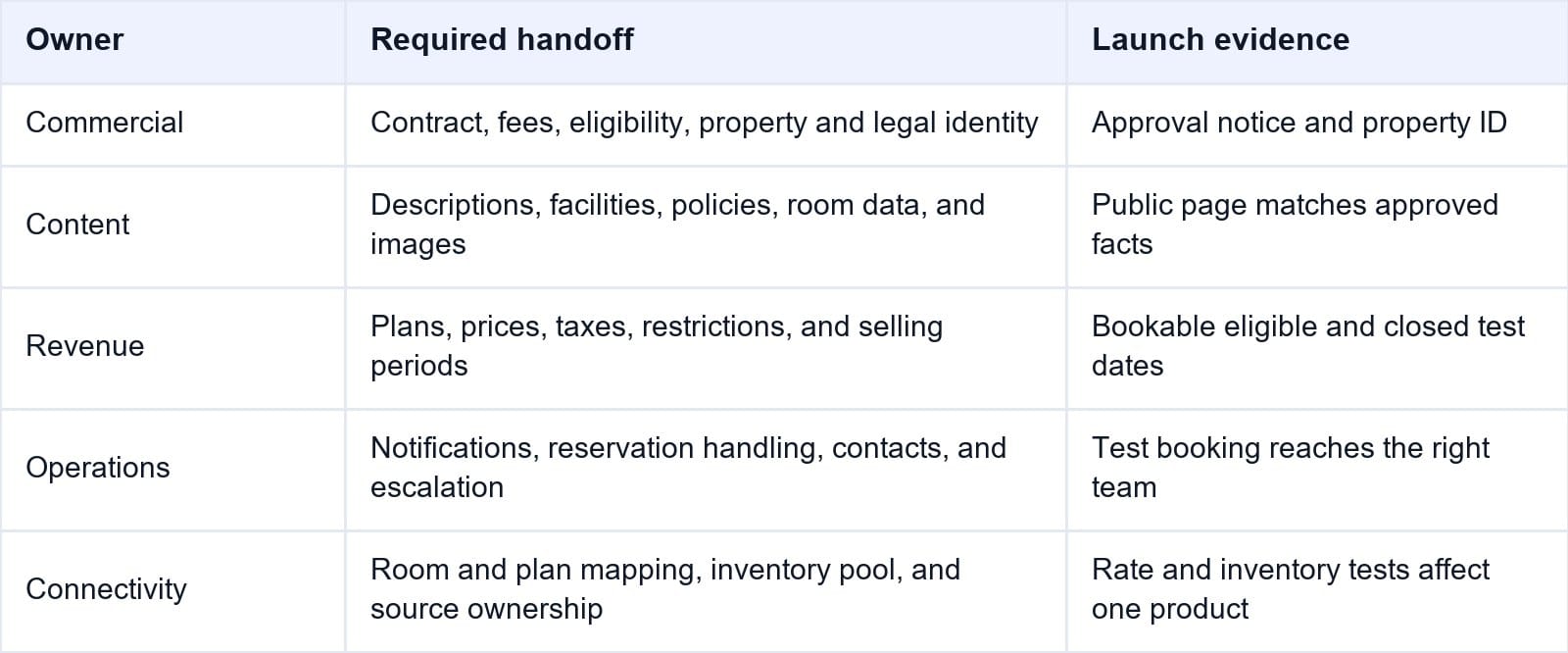
Use the checklist below as a handoff between the commercial, revenue, operations, and finance teams.
Smart Order's hotel reporting software can later separate Rakuten Travel production from other channels, helping the owner compare ADR, room nights, revenue, and booking contribution after launch.
Measure Rakuten Travel After Launch
Compare Rakuten Travel room nights, ADR, occupancy, and revenue so the channel is evaluated by commercial contribution rather than listing status alone.
Build Room Types, Plans, Inventory, and Rates
After Rakuten confirms participation, sign in to the property management screen and verify the correct property before editing. The listing will not become a complete sellable product until the hotel creates its plans and registers inventory and rates.
Use this launch sequence:
- Verify the property name, address, contact details, category, check-in information, facilities, policies, and public description.
- Open the room-management area and compare every room type with the hotel's approved room register.
- Create or correct room types in this order: basic room information, sales period, base price, review, and registration completion.
- Confirm capacity and bedding before saving. Capacity is not directly editable on an existing room type in this workflow, so an error may require a replacement setup and support assistance.
- Create accommodation plans and attach them to the correct rooms. Define meals, inclusions, cancellation terms, booking period, stay period, and guest conditions.
- Enter rates for each room-plan combination. Check whether figures are tax-inclusive and whether per-person or per-room logic applies.
- Load inventory only after verifying whether it is shared at room level or controlled by a connected system.
- Review high-demand dates, closed periods, minimum-stay rules, and dates that should not sell.
- Save, reopen, and compare the stored setup with the approved room and plan registers.
Do not use a zero price as a casual substitute for a documented closure rule. Some Rakuten workflows treat zero as unavailable, but the current account, connectivity setup, and closure procedure should determine the approved method.
Connect the PMS or Channel Manager Carefully
Decide whether Rakuten's management screen or a PMS, CRS, or channel manager will own rates and inventory. Record the owner before mapping begins; two active sources can overwrite each other or expose duplicate inventory.
Map by product meaning, not similar names. Confirm property ID, room code, plan code, occupancy, meal inclusion, cancellation terms, currency, tax basis, and inventory pool. Keep screenshots or exports of the final mapping.
Test one room-plan combination and a low-risk date before loading a wide date range. Verify that a rate change reaches the intended plan without changing inventory or restrictions. Then verify that an inventory change affects the intended physical room pool.
Smart Order's hotel channel manager provides a single workflow for mapped rates and availability. The hotel can keep Rakuten Travel aligned with other channels while retaining a clear record of which source controls each product.
Control Rakuten Inventory From One Source
Map room and plan products carefully, then manage Rakuten Travel rates and availability without maintaining competing update workflows.
Validate the Public Listing and a Test Booking
Search the property on the intended Rakuten Travel point of sale. Verify name, map position, photos, room descriptions, amenities, policies, meal information, cancellation terms, currency, taxes, and final checkout total.
Test at least one bookable date and one date that should be unavailable. Match occupancy and plan conditions. A property page appearing in search does not prove every room-plan combination is correctly configured.
For launch approval, make one authorized cancellable reservation on a low-demand date. Confirm the notification reaches the correct email or connected system and verify the reservation number, guest, dates, room, plan, price, tax, payment method, and cancellation policy.
If the PMS is connected, confirm the booking creates one reservation against the correct mapped room and reduces inventory once. Cancel within policy and verify the reservation status and returned inventory in every relevant system.
Frequently Asked Questions
Can any property list on Rakuten Travel?
No. Eligibility and documentation depend on location and accommodation type. Japanese applicants should check the applicable lodging license and the separate route for regulated private lodging; overseas hotels should use their regional partner contact.
Does Rakuten create the property page?
Yes, Rakuten creates the initial property page during application review and system registration in Japan. The hotel must then verify the page and complete the sellable setup.
What must be configured before sales start?
At minimum, verify the property page and configure room types, accommodation plans, inventory, and rates. Also confirm policies, taxes, payment conditions, photos, and notification routing.
Is a room type the same as a stay plan?
No. A room type describes the physical accommodation. A stay plan defines how it is sold, including meals, cancellation terms, dates, benefits, and price.
Should the hotel connect a channel manager immediately?
Only after room and plan codes are stable and the source of rates and inventory is agreed. Test a narrow mapping before distributing broad availability.
When is the Rakuten Travel listing complete?
Completion requires more than an approved application. The public page, sellable products, rates, inventory, notifications, booking delivery, and cancellation return should all pass testing.
A Rakuten Travel listing is ready when commercial approval, product configuration, inventory control, and reservation delivery work as one process. Treat the first live booking as the final onboarding test, not the first time the team inspects the setup.
