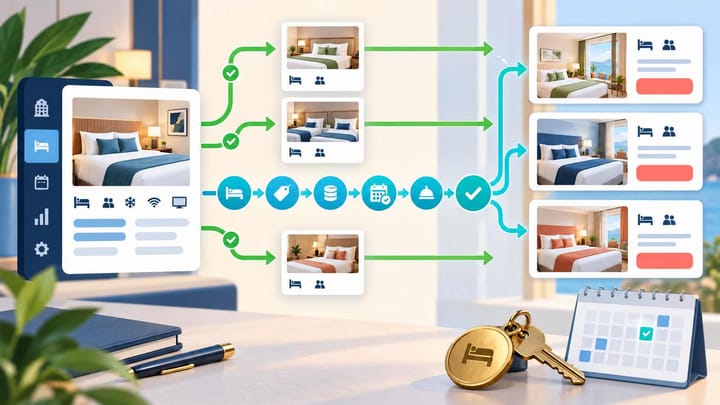
1. Keep existing room types selling while the new product is built with zero or limited future inventory.
2. Define the physical room pool before creating OTA room and rate-plan connections.
3. Map one channel at a time and test rates, availability, booking, modification, and cancellation.
4. Expand dates and inventory only after every OTA uses the correct shared room pool.
New room type mapping across a PMS and OTAs does not require the hotel to close all online sales. The safe approach is a rolling launch: protect the existing products, prepare the new room in the PMS, create matching OTA products without normal inventory, and open each channel only after a controlled test.
This article is about introducing a new room category across several OTAs. It goes beyond explaining what mapping means and does not repeat a single-channel setup. The operational goal is to keep current rooms bookable while preventing the new product from exposing extra or incorrect inventory.
Define the Physical Room Pool First
List the physical rooms that will belong to the new type. Confirm whether they are newly added rooms, renovated rooms, or rooms being moved from an existing category.
Record the number of rooms, occupancy, beds, bathroom, view, smoking status, amenities, accessibility, child and extra-bed rules, and any feature guests pay to receive. Rooms should share a type only when they are genuinely interchangeable at check-in.
If rooms are moving from an existing category, choose a future cutover date. Existing reservations before and after that date must still have a valid room assignment. Do not reduce the old room pool until every affected future booking has been reviewed.
Create a simple inventory equation: old category rooms, rooms moving out, new physical rooms, and final new-category count. The total hotel inventory must remain unchanged unless real rooms were added or removed.
Build the PMS Product Without Opening OTA Sales
Create the new room type in the PMS with a clear internal name. Add its physical rooms, capacity, room features, housekeeping setup, tax treatment, and reporting group.
Attach only the approved rate plans. Define room-only, breakfast, refundable, non-refundable, occupancy prices, derived rates, and minimum or maximum stay rules as required. Do not clone every old rate plan automatically.
Keep the new room closed to connected OTAs or use zero inventory until mapping is ready. This does not require closing existing room types. Their current connections and inventory should continue operating normally.
Run an internal test reservation in the PMS. Confirm the correct room can be assigned, inventory decreases once, the rate and taxes calculate correctly, and cancellation returns the room as intended.
Create Matching Products on Each OTA
Create the new public room type in each OTA account using accurate content and photos. Keep it closed, inactive, or at zero availability according to the controls available on that channel.
Record the OTA room identifier and every rate-plan identifier. Compare occupancy, beds, inclusions, cancellation rules, payment method, currency, tax display, and inventory basis with the PMS product.
Names may differ for marketing reasons, but meaning must match. A PMS “Family Suite” cannot map to an OTA “Two-Bedroom Apartment” unless the physical layout and guest promise are truly the same.
If an OTA creates a copied or partner-supplied room automatically, review it separately. Do not map the new PMS room to the nearest-looking product merely to finish the connection.
Map the Room and Rate Plans One Channel at a Time
Start with the OTA that offers the clearest low-risk testing route. Select the new PMS room type and connect it to the exact new OTA room. Then connect each supported rate plan to the matching OTA offer.
Check the rate-plan meaning, not only its name. Meals, refundability, occupancy, payment timing, taxes, and derived-price rules must agree.
Keep all rate plans for the same physical room on one inventory pool unless the hotel intentionally operates an allotment. A flexible and non-refundable offer are two ways to sell the room, not two separate rooms.
When several systems are involved, record which one owns room availability, prices, restrictions, and channel-specific promotions. One field should have one routine owner.
Smart Order can keep the PMS room, connected OTA products, rate plans, and incoming reservation reference in one operating workflow. Managers can approve each channel after the inventory and test result agree without interrupting existing room sales.
Add OTA Room Types Through a Controlled Launch
Use Smart Order to connect room inventory and reservations, then verify each new channel product before expanding sales.
Release a Small Test Window
Choose quiet future dates with enough existing availability. Open one unit of the new room on the first OTA while leaving other new OTA products closed. Record the starting quantity in the PMS and every connected channel.
Send the approved rate and availability from the normal controlling system. Confirm the OTA shows the correct room, occupancy, price, taxes, meals, cancellation terms, payment method, and stay restrictions.
Run an excluded search as well. A date outside the new selling window or an unsupported occupancy should not produce the offer. This proves the boundaries work, not only that the room is visible.
Do not open the full season because the first availability update succeeded. That proves the room can display; it does not prove a reservation will reach the correct PMS pool.
Complete the Booking Lifecycle Test
Place one authorized cancellable reservation on the controlled date. Verify the OTA room and rate plan, PMS import, guest count, price, payment instructions, and source reference.
Then check inventory everywhere. The new PMS room pool should decrease once, all rate plans sharing that room should reflect the remaining quantity, and unrelated existing room types should not change.
Modify the stay or occupancy where supported and confirm the original PMS record updates. Cancel through the normal channel process and confirm the same record changes status and the room returns once.
Use this six-point approval check:
- Correct public room and guest promise.
- Correct rate, tax, meal, payment, and cancellation conditions.
- One PMS reservation under the new room and rate plan.
- One inventory reduction across every linked offer.
- One modification on the original reservation.
- One cancellation and inventory return.
If any result fails, return the new OTA product to zero or closed status. Existing room types can continue selling while the hotel corrects only the new connection.
Expand Without Creating a Hidden Inventory Increase
After the first OTA passes, repeat the same process for the next channel. Keep the test dates and evidence consistent so differences are easy to identify.
Before increasing inventory, add the available quantities for the old and new room types across the cutover period. If rooms moved between categories, the combined sellable count must not exceed the physical rooms the hotel can assign.
Open dates gradually: a short low-risk range, then normal dates, then high-demand and restricted periods. Confirm derived rates, minimum stays, closed dates, and occupancy prices after each expansion.
Monitor the first live booking from every OTA. A channel is not fully launched until a real or controlled booking, modification, cancellation, and inventory return all behave correctly.
Keep a Rollback That Does Not Affect Existing Sales
The rollback for a new room should be narrow. Set the new OTA product to zero or closed, preserve existing reservations, and leave established room mappings untouched.
Do not delete the new PMS room, OTA room, or rate plan while bookings refer to it. Correct the mapping and retest, or move future reservations through an approved guest-safe process before retiring a product.
Keep a launch record with PMS room code, physical room count, OTA room and rate identifiers, inventory owner, test dates, reservation references, approver, and open issues. Update it whenever a room is renamed, cloned, merged, or removed.
Frequently Asked Questions
Must the hotel close all OTA sales during mapping?
No. Keep existing products active and hold only the new room type at zero or limited future inventory until each connection passes testing.
Can several OTA room types map to one PMS room type?
Only when they represent the same physical room pool and guest promise. Their rate plans may differ, but inventory must not be duplicated.
What if rooms move from an old category to the new one?
Set a future cutover date, review existing reservations, and reduce the old pool as the new pool opens so combined availability never exceeds physical rooms.
When is the new room type fully live?
Every channel shows the correct offer, one booking reaches the correct PMS record, inventory changes once, and modification and cancellation complete on that same record.
