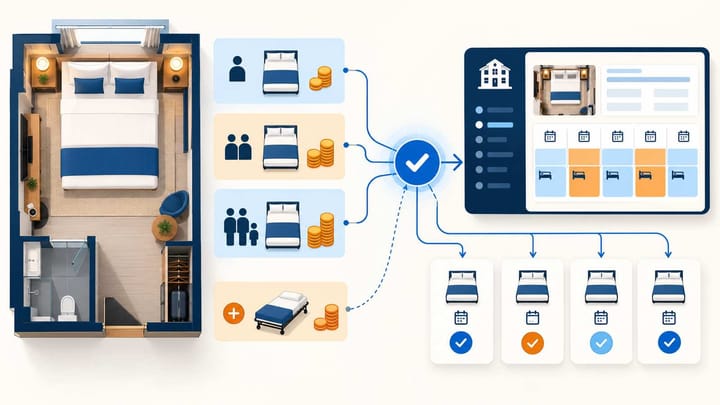
1. Approve the expected room total for each guest combination before changing rates or sending a wider update.
2. Check single-occupancy reductions, child charges, and extra-bed fees separately so one adjustment is not counted twice.
3. Verify the saved rate, the guest-facing offer, and the reservation received by the PMS; a successful update alone is not a price check.
YCS Agoda occupancy pricing needs more than a correct double-room rate. A room can show the right price for two adults while selling too cheaply to one adult or adding an unexpected charge for a child.
Agoda's merchant system is now called Agoda Partner Portal; YCS is its former name. This guide focuses on checking the finished price before and after synchronization. Start with existing room and child policies, then prove that each guest combination produces the offer your hotel intends to sell.
What YCS Agoda Occupancy Pricing Needs to Match
Occupancy pricing means charging different room totals according to who stays in the room. Keep the room's physical capacity separate from its price. A lower single rate does not create a separate single room, and an extra-bed price does not increase the number of beds the room can hold.
Record the expected nightly totals for one adult, two adults, and accepted families. Include the child's age, bedding arrangement, breakfast, and tax treatment.
For an illustrative hotel offer, one adult might pay USD 100 and two adults USD 120. An eligible child sharing existing bedding might add USD 15, making the family total USD 135. Those are example hotel prices, not an Agoda calculation rule.
If the same family requests a USD 25 extra bed, decide whether that fee replaces or adds to the USD 15 child charge. Both approaches need a clear, correctly configured offer. Staff must not assume that every child automatically generates both charges.
Use the same date, room, plan, currency, and meal basis for each comparison. Otherwise, differences can hide an occupancy-pricing error.
Agree Which System Updates Each Price
For a connected property, make routine rate and availability updates through the channel manager or Property Management System (PMS) that controls them. Use the Portal to review the result and manage settings assigned there. Editing the same price in two places can cause the next update to replace a manual correction.
Identify whether each adult occupancy price is sent directly or calculated from a base rate. Then record where child and bedding charges are maintained. Knowing that the double rate synchronized does not establish that every other price was included in that update.
Match the exact room and plan, using their identifiers when names are similar. Refundable and non-refundable offers may have different prices and benefits.
When several channels sell the same room, scattered rate changes make discrepancies harder to trace. Smart Order's OTA channel manager supports real-time rate and availability synchronization with Agoda and key Asian channels, including Trip.com, Traveloka, and Rakuten Travel. Rates and availability flow from the PMS to connected channels, while reservations return to the PMS and update the calendar. This gives staff a current booking record to compare with the offer they approved.
Keep Channel Prices and Bookings Connected
Manage rates and availability from one workspace, then review incoming bookings against the prices your team approved.
Inspect Single and Adult Occupancy Rates
Use the desktop Portal for the review. Menu labels may vary by property type and account configuration. For the hotel Calendar route, inspect the saved occupancy prices without changing fields controlled by your connected system.
- Open Rates and availability > Calendar and select the exact room type and rate plan.
- Select the test date or a short date range with the same intended prices.
- Open the rate plan's three-dot menu and choose Occupancy rates.
- Review the full-occupancy price and each lower-occupancy amount, including any reduction by percentage or fixed amount.
- Compare the displayed amounts with your approved figures. Make corrections in the system responsible for those fields, then reopen the Portal to verify them.
Treat each occupancy amount as the room price for that guest count. Do not multiply it by the number of guests unless the offer explicitly requires that calculation. Compare nightly figures with nightly figures, rather than with an entire stay total.
With a reduction per unused occupancy, check how many reductions apply to the single rate. For example, a three-person full-occupancy rate of USD 180 with a 10% reduction per unused place gives USD 162 for two people and USD 144 for one. This uses the full rate for each reduction, not a repeatedly discounted balance.
If prices are entered individually, review every supported occupancy level. Do not leave a required price blank or assume zero means "not for sale." Also check a high-demand date: a fixed reduction and a percentage reduction can produce very different single rates after the full rate increases.
Check Child and Extra-Bed Charges Against the Same Offer
Use a family that the room already permits. Record the child's age, the number of adults, bedding arrangement, and selected plan. This is a selling-price check, so avoid changing age policies simply to make an unexpected total disappear.
Children Sharing Existing Bedding
Check whether the child is free or charged under the selected offer. Review plan-specific child prices and room overrides where present. In Agoda's guided child-pricing setup, plans without child prices can treat children as adults, so test every plan you intend to sell.
If the child charge is a percentage of an adult price, inspect how the adult price is calculated for that family search. A correct percentage applied to a different starting amount can still produce an unexpected charge. Compare one-adult and two-adult family searches where both combinations are permitted.
Extra Beds and Breakfast
Review the extra-bed charge in the property's age and bedding settings, then check the actual offer. A standard extra-bed price may appear in the Calendar, but that does not prove it belongs in every guest total. Confirm whether it is already included, charged separately, or subject to request.
Breakfast needs the same treatment. If a child's breakfast is already included in the selected package, reception should not add it again. If a charge is payable at the property, preserve that distinction instead of treating it as money already collected online.
A two-night booking is a useful control. A USD 25 nightly bedding charge should contribute USD 50 for two nights if that is the hotel's configured rule. A USD 25 per-stay fee would behave differently; check the unit before assuming the price is wrong.
Send a Small Update and Verify the Guest Price
After approving the figures, test a limited room, plan, and date range through the normal connected workflow. Record the old values, intended values, update time, and person responsible. Avoid changing promotions during the same test because that adds another explanation for a price difference.
- Send the approved rate update from the system that controls those prices.
- Check the resulting adult occupancy amounts in Agoda Partner Portal.
- Search Agoda for one adult and then two adults using identical dates, room, plan, currency, and discount conditions.
- Repeat with an eligible child at the relevant age and review the bedding and breakfast wording.
- Compare the final booking breakdown, including taxes, discounts, and amounts payable at the property.
- Repeat for a second date or plan before applying the correction more widely.
A saved rate and selling total can differ because of taxes or promotions. Explain the difference before changing prices. Label screenshots with the test conditions and exclude payment details.
The Single Rate Returns to Its Old Value
Check whether a later update replaced a Portal edit or recalculated the single rate from the full rate. Correct the controlling value or rule, then repeat the same search. Repeating the manual Portal edit will not settle a conflict over which system controls it.
The Family Total Is Too High
Check the child's age classification, selected plan, and included bedding charge. Look for an adult price applied to the child or a charge included twice. Correct the specific cause rather than lowering the base room rate for every guest.
The Rate Looks Right, but the Room Cannot Be Booked
Check available rooms, permitted guest combinations, and stay restrictions. A valid price does not make a room available for an unsupported family size or a closed date.
Check the Incoming Reservation Before Wider Release
Agree payment and cancellation handling before making an authorized test reservation. Guest searches establish many pricing outcomes; a booking also checks what reception receives.
Match the Agoda confirmation with the PMS front desk reservation: booking number, dates, room, plan, adult and child counts, total, and included charges. Verify child ages where supplied. Do not invent missing age information or assume a separate fee line must exist if the agreed total already includes it.
Check availability after the booking, too. One room sold to one adult normally consumes one room, just as the same room sold to two adults does. Confirm the affected room nights were deducted once; pricing by occupancy should not create separate physical inventory for each guest count.
Before wider release, have a second staff member review any unresolved difference. Keep the approved figures and test results available alongside your hotel reporting and analysis, so later rate reviews can distinguish an intentional price change from an error. Retest after changing the occupancy model, copying a plan, or changing child or bedding charges.
Frequently Asked Questions
Can I set different prices for different guest counts?
Yes. Occupancy pricing supports different room prices for permitted guest counts. Verify which prices are supplied by your connected system and which are calculated in the Portal.
Must the single rate be lower than the double rate?
That is a hotel pricing decision. Confirm the intended amount and avoid applying a single-use discount twice through overlapping settings.
Does a correct double rate prove the child price is correct?
No. Check the child's age, the selected offer, and any child or bedding charge using a family search.
Does an extra guest always need an extra bed?
Follow the room's permitted arrangement and the booked offer. Existing bedding and extra bedding can have different prices and conditions.
What should be verified after synchronization?
Check the saved rates, guest-facing totals, and incoming reservation. Also confirm that the booking deducts the correct room inventory once.
