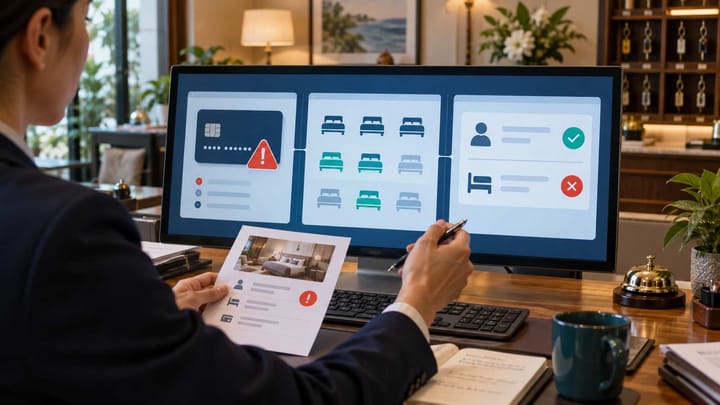
1. Confirm whether Agoda Partner Portal shows a confirmed, cancelled, or missing reservation.
2. Read the booking's payment instruction before charging the guest or assuming Agoda will pay.
3. Compare the exact Agoda room and stay dates with PMS inventory before reopening a room.
4. Treat a confirmed Agoda booking as active even when it is missing from the PMS.
An Agoda failed booking can mean several different things. The guest may not have completed payment. Agoda may have confirmed the stay while the hotel system failed to receive it. A cancelled booking may still appear in an email. Or the room count may have changed even though staff cannot find a usable reservation.
Do not try to solve all four possibilities with one action. Check reservation status, payment responsibility, and inventory separately. When those three records agree, the hotel knows whether to honor the stay, collect money, or return a room to sale.
Menu labels may vary by property type and account configuration, but the control points remain the same.
Confirm Whether Agoda Created a Reservation
Open the correct property in Agoda Partner Portal and go to the reservations area. Search by Agoda Booking ID, guest name, booking date, and stay dates. Clear filters that could hide future, modified, or cancelled bookings.
If the booking appears as confirmed, the hotel should protect the stay. A missing PMS record or failed notification does not cancel the Agoda reservation.
If it appears as cancelled, check the cancellation time, applicable fee, and whether the room has already returned to sale. Do not use an older confirmation email as proof that the booking is still active.
If Partner Portal contains no booking, recheck the selected property and reference. A guest screenshot showing an unsuccessful payment or spinning checkout page is not a confirmed hotel reservation.
Check Who Is Responsible for Payment
Open the latest reservation details and read the payment instruction. Do not decide based on how the guest describes the transaction.
An Agoda Collect booking normally shows that the guest prepaid through Agoda. The hotel should follow the payout method and amount shown for that reservation rather than charging the guest again.
A Property Collect booking tells the hotel to collect the applicable amount from the guest. Confirm the amount, currency, taxes, deposit conditions, and payment timing before asking front desk to collect.
If the reservation is confirmed but the hotel's payout or card cannot yet be used, keep the payment issue separate from the stay status. Do not cancel or refuse a confirmed guest simply because finance cannot immediately collect the expected funds.
If the booking was amended or cancelled, use the latest amount and status. An earlier confirmation can show a payment figure that is no longer current.
Verify Whether Room Inventory Changed
Open the Agoda calendar for the affected room type and stay dates. Note the current room count for every night. Then compare it with the same physical inventory in the PMS or channel manager.
Use the guest's exact room type, occupancy, number of rooms, and rate plan. Another Agoda rate plan or room category may still be available even when the booked inventory was reduced correctly.
If the Agoda booking is confirmed but absent from the PMS, protect the required rooms through the hotel's normal inventory control. Make one documented adjustment only. Repeating the hold in Partner Portal, the channel manager, and the PMS can remove too much inventory.
If there is no Agoda reservation but availability fell, check for another confirmed booking, manual closure, maintenance block, group allocation, or room shared with another plan. Restore the room only after the cause is known.
A failed-booking incident becomes easier to manage when reservation status and shared availability are visible together. Smart Order's hotel channel manager connects Agoda reservations with the affected room pool so managers can see whether one booking reduced inventory once.
Keep Agoda Bookings and Room Counts Together
Review the incoming reservation and its availability impact in one workflow before reopening rooms or creating a manual hold.
Choose the Right Action for the Status You Find
Confirmed, prepaid, and inventory reduced
Keep the room protected. Confirm the PMS contains one reservation and that front desk understands the guest should not be charged again for the prepaid accommodation amount.
Confirmed, but payment is collected by the property
Keep the booking active and follow the collection instruction shown on the latest reservation. Do not wait for an Agoda payout that is not part of that booking's payment arrangement.
Confirmed in Agoda but missing from the PMS
Add a controlled operational hold, brief the front desk, and ask the hotel-system provider to recover the original Agoda booking. Avoid creating several manual reservations for the same guest.
Cancelled, but the room remains closed
Check whether the PMS received the cancellation and whether another restriction or booking still uses the room. Reopen only the inventory that the cancellation genuinely released.
No Agoda reservation and no Booking ID
Do not charge the guest or create an Agoda booking manually. The guest should make a new reservation through the normal booking process if the room is still available.
Protect the Guest Without Creating a Duplicate
For a confirmed booking arriving soon, tell the front desk which record is authoritative and which room is protected. Include the Agoda Booking ID, stay dates, room type, payment instruction, and employee handling the case.
Search the PMS one final time before making a manual reservation. Check arrivals, future stays, cancelled records, unassigned rooms, and any failed or pending booking area available in the hotel system.
If hotel policy requires a temporary PMS entry, label it clearly and attach the Agoda Booking ID. Assign one person to reconcile it when the original booking arrives. Never copy full card or payout credentials into ordinary reservation notes.
Do not ask a confirmed guest to book again. A second Agoda booking can create another charge and reduce inventory twice.
Recheck Payment and Inventory After the Fix
Open the reservation again in Partner Portal and confirm the status has not changed. Check the latest payment instruction and amount, particularly after a cancellation, amendment, no-show, or partial refund.
Then confirm that one usable PMS reservation exists and that the correct number of rooms is unavailable for every stay night. Review the guest-facing Agoda result using the same room, dates, and occupancy.
For finance, keep the reservation amount, amount collected from the guest, Agoda payout, and any later adjustment as separate records. Do not change room revenue merely to make a payout figure appear to match.
The case is complete only when front desk knows whether the guest is arriving, finance knows who collects payment, and the hotel has the correct remaining rooms for sale.
Escalate With a Clear Hotel Record
Send one concise case to the responsible support team. Include the property name, Agoda Booking ID if available, guest name, current reservation status, payment instruction, room and rate plan, stay dates, room quantity, PMS search result, inventory before and after, and redacted screenshots.
Describe the business problem rather than the underlying technology. For example: “Agoda shows this booking as confirmed and prepaid, but no PMS reservation exists and the room is still available for sale.”
Escalate immediately for a same-day arrival, last-room inventory, possible double charge, several affected bookings, or a payment instruction the hotel cannot safely interpret.
Frequently Asked Questions
Does a failed payment mean the Agoda reservation is cancelled?
Not necessarily. Confirm the latest reservation status and payment instruction in Partner Portal before changing the stay or room inventory.
Should the hotel charge a guest whose Agoda booking says prepaid?
Do not charge the prepaid accommodation amount again. Follow the latest reservation payment instruction and confirm separately collected hotel extras under the property's normal policy.
Can Agoda deduct inventory when the booking is missing from the PMS?
Yes, a confirmed Agoda reservation may exist even when the PMS did not receive it. Compare Partner Portal, the Agoda calendar, and the PMS before reopening the room.
When is it safe to return the room to sale?
Only after the booking is confirmed as cancelled or nonexistent and no other booking, hold, restriction, or shared room pool requires that inventory.
