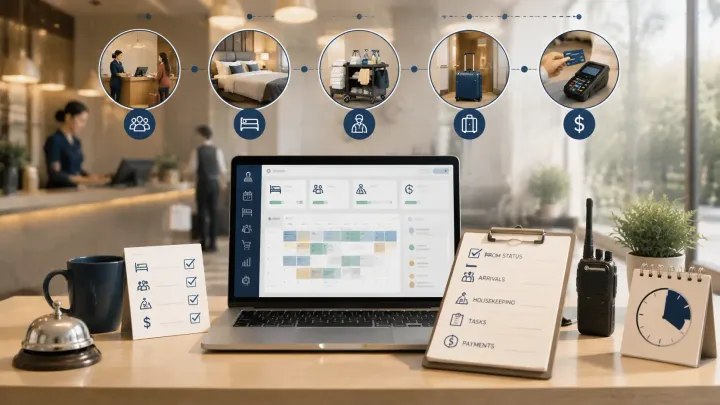
1. The first three hours of the hotel day set the operational tone for everything that follows — departures, housekeeping, arrivals, payments, and rates all need to be resolved before check-in traffic starts
2. A PMS should give you live status on each of these areas without requiring manual lookups across separate systems
3. The checklist below maps each morning task to the PMS data that drives it, so nothing falls through during shift handovers or peak arrival windows
4. Properties without a connected PMS spend the morning chasing information instead of acting on it
Why the First Three Hours Determine the Rest of the Day
By noon, guests are already arriving. Housekeeping is mid-floor. The front desk is fielding check-in requests, phone calls, and special requests simultaneously. If you haven't resolved departures, room assignments, and payment flags before that window opens, the afternoon turns reactive.
The morning operations routine isn't just a checklist — it's a preparation window. A hotel PMS compresses that window by surfacing live departure status, room readiness, and pending payment alerts in one dashboard rather than requiring staff to check multiple sources before acting.
What follows is a task-by-task breakdown of what should be completed before noon, and what your PMS data should show at each step.
1. Departures: Verify Checkouts Before 11am
Start the morning by confirming which guests are departing and whether they've already left.
Your PMS reservation calendar should show all checkouts scheduled for today, separated from in-house guests. For each departure, verify three things: whether the guest has settled their balance, whether there are any outstanding charges (room service, minibar, late additions), and whether the room has been flagged for housekeeping.
The mistake most front desks make is processing departures as they happen rather than auditing the full list at the start of the morning. A guest who quietly checks out at 6am with an unsettled minibar charge won't call back — you need to catch it before their payment window closes.
When Smart Order shows a departure as checked out, the corresponding room status updates for housekeeping automatically. The front desk doesn't need to call housekeeping separately — the system flags it.
2. Room Status: Assign Housekeeping From Live Data
Once departures are confirmed, the housekeeping assignment follows directly from your PMS room status view.
The morning assignment should separate rooms into three categories: vacant and dirty (departed guests, needs cleaning), occupied and staying (in-house guests, do not disturb unless requested), and vacant and clean (ready for new arrivals). A PMS that tracks these states in real time removes the need for a paper assignment sheet or a morning huddle to communicate which rooms are available.
Here's why this matters operationally: on a Friday morning with 14 checkouts and 16 arrivals, a head housekeeper working from a static room list will miss status changes that happen between 9am and noon. A guest who requests late checkout at 10am means that room shifts from "clean by noon" to "clean by 2pm" — and the entire assignment sequence needs to adjust.
Run Your Morning Checklist From One Dashboard
Smart Order shows live room status, departure confirmations, and housekeeping assignments in one view — so the morning shift starts with current data, not yesterday's printout.
3. Arrivals: Confirm What's Expected and When
After departures and housekeeping are mapped, shift to today's arrivals.
Pull the full arrival list from your PMS and work through it systematically. For each arrival: confirm the reservation details match what the guest expects (room type, occupancy, dates), check whether a pre-arrival message has been sent, note any special requests flagged at booking, and verify the payment method on file.
For OTA bookings, the reservation details should already be in your PMS from the channel manager sync. If a guest booked through Booking.com last week and requested a high floor, that note should appear in the reservation — not in a separate email thread that gets buried.
The purpose of the arrivals review isn't just logistics — it's identifying the reservations that need a human decision before the guest walks in. A booking with no payment method on file, a room type that was oversold, or a VIP guest without a room assignment are all issues that are solvable at 9am and chaotic at 2pm.
4. Payments: Flag Outstanding Balances Before Check-In
Run a payment audit as part of the morning routine, not at end-of-day.
Your PMS should allow you to filter reservations by payment status. Look for: today's arrivals with no card on file or unpaid deposits, in-house guests with charges that haven't been settled, and departures from the past 24 hours with open balances.
For properties using online payment collection, many of these issues can be automated — the PMS sends a payment link at booking and flags the reservation if it goes unsettled past a threshold. For properties still processing cards manually at check-in, the morning audit is the only reliable catch before the front desk gets busy.
A scenario that front desks encounter regularly: a guest booked through an OTA three weeks ago, the OTA collected nothing upfront, and the reservation shows a pending balance. If the front desk doesn't notice until check-in, they're asking the guest for payment while managing a line of arrivals. If they catch it in the morning review, they can send a payment link before the guest arrives.
5. Rates: One Check Before the Day Locks In
The final morning task is a rate review — not a deep analysis, just a quick check on whether today's pricing still reflects what demand actually looks like.
Look at two numbers: today's occupancy based on confirmed arrivals, and any remaining availability. If occupancy is already above 85% with a full day ahead, rates should be at or near peak. If you're sitting at 60% occupancy at 9am with no group bookings pending, there may be room to adjust walk-in or same-day OTA rates.
Your PMS reporting module should show current occupancy, ADR, and available rooms by type without requiring a manual calculation. A rate change pushed through the channel manager at 9am reaches all connected OTAs before your check-in window opens — a change made at 3pm is often too late to affect same-day demand.
When the PMS Runs the Morning Routine
The checklist above works as a manual process — but the value of a connected PMS is that most of it happens automatically or surfaces without being requested.
Smart Order brings OTA bookings, direct reservations, room status updates, and payment records into one dashboard. When the morning shift starts, the front desk sees which rooms are vacant and dirty, which arrivals have unsettled payments, and which departures are still in-house — all from the same view. There's no morning printout to prepare, no cross-referencing a channel manager spreadsheet against a room list, and no separate call to housekeeping to confirm assignments.
The goal isn't to eliminate the morning routine. It's to make the routine something the system prepares rather than something your staff assembles from scratch every day.
Start Every Morning Shift With Accurate Data
Smart Order tracks departures, room status, arrivals, payments, and occupancy in one live dashboard — so your front desk acts on current information from the moment the day starts.
FAQ
What should be on a hotel daily operations checklist?
A hotel daily operations checklist should cover five core areas each morning: departure verification (checkouts cleared, balances settled), room status and housekeeping assignments, arrival preparation (reservations confirmed, special requests noted), payment audit (outstanding balances flagged), and a rate check against current occupancy. A PMS surfaces data for each of these from one dashboard.
How does a PMS help with hotel morning operations?
A PMS centralizes reservation data, room status, and payment records so front desk staff don't need to check multiple systems during the morning routine. Departures update room status for housekeeping automatically. OTA bookings appear alongside direct reservations without manual import. Payment flags show which arrivals have outstanding balances before check-in begins.
What time should hotel housekeeping assignments be made?
Assignments should be finalized by 9–10am, based on the confirmed departure list from your PMS. Late checkout requests and early arrivals should be tracked in real time so the assignment sequence can adjust — a static list prepared the night before will be inaccurate by mid-morning on any busy day.
How do hotels catch unpaid balances before check-in?
Run a payment filter in your PMS each morning that shows today's arrivals by payment status. Flag any reservation without a card on file or unsettled deposit and send a payment link before the guest arrives. Properties using automated payment collection through their PMS can set this to trigger at booking, reducing morning audit load.
Should rate checks be part of the daily hotel operations routine?
Yes — a brief occupancy check at the start of each day lets you adjust same-day rates before the check-in window opens. Looking at confirmed arrivals versus available rooms takes less than five minutes with a PMS reporting view. A rate adjustment at 9am reaches OTA channels before walk-in demand peaks; waiting until afternoon is typically too late to affect same-day bookings.
What's the difference between a hotel operations checklist and a front desk checklist?
A hotel operations checklist covers all departments that need to coordinate in the morning — front desk, housekeeping, and management. A front desk checklist focuses on reservation and guest-facing tasks only. The most effective version of either combines both: it starts with departmental data from the PMS and assigns tasks based on live status rather than a fixed template.
