
1. An Airbnb guidebook helps guests find check-in details, house instructions, local recommendations, emergency contacts, and checkout steps without messaging the host.
2. The best Airbnb guidebook is short, mobile-friendly, specific to the property, and updated whenever access details or local recommendations change.
3. Hosts should create both a digital guidebook and a simple in-property backup for Wi-Fi, emergency contacts, and checkout instructions.
An Airbnb guidebook is one of the simplest ways to reduce guest questions and improve the stay experience. Guests do not want to search old messages for the Wi-Fi password or guess where to park.
For hosts, the guidebook turns repeated explanations into a clear guest resource. It also makes the stay feel more professional before the guest arrives. A good Airbnb guidebook does not need to be long. It needs to answer the right questions in the order guests actually need them.
This guide shows how to create an Airbnb guidebook for your guests and keep it useful after publishing.
What Is an Airbnb Guidebook?
An Airbnb guidebook is a guest-facing resource that explains the property, stay instructions, and local area. Hosts can use Airbnb's native feature for local recommendations, or create a separate digital guidebook for property instructions.
The distinction matters. Airbnb's built-in guidebook is useful for restaurants, attractions, neighborhoods, and local tips. Guests also need property-specific information: access codes, parking, Wi-Fi, heating, trash, appliances, emergency contacts, and checkout tasks.
For that reason, many hosts use both. The Airbnb guidebook helps guests discover the area. A digital guest guidebook covers the operational details of the stay. Together, they reduce repetitive messages and make guests more self-sufficient.
If you already have a guidebook but want structured ideas, you can get the free Airbnb Guidebook templates in the article below:
 Smart Order
Start With the Guest Journey
Start with the guest journey, not every detail about your property.
A guest needs different information at different moments. Before arrival, they need directions, parking, check-in time, and access instructions. During the stay, they need Wi-Fi, appliances, house rules, local recommendations, and what to do if something breaks. Before leaving, they need checkout time, trash instructions, key return, and any simple cleanup requests.
This order is more useful than grouping information by what the host thinks is important. A guest arriving after a flight should not scroll past restaurant suggestions to find the lockbox code.
Build the guidebook around moments:
- Before arrival: address, parking, check-in, access, contact method
- During stay: Wi-Fi, appliances, rules, local recommendations, emergency help
- Before departure: checkout time, trash, linens, key return, final reminders
This structure prevents the guidebook from becoming a pile of notes.
What to Include in Your Airbnb Guidebook
Your Airbnb guidebook should answer the questions guests are most likely to ask. Keep each answer direct.
Include these core sections:
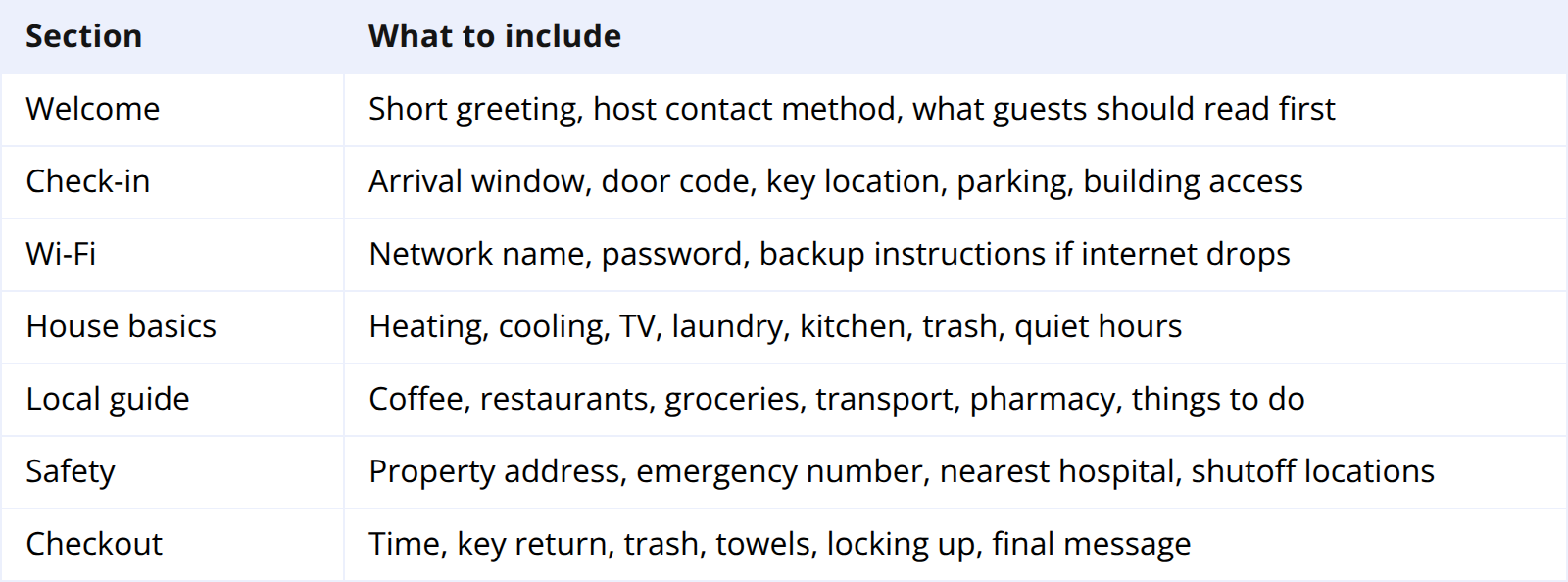
The strongest guidebooks are specific. "Great coffee nearby" is weak. "Blue Door Cafe is a five-minute walk and opens at 7am" is useful. The same applies to property instructions. "Use the keypad" is vague. "Press the Yale logo, enter the code, then press checkmark" is clear.
Do not overload the guidebook with rules. Summarize the essentials and keep the full policy in your Airbnb listing.
How to Create a Guidebook on Airbnb
Airbnb's native guidebook feature is best for local recommendations. The interface can change, but the workflow is generally the same.
- Open your Airbnb host account and select the listing.
- Go to the guidebook or location/recommendations area in listing settings.
- Add places by searching for the business or attraction name.
- Write a short host note explaining why you recommend each place.
- Group recommendations by category, such as food, coffee, groceries, transport, and activities.
- Preview the guidebook on mobile before relying on it.
The host note matters most. Airbnb can supply the name, address, and map location. Only you can explain whether the restaurant is good for families, reservations are needed, or the grocery store is better than the closer one.
Keep the list selective. Five strong recommendations are more useful than twenty generic ones.
Create a Digital Guest Guidebook Too
Airbnb's guidebook is useful, but it is not always enough for property operations. A digital guest guidebook gives you more control over layout, instructions, photos, QR codes, and updates.
You can create one with a web page, PDF, Notion page, Google Doc, or guidebook app. Guests should be able to open it from a phone before arrival and during the stay.
Digital guidebooks work well for:
- Step-by-step check-in photos
- Smart lock or lockbox instructions
- Appliance screenshots
- Parking diagrams
- Longer house manuals
- QR codes inside the property
Add the guidebook link to your pre-arrival message. Then place a QR code inside the property, ideally near the entrance or Wi-Fi card.
Smart Order helps hosts and property managers automate this handoff. Pre-arrival messages can include guidebook links, access notes, and stay instructions so guests receive the right information without the host sending each message manually.
Send Guest Instructions Without Manual Follow-Up
Smart Order helps hosts manage reservations, guest messages, OTA channels, and direct bookings from one system, so guidebook links and arrival details can be sent at the right time.
Make the Guidebook Easy to Use
A guidebook can contain the right information and still fail if it is hard to scan. Most guests read it on a phone.
Use short section titles. Put urgent details near the top. Use photos only when they clarify something, such as parking, keypad location, or appliance controls.
For local recommendations, add practical context: walking time, reservation needs, closing days, family suitability, noise level, and whether the place is good for late arrivals.
For rules, use plain language. Guests are more likely to follow rules when they understand the reason.
Keep It Updated
An outdated Airbnb guidebook creates frustration. A closed restaurant, old Wi-Fi password, changed trash schedule, or expired lock code can turn a useful guide into a complaint.
Review your guidebook once per season. Update it immediately after any operational change: new smart lock, parking rule, checkout process, appliance, or emergency contact.
Use guest questions as a quality signal. If two guests ask the same question, the guidebook is missing something or the answer is too hard to find. Add the answer where the guest would naturally look for it.
For hosts managing multiple listings, standardize the structure but customize the details. The sections can be the same across every property. The instructions, photos, and local recommendations should be property-specific.
FAQ About Airbnb Guidebooks
What should be in an Airbnb guidebook?
An Airbnb guidebook should include check-in instructions, Wi-Fi, house basics, local recommendations, emergency information, and checkout steps. The best guidebooks answer common guest questions before guests need to ask.
How do I make an Airbnb guidebook?
Use Airbnb's guidebook feature for local recommendations, then create a digital guest guidebook for property-specific instructions. Add the digital guidebook link to pre-arrival messages and place a QR code inside the property.
Is a digital Airbnb guidebook better than a PDF?
A digital guidebook is usually easier to update and read on mobile. A PDF can work if it is short and mobile-friendly. For emergency information, keep a small printed backup inside the property.
Can I print my Airbnb guidebook?
Yes, but printed guidebooks become outdated quickly. If you print anything, keep it limited to Wi-Fi, emergency contacts, checkout instructions, and a QR code linking to the full digital guidebook.
How often should hosts update their guidebook?
Review it seasonally and after every operational change. Update local recommendations when businesses close, hours change, or you discover better options for guests.
Final Takeaway
An Airbnb guidebook should make the stay easier for both guest and host. It gives guests the information they need before they ask, while reducing repetitive messages and avoidable confusion.
Start with the guest journey, keep the structure simple, write specific instructions, and update it regularly. A useful guidebook is not a one-time document. It is part of how your property operates.
