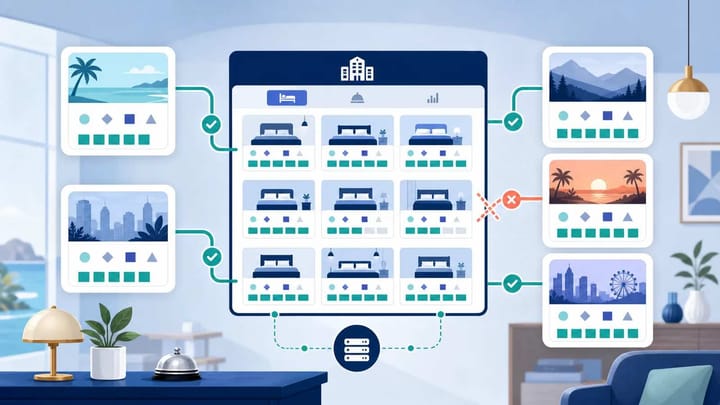
1. Hotel room mapping links each PMS room type and rate plan to the correct product on every online travel agency (OTA).
2. A mapping can look connected but still send availability to the wrong room, price, or booking conditions.
3. Before going live, test rates and availability, place a reservation, confirm the PMS import, and verify that inventory closes on every channel.
Room mapping in a hotel PMS and OTAs decides where every booking, rate, and unit of availability goes. One wrong connection can leave a sold room open on another channel, creating an overbooking even when the software is synchronizing normally.
The risk is highest when room names look similar. The mapping must follow the actual room, occupancy, rate conditions, and inventory pool, not the closest-looking label.
What Hotel Room Mapping Actually Connects
Hotel room mapping is the process of linking the products in your Property Management System (PMS) to their matching products on Booking.com, Expedia, Agoda, Airbnb, or another OTA.
The PMS and OTA keep separate records. Each side assigns its own identifier to a room type and rate plan. Mapping tells the channel manager that a specific PMS product and a specific OTA product represent the same thing.
Four layers must line up:
- Room type: the physical category, such as Standard Queen, Deluxe King, or Family Suite.
- Rate plan: the price and booking conditions, such as flexible, non-refundable, breakfast included, or advance purchase.
- Inventory: the number of rooms available for sale in that room type on each date.
- Restrictions: rules such as minimum stay, closed to arrival, maximum occupancy, or booking window.
Booking.com describes a sellable “roomrate” as the unique combination of a room type, rate plan, and conditions. A room type may be mapped correctly while one of its rate plans is not.
For example, one Deluxe King may have flexible and non-refundable rates. Both connect to the same physical inventory, but each retains its own price and conditions.
How a Small Mapping Error Becomes an Overbooking
Consider a hotel with one Standard Queen remaining for Friday while its Deluxe King category is sold out.
If the OTA’s Deluxe King is accidentally mapped to the PMS Standard Queen inventory, the OTA may continue selling a Deluxe King. The reservation arrives, but the hotel has no Deluxe King to assign. At the same time, the remaining Standard Queen may close even though nobody booked it.
Another failure happens when two OTA room types sell the same physical pool as separate inventory. The PMS may send “1 available” to both, allowing two guests to book the final room.
These are not always synchronization failures. The channel manager may transfer every update exactly as configured. The problem is that the configuration points to the wrong inventory bucket.
A clean connection should follow one concrete flow: an OTA reservation enters the PMS, the correct room-type inventory decreases, the updated availability returns through the channel manager, and every connected OTA displays the new quantity.
Smart Order’s hotel channel manager connects the reservation source, PMS inventory, and OTA availability in that sequence. This gives the team one place to confirm which room sold and whether the remaining quantity changed across channels.
Keep each OTA connected to the right inventory
Map room types and rates once, then manage reservations, availability, and OTA updates from one connected PMS and channel manager.
Room Types Must Match the Physical Inventory
Start with the rooms you can actually assign at check-in. Group physical rooms only when they are genuinely interchangeable for the guest.
Two rooms should not share one room type merely because they have the same bed. A sea-view king and an interior king need separate categories if guests pay for the view.
Names can differ across systems, but the meaning must match. Check bed type, occupancy, view, bathroom, and other promised attributes.
Do not create duplicate PMS room types just to match different OTA wording. If Booking.com says “Superior Double” and Expedia says “Deluxe King,” both can map to one PMS Deluxe King category only when they represent the same physical inventory.
Also check the count. A PMS category with five physical rooms must not expose six because an inactive OTA room remains. Confirm whether marking a room out of order reduces OTA inventory.
Rate Plans Need Their Own Mapping
Room mapping is only half the setup. Every active OTA rate plan must connect to the correct PMS or channel-manager rate.
A flexible room-only rate should not map to a non-refundable breakfast rate. The physical room may be correct, but the guest could receive the wrong cancellation terms, inclusions, or price. This creates disputes and can hide a deeper inventory problem during testing.
For derived rates, change the parent price and confirm the OTA receives the expected child price. Matching names do not prove that the relationship works.
Check occupancy pricing too. If the PMS sends one base price while the OTA expects prices by guest count, availability may be accurate while the displayed rate is wrong.
The safest sequence is room types first, then rate plans. Smart Order’s PMS pre-connection checklist also recommends creating room types and individual rooms before associating rate plans and connecting an OTA.
Inventory Mapping Is Where Overbooking Risk Lives
Inventory should usually be controlled at the room-type level because all rate plans for that room draw from the same physical pool. Selling a Standard Queen on a non-refundable rate must reduce availability for the flexible Standard Queen rate too.
Problems appear when rate plans behave like separate pools. One room displayed under three rates is still the same last room.
Review a quiet date, a nearly sold-out date, and a restricted date. Confirm that PMS and OTA quantities match after any intentional channel allocation.
Reduce a room type from three available to two at the inventory source. Every mapped OTA product should move to two without changing an unrelated room.
Restrict manual OTA extranet edits after connection. Adding a room type or renaming a rate can create an unmapped product that the PMS does not control.
Run Test Reservations Before You Go Live
A green “connected” status proves that systems can communicate. It does not prove that every room, rate, restriction, and reservation path is correct.
Test each inventory pool plus any rate with distinct payment or cancellation conditions.
Use this go-live check:
- Choose future dates with plenty of availability and record the starting quantity in the PMS and OTA.
- Confirm the public room name, occupancy, rate, taxes, meal inclusion, cancellation policy, and restrictions.
- Place a real test reservation through the OTA, then confirm it enters the PMS under the correct room type and rate plan.
- Verify the PMS inventory decreases by one and that the new quantity reaches every connected channel.
- Modify the reservation, then cancel it and confirm the dates, price, status, and released inventory update correctly.
- Repeat the test for each distinct room inventory pool and investigate any mismatch before opening full availability.
Check the guest-facing booking page, not only the extranet. That is where pricing, occupancy, and restrictions are finally presented.
Record screenshots, timestamps, reservation IDs, expected results, and actual results. This makes it easier to separate a mapping mistake from a delayed update or an OTA-side configuration issue.
Who Should Own Room Mapping
Assign one person to own the mapping record, even if a PMS provider helps with the technical connection. The hotel remains responsible for deciding which products are truly equivalent.
Keep a mapping sheet with the PMS room type, room count, rate plan, OTA room and rate names, and connection status. Update it after any product change.
Re-test after renovations, room-type renaming, new rate launches, OTA migrations, or channel-manager changes. A setup that worked last season may no longer be safe after one side changes its product structure.
The best warning sign is any mismatch between what was booked and what the PMS imported. Treat wrong room names, unexpected occupancy, missing meal plans, or unchanged inventory as mapping incidents—not harmless display errors.
FAQ
What is room mapping in a hotel PMS?
Room mapping links a room type and rate plan in the hotel PMS or channel manager to the matching product on an OTA. It ensures that reservations, rates, restrictions, and inventory updates reach the correct room.
Can wrong room mapping cause overbookings?
Yes. Wrong mapping can send availability from one physical inventory pool to another or allow duplicate OTA products to sell the same last room independently. The systems may still show a successful connection while selling incorrect inventory.
Should every OTA room type map to one PMS room type?
Each OTA room type should map to the PMS room type that represents the same physical rooms. Multiple OTA listings can sometimes map to one PMS room type, but only when they draw from the same inventory and are interchangeable for guests.
Do rate plans share the same room inventory?
Rate plans attached to the same room type normally draw from the same physical inventory. A flexible and non-refundable Standard Queen are two offers for the same room pool, not two separate rooms.
How do you test OTA and PMS room mapping?
Check the public listing, place a future-dated test reservation, confirm that it imports with the correct room and rate, and verify that availability decreases across every connected OTA. Then modify and cancel the booking to test the full update cycle.
The Mapping Rule That Prevents Most Errors
Map by physical inventory and booking conditions, not by similar names. Room types answer “which room can the hotel assign?” Rate plans answer “under what price and conditions can it be sold?” Inventory answers “how many remain for these dates?”
When those three answers match in the PMS, channel manager, and OTA, a reservation closes the correct availability everywhere. When one answer differs, a small setup mistake can become a guest relocation, refund, or overbooking.
