Creating a TripAdvisor listing is free and takes about 10 minutes. Visit the TripAdvisor website, check if your business already exists, then either claim it or submit a new one. You'll need your business name, address, phone number, and a few photos. Approval typically takes 3–5 business days. Once live, keep your listing active by uploading photos, responding to reviews, and updating your details regularly — that's what actually moves the needle on your ranking.
Introduction
If your hotel, B&B, or guesthouse isn't on TripAdvisor yet, you're leaving real bookings on the table. With over 490 million unique monthly visitors, TripAdvisor is where travelers go before they commit to a stay — not after. They read reviews, compare photos, and check rankings. Your listing is often the first impression you make.
The good news? A TripAdvisor business listing costs nothing to create. And for independent hotels and small properties that can't outspend the big chains on advertising, this platform is one of the few places where great service and strong reviews genuinely win.
This guide covers everything you need to get listed on TripAdvisor from scratch, what to do once you're approved, what it costs to go further, and how to troubleshoot the issues that catch many operators off guard.
What Is a TripAdvisor Listing and How Does It Work?
A TripAdvisor listing is your business's dedicated page on the platform. Think of it as your public profile — it's where potential guests land when they search for accommodation in your area. TripAdvisor aggregates traveler reviews, photos, rankings, and booking options all in one place, and your listing is the hub for all of that.
The platform uses a popularity ranking algorithm that factors in review quantity, review quality, and recency. That means a property with 50 detailed, recent reviews will typically outrank one with 200 old ones. It's not just about volume — it's about staying active.
What a TripAdvisor Business Listing Includes
A complete listing typically shows:
- Property name, address, and contact details
- Photos — both owner-uploaded and guest-submitted
- Overall rating (out of 5) and individual review scores for categories like cleanliness, value, and location
- Traveler reviews with management responses
- Amenities and property details
- Booking links (to your direct site or OTA partners)
- Popularity ranking within your destination
You can also add a description, highlight special features, and — with paid tools — pin your favorite reviews or showcase promotional offers.
Before You Start: What Information You Need to Create a TripAdvisor Listing
Jumping straight into the form without your information ready is a good way to end up with an incomplete or mismatched listing. TripAdvisor cross-references your details against other sources online, so accuracy matters from the start.
Here's what to have on hand before you begin:
Business details:
- Official business name (exactly as it appears on your website and Google Business Profile)
- Full street address, city, state/region, and country
- Business phone number
- Business email address
- Website URL and/or Facebook page link
Category and description:
- Your business type (hotel, B&B, guesthouse, etc.)
- A brief description of your property — what makes it stand out, your location, and the kind of experience guests can expect
Photos:
- At least 5–10 high-resolution images (more on this below)
- Include a mix: exterior shot, lobby or common areas, guest rooms, and anything unique to your property
Owner verification info:
- Your name and role (e.g., owner, general manager)
- Personal email address for account verification
A critical detail many operators overlook: your Name, Address, and Phone (NAP) must match exactly across TripAdvisor, Google Business Profile, and your own website. Discrepancies don't just confuse guests — they can slow down your approval and hurt your local SEO rankings.
How to Create a TripAdvisor Listing (Step-by-Step Guide)
Step 1 – Check if Your Business Is Already on TripAdvisor
Head to TripAdvisor "Claim your listing" page and search your business name. This is important — guests and travelers can create listings on behalf of businesses they've visited, and you might already have a page with reviews you don't even know about.
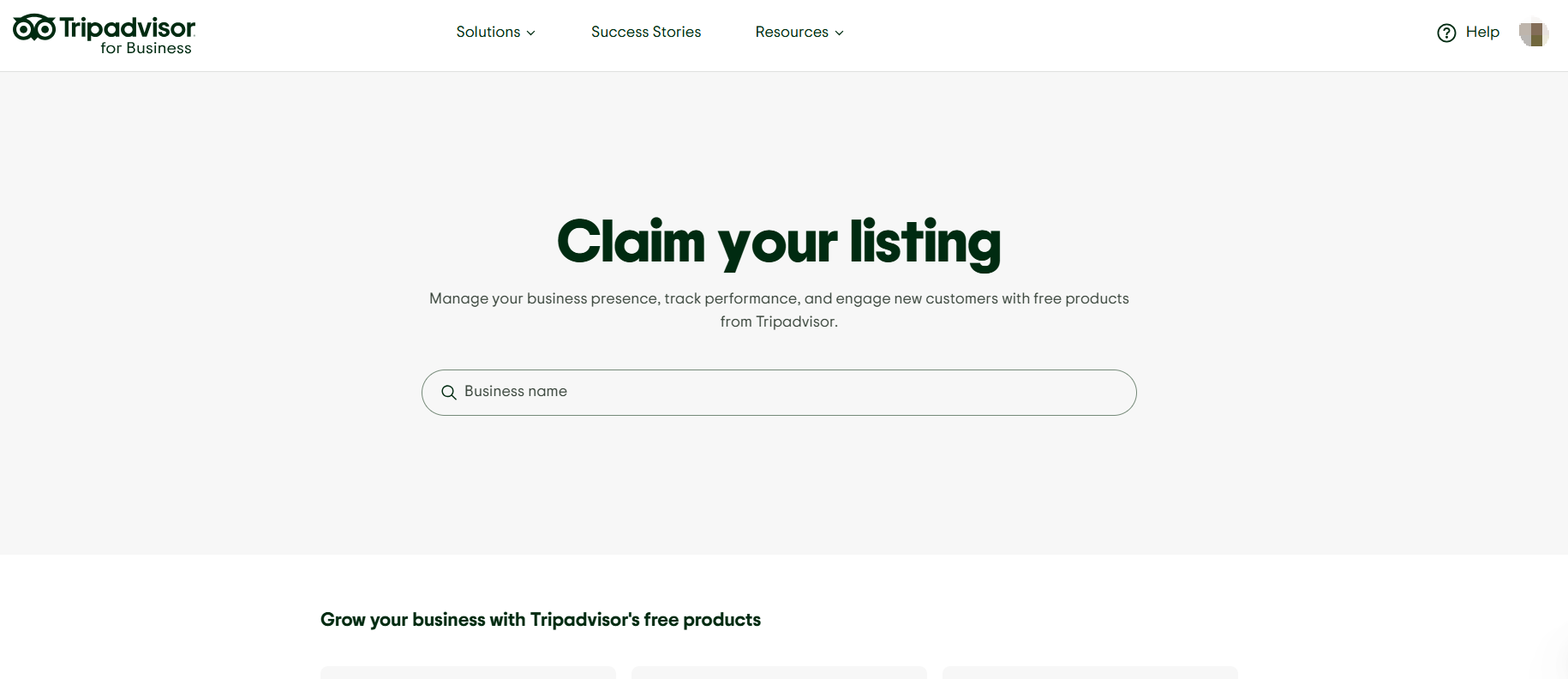
If something comes up, don't panic. You haven't missed anything; you've just got a head start. Move to Step 2.
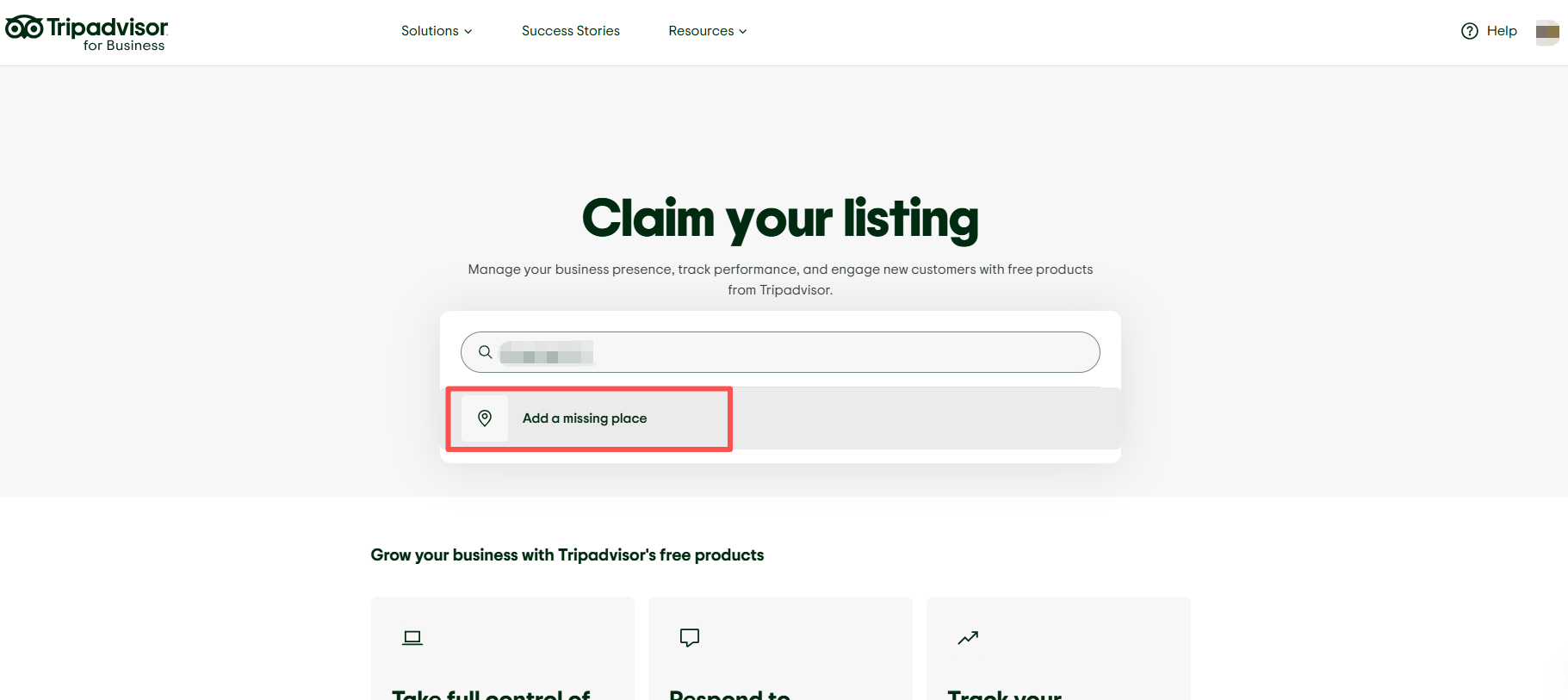
If nothing shows up, you'll need to submit a brand-new listing. You'll see a "Get listed now" option in the search bar — that's your path forward.
Step 2 – Claim an Existing Listing or Create a New TripAdvisor Listing
If a listing already exists: Click "Claim listing." TripAdvisor will walk you through an ownership verification process. This usually involves confirming your contact details and proving your connection to the property. Once verified, you'll have full access to manage the page.
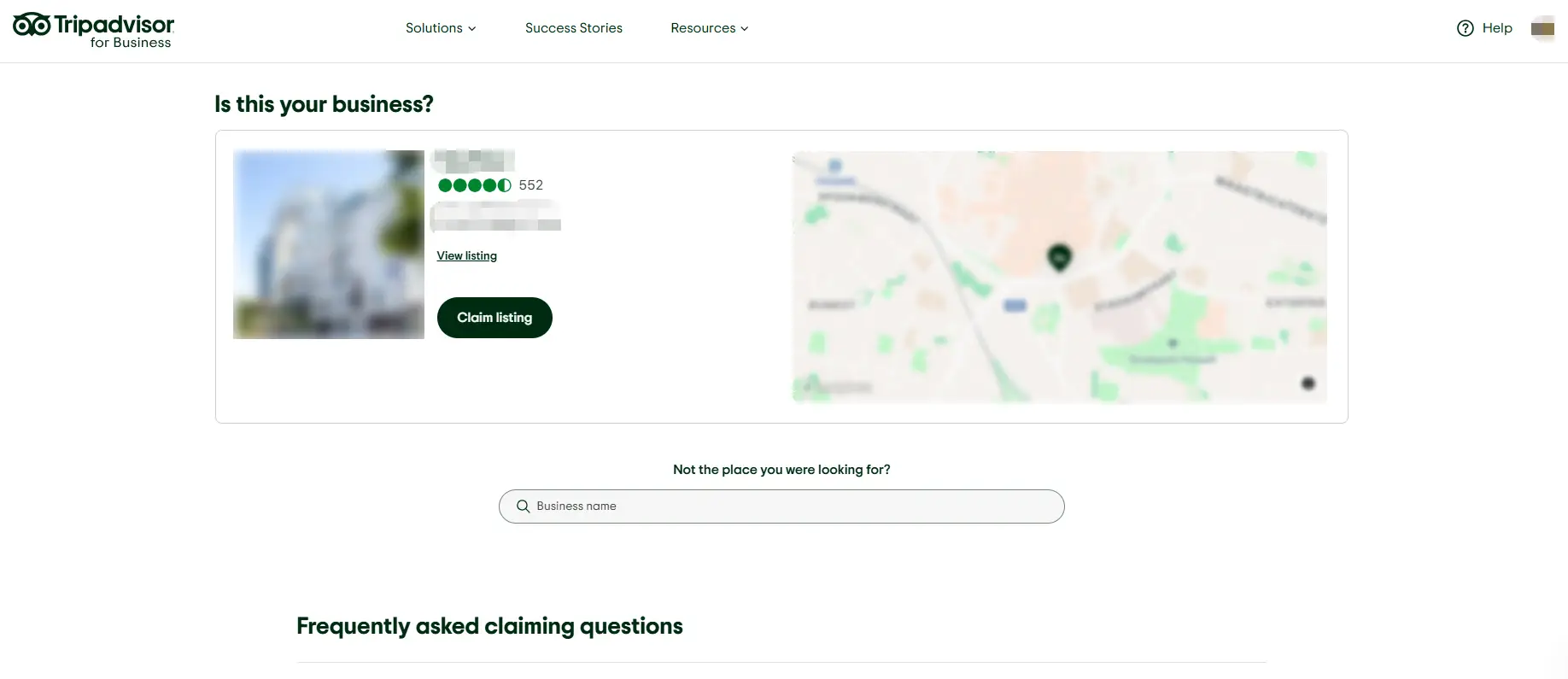
If no listing exists: Click "Add a missing place" and select your business category. TripAdvisor will ask you to confirm that your business meets their listing criteria before you proceed.
Either way, you'll need to create or log into a TripAdvisor account to manage the listing going forward.
Step 3 – Fill in Your Business Details Accurately
This is the step where many listings run into problems later. Every field matters.
- Business name: Use your official trading name. No keyword stuffing (e.g., "Best Hotel London - Smith's Inn") — TripAdvisor will flag and reject it.
- Address: Enter your full address and then drop a pin on the map to confirm your exact location. If the pin lands in the wrong spot, guests will get lost.
- Phone and email: Use numbers and addresses that are actually monitored. TripAdvisor may use these to verify your identity.
- Description: Keep it factual and specific. "A 12-room boutique guesthouse a 5-minute walk from the city's main train station" tells travelers something real. Vague phrases like "a unique and memorable experience" tell them nothing.
- Amenities and features: Check every box that applies — travelers filter search results by amenities like free Wi-Fi, parking, pet-friendliness, and accessible rooms. If you offer it, tick it.
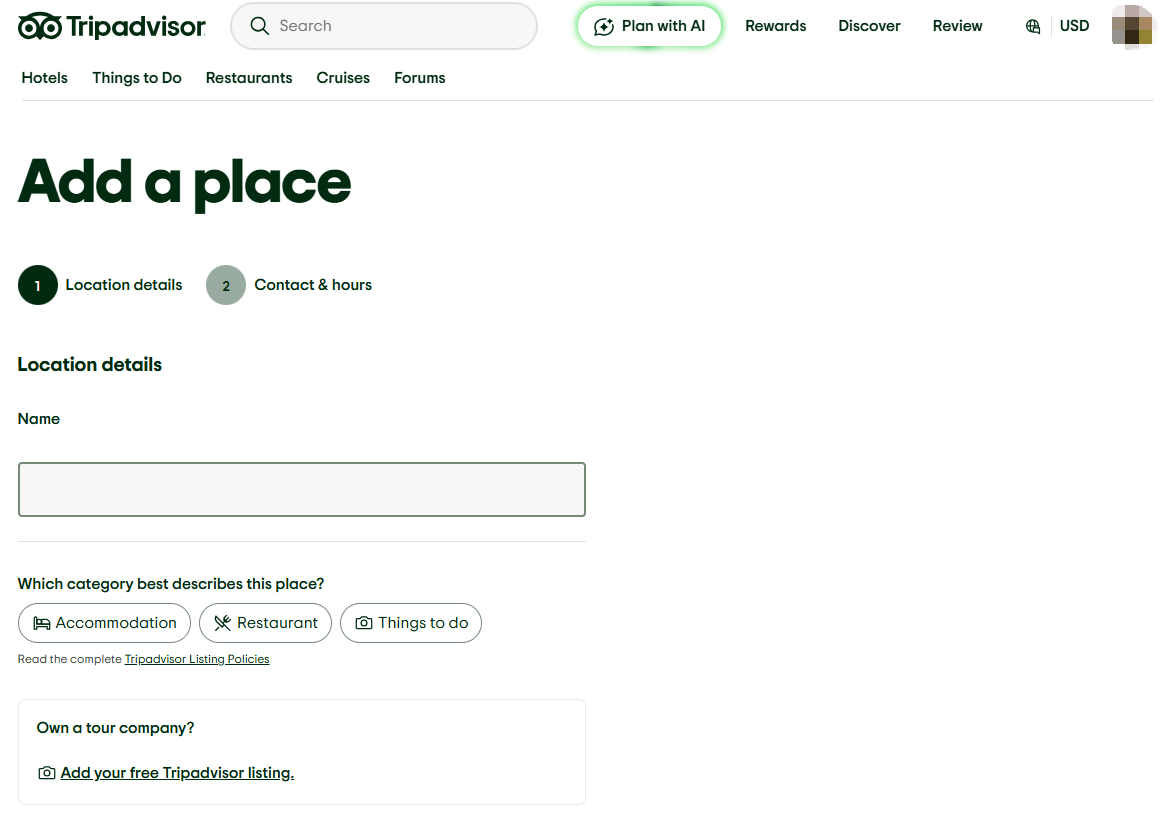
Step 4 – Upload high-quality photos to your profile
Photos strongly influence traveler decisions.
Effective listings usually include:
- Exterior photos of the property
- Guest rooms or accommodation spaces
- Amenities such as pools or restaurants
- Nearby attractions
Authentic photos help travelers visualize the experience before booking.
Step 5 – Submit your listing for TripAdvisor review
Once all information is complete, submit the profile for TripAdvisor review.
Approval times can vary depending on verification requirements and listing completeness.
Providing accurate information and clear photos can help reduce review delays.
Step 6 – Verify ownership and access the TripAdvisor Management Center
After approval, TripAdvisor may request ownership verification.
Verification methods may include:
- Email confirmation
- Phone verification
- Documentation checks
Once verified, you gain access to the TripAdvisor Management Center, where you can manage reviews, update photos, and monitor listing performance.
How to Optimize Your TripAdvisor Listing After It's Approved
Getting listed is just the beginning. The properties that consistently rank well aren't the ones with the most reviews from three years ago — they're the ones actively managing their presence right now.
- Reviews are your ranking fuel. The TripAdvisor algorithm prioritizes recent reviews, so a steady trickle beats a one-time flood. The most effective way to build reviews consistently is to ask at the right moment: at checkout, or in a follow-up email sent 1–2 days after a guest's stay. Keep the ask simple — a QR code or a direct link removes friction.
Responding to reviews matters more than most operators realize. A TripAdvisor/Ipsos study found that 77% of travelers are more likely to book a property when the owner has responded to reviews. For negative reviews, acknowledge the issue specifically, apologize without being defensive, and explain what's changed or been addressed. Generic responses ("We're sorry you felt this way") do more harm than good.
- Update your photos every season. Fresh imagery signals an active listing. If your property looks different in winter versus summer, show both.
- Use TripAdvisor widgets on your website. There are several free widget options — review badges, rating widgets, and "Write a review" buttons. Adding these to your website not only builds social proof but actively encourages happy guests to leave feedback.
Connect your booking engine if your system supports TripAdvisor integration. When travelers can check availability and book directly from your listing, conversion rates improve and you reduce dependency on OTA commissions.
TripAdvisor Listing Costs: Free vs. Paid Options
Getting a basic TripAdvisor listing is 100% free. You can collect reviews, upload photos, and respond to customers without spending a dime. However, TripAdvisor offers "Business Advantage" for hotels and "Premium" for restaurants. These paid tiers allow you to:
- Feature a "Favorite Review" at the top of your page.
- Add a direct "Click-to-Phone" button on mobile.
- Access more in-depth competitor data.
- Post special offers and announcements.
Common Problems When Creating a TripAdvisor Listing (and How to Fix Them)
Duplicate TripAdvisor Listings
This happens more often than you'd think. A guest created a listing years ago, you submitted another one, and now two pages exist for the same property — splitting your reviews and confusing travelers.
To fix it: contact TripAdvisor's owner support and request a listing merge. You'll need to verify ownership of both pages. The sooner you catch this, the less damage it does to your review history.
TripAdvisor Listing Not Showing Up in Search
If your listing was approved but isn't appearing in search results, a few things could be causing it:
- Your listing is too new and hasn't been indexed yet (give it a few days)
- Your business category was set incorrectly — double-check it in the Management Center
- Your listing was placed in a different location than expected due to address errors
- You have zero reviews, which limits visibility in competitive markets
Getting your first 5–10 reviews as quickly as possible is the fastest way to gain traction.
Inconsistent NAP Information Across Platforms
If your business name, address, or phone number on TripAdvisor doesn't match what's on your website, Google Business Profile, or booking sites, it creates conflicting signals — for both TripAdvisor's system and Google's local SEO algorithm.
Audit your listings across every platform and make sure every detail is identical, right down to abbreviations (e.g., "St." vs. "Street").
Wrong Business Category
Choosing the wrong category can hurt your search visibility significantly. A guesthouse listed as a "vacation rental" won't appear in the right filters or searches. Review your category under the Management Center settings and change it if it doesn't accurately describe what you offer.
Photos Rejected or Not Displaying
TripAdvisor has content guidelines for photos. Common rejection reasons include images with text overlaid, watermarks, low resolution, or photos that don't actually show the property. Make sure your images are clean, unedited beyond standard brightness/contrast adjustments, and meet the minimum resolution requirements.
TripAdvisor Listing FAQ
Is a TripAdvisor listing free?
Yes. Creating and maintaining a basic TripAdvisor business listing costs nothing. Paid features like Business Advantage, Sponsored Placements, and Instant Booking are optional upgrades.
How long does it take for a TripAdvisor listing to be approved?
Most listings are approved within 3 to 5 business days. For new businesses or properties in areas with less online presence, the process can take up to 4 to 8 weeks. Don't resubmit while your application is pending — it resets the timeline.
Can I create a TripAdvisor listing if my business already exists on the platform?
Yes, but you should claim it rather than create a new one. Go to tripadvisor.com/Owners, search for your property, and click "Claim Your Business." Creating a duplicate listing will split your reviews and cause confusion.
Why was my TripAdvisor listing rejected?
Common reasons include: the business name contains keywords rather than an official name, the address couldn't be verified, the property doesn't meet TripAdvisor's listing criteria, or the submitted photos violate content guidelines. TripAdvisor will typically tell you why a listing was rejected in their notification email, so you can correct and resubmit.
Can I create a TripAdvisor listing without an address?
No — a verified physical address is required for most business types. TripAdvisor uses your address to place your listing on the map and within local search results. Without it, your listing can't be processed.
What happens if my business is already listed on TripAdvisor by someone else?
This is common. A guest or a previous owner may have created the page. Claim it by going to tripadvisor.com/Owners and following the ownership verification steps. Once you've claimed it, you'll have full control to update information, respond to reviews, and manage the profile. If there's a dispute over ownership, TripAdvisor's owner support team handles these on a case-by-case basis.
