If your Airbnb has stopped getting bookings or never gained traction, the cause usually falls into one of nine categories: photos, price, calendar, settings, reviews, content, policies, response rate, or platform reach.
This guide walks through each one with a concrete fix — and covers a less-discussed cause that affects hosts managing multiple platforms at once.
Why Listings Go Invisible on Airbnb
Airbnb doesn’t show every listing equally. Its algorithm ranks results based on two core predictions: how likely a guest is to book your listing, and how likely they are to leave a five-star review afterward.
If either number drops — because of a recent cancellation, fewer clicks, or a slow response — your listing gets pushed down in search results. You don’t get a notification. Your listing stays live. But most guests never see it.
This creates a compounding problem. Lower placement means fewer views. Fewer views mean fewer bookings. Fewer bookings signal to the algorithm that your listing is underperforming — and it pushes you down further.
Understanding this loop is the first step to breaking it.
The 9 Most Common Reasons Your Airbnb Isn’t Getting Booked
1. Your Photos Aren’t Converting Viewers to Bookers
Photos are the first thing a guest sees, and in most cases, the decision to click — or skip — happens in under two seconds.
Airbnb now reads your listing using a system that evaluates photos and text together. If your cover photo doesn’t immediately communicate the property type, location feel, and quality level, guests scroll past.
What tends to work:
- At least 20 photos covering every room, plus the exterior and key outdoor spaces
- The first photo showing the most visually compelling space — usually the living area or bedroom, not the front door
- Natural light, no flash, no clutter
- Photos in the same order a guest would physically walk through your property
If you uploaded your current photos more than a year ago, they’re worth retaking. Guest expectations on photo quality have shifted significantly.
2. Your Price Is Out of the Competitive Range
Price too high and guests choose a better-valued alternative. Price too low and the algorithm reads your listing as lower quality — and so do guests.
To find the right range, search your property type in your location for a typical 3-night stay. Look at the listings that appear on the first two pages. Your base rate should sit within 15% of the median price for comparable properties.
A few specific things to check:
- Cleaning fee: A $20/night rate with a $150 cleaning fee will lose to a $35/night rate with a $50 cleaning fee, even though the total cost is similar. Guests compare base price first.
- Weekend vs. weekday pricing: Flat pricing across the week is a missed opportunity. Most markets book differently on weekends.
- Airbnb Smart Pricing: It adjusts your rate based on demand signals, but it doesn’t account for your specific amenities or positioning. Use it as a floor, not a strategy.
3. Your Calendar Has Gaps, Blocks, or Accuracy Problems
An outdated or restricted calendar directly limits how often your listing appears in search results.
If you haven’t updated your calendar in more than two weeks, Airbnb treats it as stale. Listings with frequently updated calendars rank higher because they’re seen as actively managed.
Beyond staleness, check for:
- Blocked dates you forgot about: Past-dated blocks that were never removed can prevent bookings
- Minimum stay settings that create unavoidable gaps: A 4-night minimum in a market where guests mostly book 2–3 nights eliminates a large share of your potential demand
- Advance booking window: If guests can’t book more than 3 months out, you’re invisible to travelers planning ahead
If you manage the same property on Airbnb and Booking.com simultaneously, there’s a risk most guides don’t cover.
When a guest books on Booking.com, your Airbnb calendar doesn’t automatically update — unless you have a system connecting them. If that same period then gets booked on Airbnb, you’re forced to cancel one reservation.
Airbnb records that cancellation against your account. Even one host-initiated cancellation can suppress your listing’s ranking for weeks. Hosts who manage multiple OTAs manually are regularly losing bookings this way without knowing why.
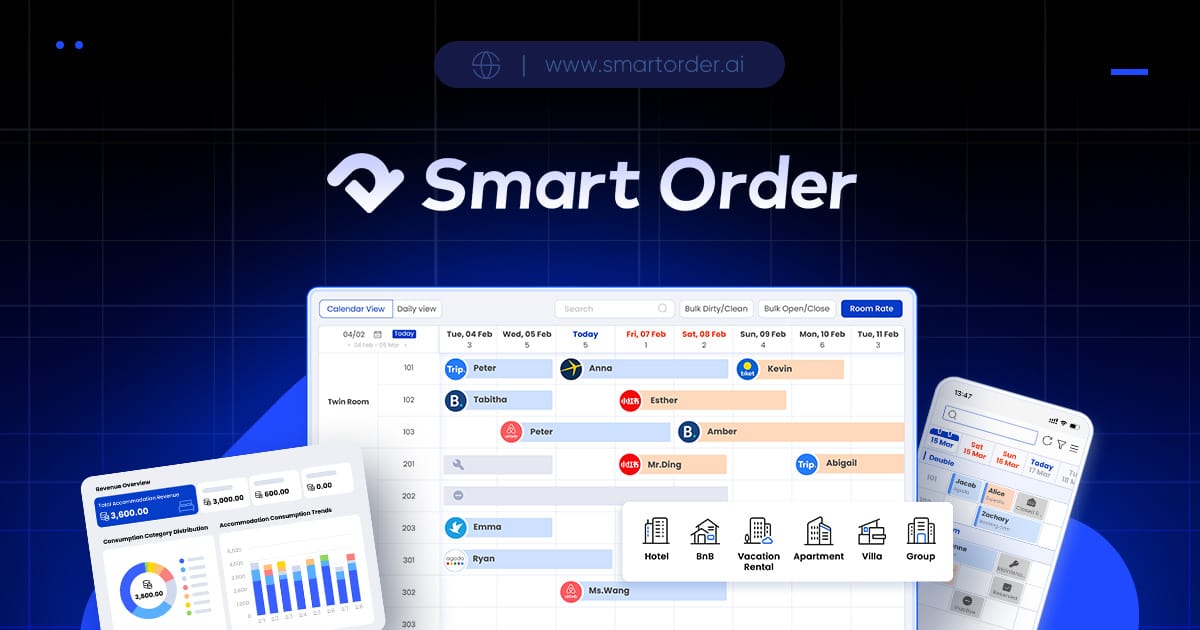
Smart Order Channel Manager
A channel manager like Smart Order syncs your availability across Airbnb, Booking.com, Agoda, and other platforms the moment a booking comes in. When one channel closes the dates, every other channel closes automatically — eliminating the overbooking risk and protecting your ranking.
4. Instant Book Is Turned Off
Airbnb gives priority search placement to listings with Instant Book enabled. It also means your listing appears in the results for guests who filter by Instant Book — which is a large share of mobile bookings.
If you require approval for every reservation, you’re excluded from those searches entirely.
Common concern: “I want to screen my guests.” Instant Book doesn’t remove that ability. You can still set guest requirements (verified ID, positive reviews, agreement to house rules) and cancel within 24 hours if something is wrong. Airbnb offers cancellation protection for hosts in those cases.
Turning on Instant Book is one of the highest-impact single changes you can make to a stalled listing.
5. You Have Too Few Reviews — or a Recent Low One
Reviews affect two things: guest trust and algorithm ranking.
Airbnb’s system requires a minimum number of reviews before a listing is treated as “established.” Before that point, you’re in a lower-visibility category. Getting your first 3–5 reviews is the most important milestone for a new listing.
For existing listings:
- An average below 4.7 puts you below the threshold for the Guest Favorites badge, which gets significantly better placement
- A recent 3-star review after a run of 5-star reviews creates a temporary dip in your ranking score
- Fewer than 5 reviews in the last 12 months signals reduced recent activity
If a guest left a low review, responding thoughtfully matters — not to change the guest’s mind, but because future guests read host responses when evaluating trust.
6. Your Title and Description Don’t Match What Guests Are Searching For
Airbnb’s search reads your listing text and matches it to what guests type. Generic titles like “Cozy Apartment in the City” compete against every other cozy apartment in every city.
A stronger title includes:
- The specific neighborhood or landmark proximity (not just the city)
- The property type and standout feature
- A specific amenity that differentiates your listing
“Studio with Pool View — 5 min Walk to Old Town” outperforms “Nice Studio in the City Center” for guests searching in that area.
For the description, the first paragraph is the deciding text. Most guests read only the first 2–3 sentences before making a booking decision. Lead with what makes your property worth choosing — not with rules, not with check-in instructions.
Also check your amenity tags. An untagged washing machine or missing parking tick can cause your listing to disappear from filtered searches entirely.
7. Your Policies Are Discouraging Bookings Before Guests Even Read Them
Restrictive policies reduce your listing’s competitiveness in two ways: guests self-select out, and the algorithm deprioritizes you for certain search filters.
Check:
- Minimum stay: If the median booking length in your market is 2 nights and your minimum is 4, you’re blocking the majority of demand. Even dropping to 3 nights can materially increase your booking frequency.
- Cancellation policy: Strict cancellation policies reduce conversion. Many guests choose the Moderate or Flexible option when comparing similar listings at the same price.
- No pets / no children: These are valid restrictions, but they make your listing invisible to a significant portion of family and pet-owner searches. If your space genuinely accommodates them, reconsider.
8. Your Response Rate Is Below 90%
Airbnb displays your response rate on your listing profile. Guests notice it. The algorithm factors it into your placement.
If your response rate has dropped — perhaps during a busy period or while traveling — it takes time to recover. The metric is calculated over the last 30 days.
To rebuild it:
- Set up a short auto-reply that acknowledges receipt within one hour
- Use Airbnb’s saved messages to respond to common questions in under a minute
- Turn on notifications so every inquiry shows up immediately
A 100% response rate is achievable for any host regardless of how busy the property is. The mechanism just needs to be set up once.
9. You’re Only Listed on One Platform
Airbnb’s market share varies significantly by region, travel type, and season. In many markets, Booking.com drives more short-term rental bookings than Airbnb. In Asia, Agoda and Trip.com are often stronger.
Listing on only Airbnb means your occupancy is capped by one platform’s algorithm, one platform’s demand fluctuations, and one platform’s seasonal patterns.
Multi-platform listing isn’t just about reaching more guests — it’s about having diversified booking flow so a slow period on one channel doesn’t empty your calendar.
The challenge most hosts face when going multi-platform is keeping calendars in sync without manual effort. The next section covers that specifically.
Run a Quick Diagnostic on Your Own Listing
Before changing everything at once, run through this checklist to identify your actual problem:
- First 5 photos include exterior, bedroom, bathroom, living area, and kitchen
- Price within 15% of 3 comparable listings searched as a guest
- Calendar updated within the last 7 days
- Instant Book enabled
- At least 5 reviews with an average of 4.7 or above
- Title includes location, property type, and one standout feature
- Minimum stay is 2 nights or less
- Response rate at 90% or above over the last 30 days
- All major amenities tagged (WiFi, parking, kitchen, washer, AC)
- Listed on at least 2 booking platforms
Any item you mark as failing is your starting point. Fix the highest-impact issues first (photos, price, Instant Book) before adjusting the smaller variables.
If You’re Managing Multiple Platforms, One Risk Is Costing You More Than You Realize
Most of the issues above affect single-platform hosts. But if you’re running your property on Airbnb and Booking.com — or adding Agoda, Vrbo, or Trip.com — there’s a booking killer that doesn’t appear anywhere in your listing settings.
Calendar desynchronization.
When a guest books your property on Booking.com, that date needs to close on Airbnb immediately. If there’s a delay — or if you’re updating calendars manually — a second guest can book the same date on Airbnb. You then have to cancel one reservation.
Here’s why that matters for bookings: Airbnb treats host-initiated cancellations as a serious performance signal. One forced cancellation can suppress your listing’s ranking for up to 30 days. Hosts who regularly manage calendars manually experience periodic ranking drops they can’t explain — this is often why.
Smart Order’s channel manager connects your Airbnb, Booking.com, Agoda, and other OTA accounts so every booking instantly updates availability everywhere. When Booking.com closes a date, Airbnb sees it in real time. No overlap, no forced cancellations, no ranking penalties from preventable double-bookings.
For hosts wanting to reduce OTA commission dependency, Smart Order also includes a direct booking engine — a commission-free booking page you can connect to your own website or share directly with returning guests. Availability stays synced with all your OTA channels.
Frequently Asked Questions
Why is my Airbnb not getting bookings?
The most common causes are underperforming photos, pricing outside the competitive range, and calendar accuracy problems. If you’re listed on multiple OTAs, a calendar sync issue may be creating forced cancellations that suppress your ranking without your knowledge. Start with the 10-point checklist above to isolate the specific issue.
Why did my Airbnb bookings suddenly stop?
A sudden drop usually follows one of three events: a recent host- or guest-initiated cancellation, a price change that pushed you outside the competitive range, or a seasonal shift in demand. Check your listing’s position in search results as a guest would — search your property type, location, and available dates and see where you appear.
How long does it take to get a first Airbnb booking?
New listings typically receive a first booking within 1–4 weeks when pricing, photos, and Instant Book are correctly configured. Airbnb previously gave new listings a temporary visibility boost when they launched — that boost was significantly reduced in 2024–2025 algorithm updates, so new listings now compete on the same signals as established ones from day one.
What is a good booking rate on Airbnb?
A healthy occupancy rate is 60–80% depending on your location, property type, and seasonality. Below 50% consistently — outside of known slow seasons — usually points to a listing performance issue rather than market conditions. Compare your occupancy against similar properties in your area before assuming demand is low.
Is my Airbnb listing visible to guests?
Search for your property as a guest would: your city, property type, and an available date range. If your listing doesn’t appear in the first three pages of results, it’s effectively invisible to most searchers. The position tells you how serious the ranking suppression is and how urgently you need to address it.
How can I get more bookings on Airbnb fast?
Three changes tend to produce the fastest improvement: enable Instant Book if it’s currently off, update your cover photo with the most visually compelling space in the property, and drop your nightly rate 10–15% below comparable listings for the next 30 days. The temporary price reduction builds booking velocity — and more bookings improve your ranking, which brings in bookings at a normal price again.
