Hotels access the Agoda Extranet (YCS) through the official partner login page. After signing in with their Agoda partner credentials, property managers can manage reservations, update room rates, adjust availability, and track booking performance.
Quick steps to access the system:
1. Go to the Agoda partner login page
2. Enter your Agoda partner email and password
3. Complete the verification code if required
4. Open the YCS dashboard to manage bookings and rates
Hotels managing multiple booking platforms often connect the extranet to a channel manager to synchronize availability and avoid overbookings.
Introduction
Hotels that work with Agoda rely on a partner platform to manage their listings, reservations, and pricing. This platform is commonly known as the Agoda Extranet, and internally it operates through Agoda’s Yield Control System (YCS).
If you run a hotel or vacation rental on Agoda, logging into the extranet is part of daily operations. The dashboard is where property managers check reservations, update room rates, adjust availability, and review booking performance.
This guide explains how the Agoda partner platform works, how to log in to the Agoda Extranet, and what hotels can manage once they enter the system. It also covers common login problems and explores how hotels that manage multiple online travel agencies can streamline operations with automation tools.
What Is the Agoda Extranet (YCS)?
The Agoda Extranet is the management platform used by accommodation partners to control their listings on Agoda. Once a property joins Agoda, the hotel team receives access credentials to the partner dashboard.
Inside this system, hotels can monitor reservations, adjust pricing strategies, update property details, and track booking performance.
Agoda refers to the internal management interface as YCS, which stands for Yield Control System. The system is designed to give hotels direct control over their inventory and pricing without needing manual support from Agoda.
For many properties, the YCS dashboard becomes part of the daily workflow. Front desk staff use it to check incoming reservations, while revenue managers monitor occupancy levels and adjust prices based on demand.
The platform is accessible through any browser and can also be used through the mobile app for quick updates when managers are away from the front desk.
What Can Hotels Do in the Agoda YCS Extranet?
After accessing the dashboard, hotels can manage several operational areas of their Agoda listing.
- Reservation management
The booking dashboard displays confirmed reservations, guest details, arrival dates, and booking channels. Hotels can review upcoming stays, prepare check-in schedules, and monitor cancellations or modifications. - Rate and availability control
Room rates and inventory can be updated through the calendar interface. For example, if demand increases due to a local event, revenue managers can quickly raise prices or limit availability. - Property content updates
Hotels can update descriptions, upload photos, modify room types, and adjust guest policies. Accurate information improves guest trust and often leads to better conversion rates on the Agoda marketplace. - Performance tracking
The dashboard also includes performance insights such as booking trends, revenue data, and demand indicators. These insights help hotels evaluate pricing strategies and understand how their property performs in the market.
For property owners who regularly monitor demand, the YCS dashboard provides a central place to make operational decisions quickly.
Step-by-Step Agoda Extranet Login Guide
Accessing the Agoda partner dashboard only takes a few steps once your account is set up.
Step 1: Visit the Agoda partner login page
Open the official Agoda partner portal in your browser. This page is designed specifically for accommodation partners rather than travelers booking rooms.
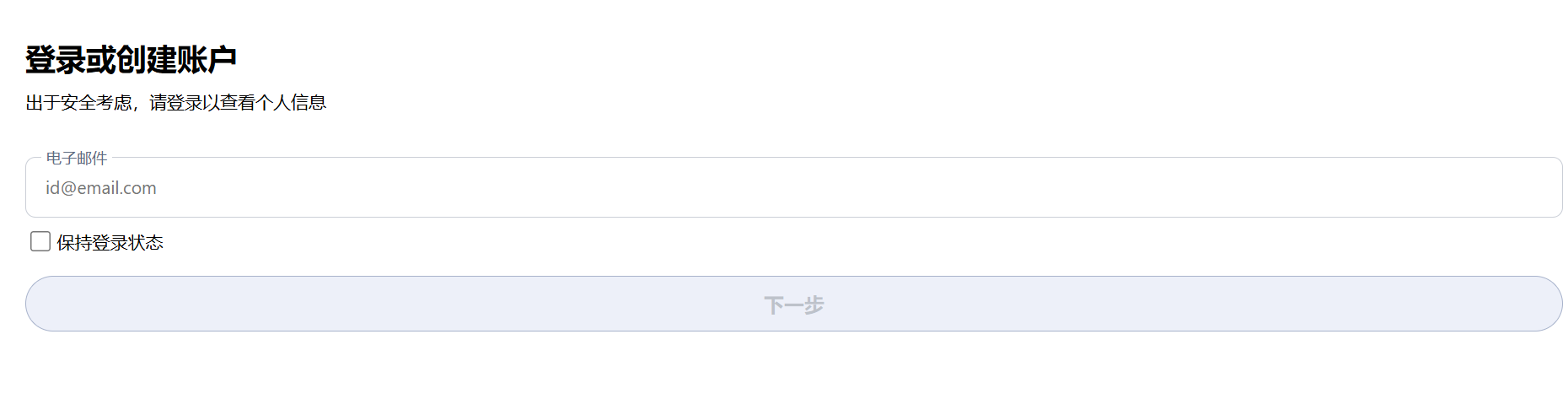
Step 2: Enter your partner credentials
Type the email address and password associated with your hotel account. These credentials are usually created during the property onboarding process.
Step 3: Complete the security verification
Agoda may require a verification code sent to your email address. This extra step helps protect partner accounts from unauthorized access.
Step 4: Open your property dashboard
Once verified, the system loads the main YCS dashboard. Hotels that manage more than one property can switch between locations using the property selector at the top of the interface.
From here, hotel managers can begin managing reservations, adjusting prices, or reviewing performance data.
Key Features to Manage on Agoda After Logging In
After logging in, the Agoda partner dashboard provides several tools that support daily hotel operations.
Reservation overview
The reservation page shows all upcoming bookings in one list. Staff can check guest names, arrival times, payment status, and room assignments. Many hotels use this section every morning to prepare for the day’s check-ins.
Pricing and inventory adjustments
Hotels frequently update prices based on demand. During busy periods such as holidays or conferences, managers may increase rates or reduce remaining inventory to avoid overselling.
This area also allows hotels to set promotions, special discounts, or limited-time deals.
Listing management
Property details can be updated directly inside the dashboard. Hotels often add new photos, revise descriptions, or update amenities to keep listings accurate.
Listings with detailed descriptions and high-quality images usually perform better in Agoda search results.
Performance monitoring
The analytics section shows booking trends and revenue data. Hotels can see how their property performs over time and identify peak booking periods.
For revenue managers, this information helps determine when to adjust pricing strategies.
Agoda YCS App: How to Manage Your Property on Mobile
Not every hotel manager sits in front of a computer all day. For this reason, Agoda offers a mobile application connected to the YCS platform.
The YCS mobile app allows accommodation partners to manage their listings using a smartphone.
Common tasks that can be done from the app include:
- Checking new reservations
- Viewing guest details
- Updating room availability
- Monitoring performance reports
Small hotels and guesthouses often rely heavily on the mobile version because the owner or manager may handle reservations personally.
For larger properties, the app serves as a convenient monitoring tool when managers are traveling or away from the office.
Common Agoda Extranet Login Issues
Although accessing the Agoda partner dashboard is usually straightforward, some hotels occasionally experience login problems.
Incorrect password
Typing errors or outdated passwords are the most frequent cause of login failures. Resetting the password through the login page typically resolves the issue.
Browser-related problems
Sometimes stored browser data can interfere with login attempts. Clearing the cache or using another browser may restore access.
Account permission restrictions
Staff members may not see certain features if their account role does not include the required permissions. Property administrators can adjust access levels for team members inside the dashboard.
Verification email delays
Security codes sometimes appear in spam folders or arrive late due to email filters. Checking spam folders or requesting a new verification code usually solves the problem.
If problems continue, Agoda partner support can help verify the account and restore access.
Using a Channel Manager Instead of the Agoda Extranet
For hotels that list rooms only on Agoda, managing bookings directly through the extranet may be sufficient.
However, many properties today sell rooms across multiple booking platforms such as Booking.com, Airbnb, and Expedia. Updating prices and availability separately on each extranet can become time-consuming and risky.
Manual updates often lead to problems such as:
- inconsistent pricing
- delayed availability updates
- accidental overbookings
This is why many hotels adopt a channel manager or property management system (PMS).
Smart Order PMS Channel Manager connect directly with major OTAs including Agoda. Instead of updating rates and inventory inside each extranet, hotel managers can control all channels from a single dashboard.
This type of integration is especially valuable for:
💠Small hotels that want to reduce manual work
💠Boutique properties that sell rooms across several OTAs
💠Multi-property operators that need centralized management across multiple locations
By automating distribution across channels, hotels can spend less time switching between extranets and more time focusing on guest experience and revenue strategy.
YCS Agoda Extranet FAQ
How do I find my Agoda Hotel ID?
Your Agoda Hotel ID can be found inside the property information section of the partner dashboard. It may also appear in Agoda onboarding emails or reports. This ID is often required when contacting Agoda support.
Is the YCS login different from the regular Agoda login?
Yes. The partner dashboard used by hotels is separate from the consumer login used by travelers. Accommodation providers must access the dedicated partner portal to manage reservations and property settings.
What should I do if I forget my Agoda extranet password?
Use the password reset option on the login page. After entering your registered email address, Agoda will send a password reset link or verification code.
Can multiple users access the Agoda YCS account?
Yes. Hotels can create multiple user accounts with different permission levels. For example, front desk staff may only access reservations, while managers can modify rates and property information.
What should I do if my Agoda Extranet account is suspended?
Account suspension may occur if required property information is missing or if compliance issues arise. Reviewing system notifications and contacting Agoda partner support is the fastest way to restore access.
Can I manage Agoda bookings without logging into YCS?
Yes. Hotels that use an integrated property management system can handle Agoda reservations from a centralized dashboard. The system automatically synchronizes booking data with Agoda and other connected booking platforms.
Is Agoda Extranet free for hotels?
Yes. The Agoda Extranet is provided free to accommodation partners who list their properties on the Agoda platform. Hotels only pay commission on completed bookings rather than paying for access to the system
