Cloud vs On-Premise Hotel PMS: A Decision Guide for a 30-Room Independent Hotel
A thirty-room hotel should consider a cloud PMS when the operating problem extends beyond an ageing front desk server. Remote access, connected reservations and work shared across devices can justify evaluating a change. If the existing system still meets those needs and has a supportable setup, room count alone is not a reason to replace it.
Smart Order is a cloud-based PMS with front desk, distribution and guest-facing tools. Its relevance is the working model it enables: staff can use connected booking information without making a particular reception computer the centre of every task.
- Identify the problem before replacing hardware. A slow computer, a failed server and a disconnected workflow are different issues.
- Compare dependencies as well as features. Moving the application off site changes responsibilities; it does not remove the need for connectivity and recovery planning.
- Keep essential interfaces visible. A working door-lock, accounting or other integration must be assessed before a switch.
Explore a cloud PMS workflow with Smart Order →
Quick Verdict
| Decision area | Cloud PMS model, including Smart Order | On-premise PMS model |
|---|---|---|
| Application location | Service runs outside the hotel's own PMS server environment | Application is operated on infrastructure at the property |
| Access away from reception | Smart Order documents phone, tablet and laptop access | Remote access depends on the particular setup |
| Local technology responsibilities | Hotel still manages devices, connectivity and any local interfaces | Hotel or its service partner also maintains the local application environment |
| Continuity | Connectivity, service availability and recovery arrangements matter | Local hardware, network, power and recovery arrangements matter |
| Migration decision | Existing records and interfaces must be assessed | Retaining the system avoids an immediate platform migration, but existing issues still need resolution |
These are deployment distinctions, not claims that every cloud system has the same capabilities or every local system works offline.
1. Diagnose what a new server would actually solve
Imagine a thirty-room independent hotel whose owner must call reception to check a reservation. The front desk also experiences recurring computer problems. Replacing hardware might address a diagnosed equipment fault. It would not, by itself, establish remote access or connect separate guest-message records.
Conversely, do not assume every slow workstation proves that the entire PMS needs replacement. Identify the failing component with the current provider or service partner. Then separate the repair decision from the operating improvements you want.
Use two lists. One contains problems with the current installation: unavailable hardware, unsupported software or recovery uncertainty. The other contains tasks the hotel wants to perform differently: checking bookings away from reception, accepting direct reservations or connecting staff handovers.
A cloud evaluation is strongest when it addresses the second list as well as the first. Otherwise, a rushed switch may exchange one unresolved problem for another.
2. Evaluate the working model Smart Order provides
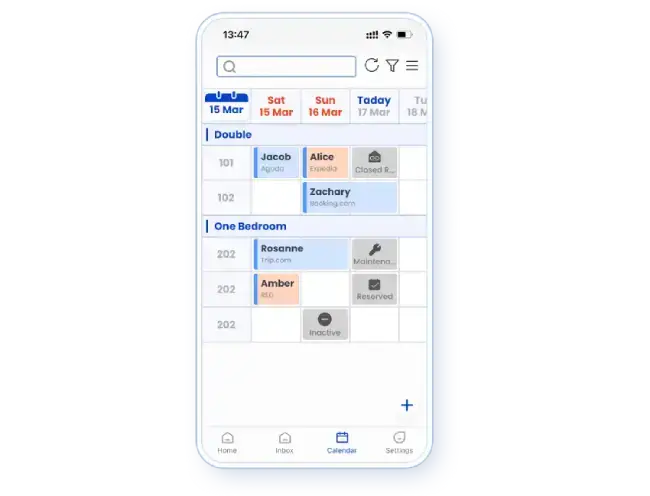
Smart Order's hotel management platform is cloud-based. Its mobile PMS explanation describes access across phones, tablets and laptops, with internet connectivity required.
For an owner who works away from the property, that is a concrete operating difference from a setup usable only at reception. The owner can review booking context on a suitable connected device rather than relying on a colleague to read it aloud.
Smart Order also provides employee accounts and module permissions. That supports assigning access to the person doing the job. Moving to the cloud does not justify sharing one owner login across the team.
Picture an afternoon when the owner is off site and a receptionist needs help with a changed stay. The useful outcome is shared access to the current record and a clear decision owner. It is not a claim that the system can resolve every guest exception automatically.
3. Keep connectivity and local interfaces in the decision
A cloud PMS is not a promise of uninterrupted operation. Smart Order's mobile guidance states that connectivity is required. Your hotel should therefore decide how staff will handle a connection interruption and how they will resume work afterwards.
A fallback might involve an agreed arrival record and an alternative connection, depending on the property. The important point is to reconcile any work completed during disruption before normal operation resumes. This is an operating recommendation, not a documented Smart Order offline mode.
Local interfaces can remain even when the PMS application is hosted elsewhere. A door-lock system, payment device or other property equipment may have its own connection requirements. Verify the exact integration rather than assuming “cloud” means there will be no technology left on site.
Likewise, retaining an on-premise system does not automatically guarantee independence from the internet. Connected distribution and external services may still depend on it. Review the actual installation rather than a simplified cloud-versus-local slogan.
4. Decide what must remain usable after a move
Future reservations deserve particular attention because the hotel must serve those guests regardless of the platform choice. Historical records, guest information and external interfaces may require different treatment.
Smart Order's initial setup guide covers room and rate preparation and future-booking import. It describes a support-upload route for prepared reservation templates where applicable. That establishes a documented starting point, not a promise to transfer every field from every legacy product.
Before selecting a replacement, identify the records your hotel must retain and obtain a workable route for them. A migration that carries future stays but leaves required history inaccessible is not automatically acceptable. Nor should you insist that every old field must appear in the same screen if an agreed retention method meets your operating needs.
Treat this as a selection condition. The detailed cutover sequence belongs after the product fit and data route are confirmed.
The decision for your thirty-room hotel
Prioritize a Smart Order evaluation when you want connected reservation work across devices and its required channels and interfaces fit your property. Those are concrete reasons to consider the cloud model beyond replacing a failing computer.
Keep the current setup under consideration when it still supports the operation, can be maintained and has an acceptable recovery arrangement. If it depends on an essential integration with no confirmed replacement, resolve that dependency before committing to a switch.
The hotel does not need to become a technology project to make this decision. Define the work that must improve, the records that must remain usable and the dependencies that cannot be lost. Then compare the proposed operating model against that brief.
Frequently asked questions
Is a cloud PMS automatically the right choice for thirty rooms?
No. The decision depends on your working model, current system and required connections. Thirty rooms provides context, not a universal replacement rule.
Does Smart Order work fully offline?
Its published mobile guidance requires internet access. Do not plan around an offline mode unless the applicable functionality has been explicitly confirmed.
Will moving to a cloud PMS remove every local device or interface?
No. Staff devices, connectivity and property equipment can remain part of the setup. Confirm the interfaces required by your hotel.
Discuss your current PMS and desired working model with Smart Order →