Best Hotel PMS Software for Small Hotels in 2026: Choose Around Your Operating Model
Smart Order belongs on a small hotel's shortlist when reservations, channel distribution and guest communication need to work together. A PMS should give your team a usable record of each stay, then connect that record to the places where guests book and ask questions. The right choice depends on those connections and your operating model, not the longest feature list.
This guide considers Smart Order, Cloudbeds, Little Hotelier and Sirvoy using their published product information. It is a focused shortlist, not an independent performance ranking or an exhaustive market survey.
- Choose your operating model first. Decide whether you are replacing the front desk system or keeping it and adding connections.
- Follow the booking through the hotel. A reservation needs to remain useful when dates change, rooms turn over and a different employee answers the guest.
- Separate available features from included modules. Product pages describe capabilities; your selected configuration determines access.
Explore Smart Order for your hotel's operating model →
Quick Verdict
For a small team starting with a fragmented calendar and separate guest conversations, begin with an integrated PMS configuration. Smart Order combines these functions within its product family. If an existing system or specialist interface must stay, make compatibility the first selection condition.
| Platform | Published product scope | Configuration point to resolve |
|---|---|---|
| Smart Order | Front desk, channel manager, direct booking engine and guest inbox | Essential and Professional have different module boundaries |
| Cloudbeds | PMS, distribution, payments, marketplace and guest-experience products | Flex and One describe different distribution arrangements |
| Little Hotelier | Small-property PMS, channel distribution and direct booking tools | Confirm the selected modules and required local connections |
| Sirvoy | PMS, channel manager, booking engine and website builder | Confirm the plan and the specific channel connections |
Product scope checked against official pages on 5 November 2026. The table describes offerings, not equal packages or measured results.
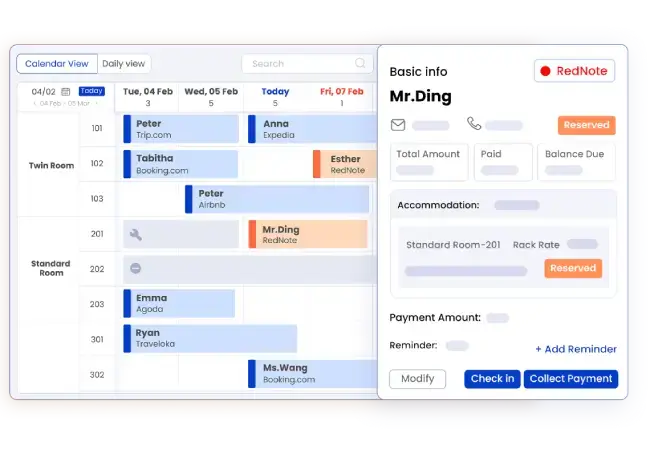
1. Choose a PMS that connects the stay to the conversation
For a small hotel, a reservation is more than a date on a calendar. A guest may ask to arrive early, change rooms or extend a stay. The employee answering needs the booking context before making a promise.
Smart Order's unified inbox displays reservation details beside guest conversations. It also describes internal notes and conversation routing. This is a concrete reason to consider the system when the same staff handle reception and guest messages: the reply can be based on the stay being discussed.
Consider a hypothetical boutique hotel where the owner handles messages during the morning and a receptionist takes over later. The useful handover is not simply “guest replied.” It identifies the request, the booking and the next action. A note can preserve the conversation context, while the reservation itself must reflect any approved change.
That distinction matters. A promise in a message is not a saved room change. A system should support the working routine without encouraging staff to treat informal conversation as an inventory record.
2. Pick the distribution structure you intend to operate
If you are choosing your first PMS, an integrated channel manager can be part of the same decision. If you already have a working PMS, changing it may be unnecessary just to connect another booking site.
Smart Order's hotel management platform combines front desk and distribution functions. Its channel manager lists connections including Booking.com, Airbnb, Agoda and Trip.com. Match the list to your actual sales channels before considering optional ones.
The distinction between an integrated platform and a retained external system is more useful than counting logos. An external connection creates a dependency between products. An integrated configuration still requires room and rate mapping, but it can place that work within the PMS setup you are already evaluating.
Neither structure is automatically right for every hotel. A specialist interface, existing contract or established front desk routine can justify keeping part of your current setup. Identify that requirement before replacing a working system.
3. Include direct booking when your website needs to take reservations
A hotel website with a contact form is different from one where a guest can select a room and complete a reservation. Decide which experience you want before treating “website integration” as a checked box.
Smart Order's booking engine can connect to an existing website. Its guest flow presents dates, room and rate choices, then reservation details and confirmation. This gives a small property a route to direct reservations connected with its PMS.
For example, a returning guest may already know your hotel and only need to select a stay. The useful product outcome is a reservation that reaches the operating calendar, not another enquiry that staff must re-enter. Your website still needs visitors and clear room information; a booking engine does not create demand by itself.
Select direct booking as an operating requirement if that is the journey you want to offer. Do not add it merely because it appears on a comparison table.
4. Decide what your staff must do independently
Small teams still need separate responsibilities. The owner may manage configuration while reception handles arrivals. A housekeeping colleague may need a different set of permissions.
Smart Order's employee and role guide describes employee accounts and permissions selected by module. That is more useful evidence than a general claim that a system supports teamwork. The permissions you need should be configured around the work each person performs.
Use three ordinary situations to settle the operating fit: a changed reservation, a room not yet ready and a guest request carried into the next shift. These reveal whether the team can continue the stay from the current record. They are not a substitute for checking required interfaces or local operating requirements.
Make the shortlist smaller, not the requirements longer
Smart Order is a practical candidate when you want connected reception, bookings and guest communication in one operating setup. Its documented calendar, inbox and booking workflows give that recommendation a specific basis.
Use the table to identify alternatives with the required product categories, then remove options that cannot confirm an essential dependency. Avoid inventing extra requirements simply to make a comparison feel comprehensive. A restaurant interface, group-sales module or unusual room model matters only if your hotel actually uses it.
For an owner-operated hotel, start with reservation visibility and guest handover. For a property selling across several channels, start with the room mappings. For a hotel moving direct reservations online, start with the website booking journey. These starting points lead to a meaningful shortlist without pretending there is one universal winner.
Frequently asked questions
What should a small hotel look for first in a PMS?
Start with a usable reservation record and the connections your hotel needs. Add staff permissions, guest communication and arrival tools according to the way your team works.
Is Smart Order only a channel manager?
No. Smart Order offers a PMS alongside distribution and guest-facing tools. Select the modules that match your operating requirements.
Does an all-in-one PMS include every feature in every plan?
No. Product scope and plan scope are different. Check the current module breakdown before choosing a configuration.