1. Confirm the reservation under Bookings > Reservations in Agoda Partner Portal and check the property's registered booking email.
2. Search the channel manager and PMS by Agoda Booking ID before requesting a resend or creating a manual record.
3. Verify the Agoda property, room type, and rate plan IDs used by the connectivity mapping.
4. Protect the guest and shared inventory, then reconcile any delayed automated booking to avoid a duplicate.
An Agoda booking not received by PMS is a live reservation incident. The notification may have stopped at the channel manager, failed during PMS import, or entered under an unexpected property, date, or status.
Do not begin with retry. Prove Agoda holds a confirmed booking, locate the last system that received it, and protect the guest and inventory. This avoids turning one missing stay into an overbooking or duplicate.
Confirm the Agoda Booking Before Changing Anything
Open Agoda Partner Portal, select the correct property from Listings, and go to Bookings > Reservations. Open the Confirmed view and search by Agoda Booking ID, guest name, arrival date, departure date, and booking date. Clear filters that could hide older, modified, or future reservations.
Agoda also sends confirmations to the registered reservation email, including when a channel manager is connected. Hotel-type properties and multi-unit homes manage recipients under Settings > Contacts using Reservation and post-booking.
Treat Partner Portal as the booking authority. Confirm status, property, timestamps, product, dates, occupancy, guest, payment model, and expected property amount. Agoda Collect is marked prepaid; Property Collect instructs the hotel to collect.
If Partner Portal cannot find it, do not create an Agoda reservation from a guest screenshot. Recheck the property, dates, and Booking ID. If it is confirmed, protect the stay even without a PMS copy.
Find Where the Agoda Reservation Stopped
A connected booking normally moves from Agoda to the channel manager or connectivity provider, then into the PMS. The PMS arrivals list is only the final operational view. Search each system in order.
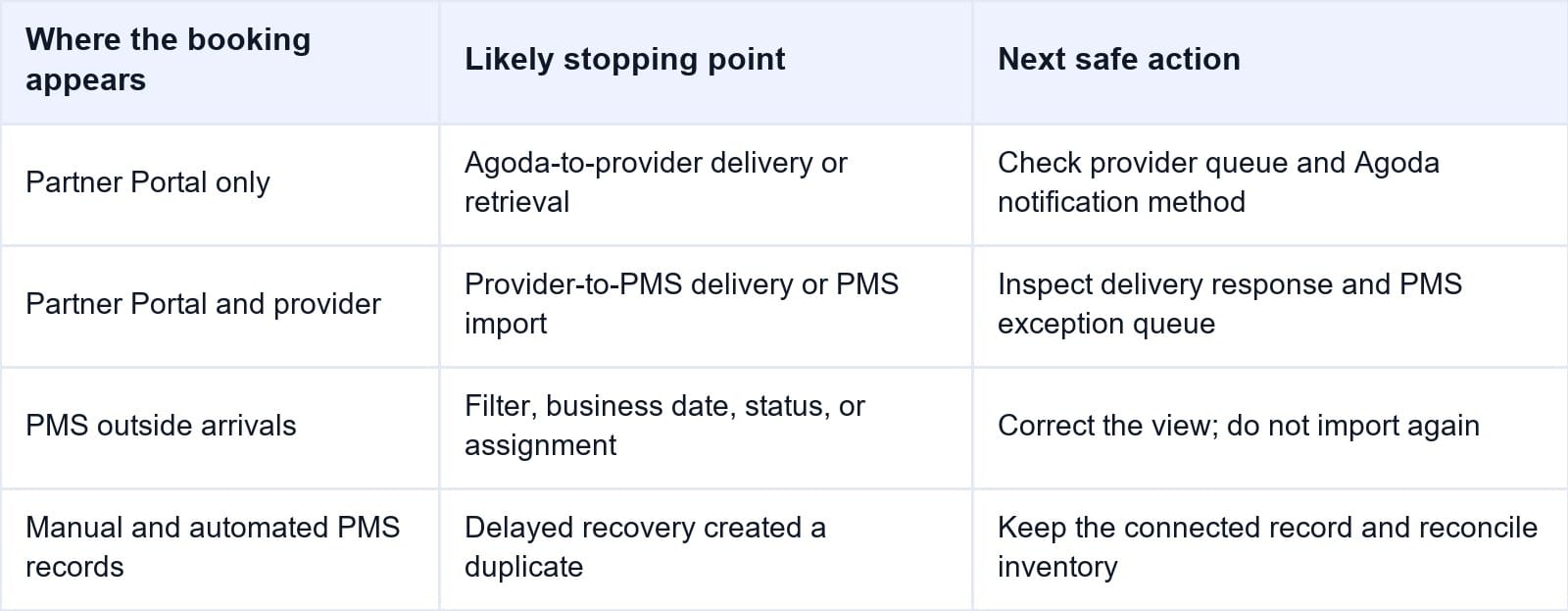
In the channel manager, search the Agoda Booking ID, provider reference, property, timestamp, and dates. Review pending, failed, rejected, and archived queues. Capture its internal reference and PMS delivery result.
Search the entire PMS, not only today's arrivals. Use every external reference, guest surname, booking date, arrival date, and room. Include cancelled, modified, unassigned, error, and imported statuses. Check the business date after night audit.
If Agoda has the booking but the provider does not, investigate the first handoff. If the provider has it but the PMS does not, inspect PMS delivery or import. If it exists outside arrivals, correct the view or assignment instead of importing again.
When Smart Order receives an Agoda reservation through its hotel channel manager, the external booking reference, mapped room inventory, and PMS reservation enter one workflow. That gives operations a clear place to see whether the booking reached the hotel system and changed availability.
Trace Agoda Bookings Into the PMS
Keep incoming Agoda reservations, external references, mapped rooms, and inventory changes connected so staff can identify the failed handoff before retrying.
Check Agoda Notification and Retrieval Behavior
Ask the connectivity provider how it receives Agoda reservations. The recovery action depends on the connection method.
Agoda's current Partner Hub says that for partners using Hint, Agoda attempts to push a booking notification three times. If those attempts fail, Agoda sends the notification to the channel manager by email. For partners not using Hint, the channel manager needs to make a new request to Agoda after the connection is restored.
Agoda also identifies Request API coverage as a possible cause. Give the provider the Booking ID, creation time with zone, and stay dates so it can check the retrieval window.
Do not let several staff resend the same booking. A delayed notification may still arrive. Before retrying, search every PMS status by external ID.
If the provider reports delivery, request its timestamp, destination, message ID, response, and retry history. A connection badge does not prove PMS import.
Verify Property, Room, and Rate Plan Mapping
Agoda requires the channel manager to map the Agoda property ID, room type IDs, and rate plan IDs. A correct property connection with an incomplete product mapping can still prevent a reservation from becoming a valid PMS stay.
Confirm the Agoda property ID displayed beside the property name in Partner Portal. For room type IDs, go to Property > Room setup. For rate plan IDs, go to Rates and availability > Rate plans. Compare these identifiers with the provider mapping and the active PMS products.
Check whether the Agoda room or plan was created, renamed, replaced, deactivated, or remapped. Compare occupancy, meals, cancellation, pricing model, and inventory pool. Similar names do not prove a match.
A room can be mapped while its rate plan is missing. The provider may receive the booking but lack a destination for the combined product.
Do not remap a live product merely to force one booking through. Record the current mapping, obtain approval, correct it, and test a low-risk product.
Protect the Guest and Reconcile Inventory Safely
A confirmed Agoda reservation is instantly binding from the hotel's operational perspective. If arrival is near, the supervisor should decide how to hold the booked room while the missing PMS record is investigated.
Use this controlled containment procedure:
- Confirm the live booking and current status in Agoda Partner Portal.
- Search the provider and all PMS statuses one final time using every external reference.
- Hold the correct room inventory under the hotel's approved exception process.
- Create a manual PMS record only when policy permits, marking it pending Agoda sync reconciliation.
- Copy the room, plan, dates, occupancy, price, taxes, meal, cancellation, and payment instructions exactly.
- Add the Agoda Booking ID and provider reference, but never copy full card or virtual-card data into ordinary notes.
- Monitor for a delayed automated reservation and reconcile it before night audit.
Check Agoda availability, shared channel inventory, the PMS count, and other OTAs. Agoda may have reduced its own inventory while the PMS retained the old shared count, allowing another channel to sell the last room.
Do not subtract a room in several systems. Use one recorded temporary control. When automation recovers, retain the record linked to future Agoda changes and retire the placeholder under PMS policy.
Check PMS Import Rules and Later Booking Messages
The PMS handoff can fail despite Agoda delivery. Check credentials, property connection, queues, unavailable services, invalid dates, unsupported occupancy, missing products, and closed plans.
Inspect the message sequence. A later modification or cancellation may have moved an imported stay, or may be waiting because the original Agoda Booking ID is missing.
Search for quarantine, exception, or manual-review queues. Some PMS platforms preserve rejected reservations outside the main calendar. The error text should identify the exact field or mapping that blocked creation.
After correction, use only the required recovery action. Confirm one PMS reservation, a preserved Agoda ID, a valid future update path, and one inventory reduction.
The Smart Order front desk connects incoming reservations with the operating calendar. When a recovered Agoda booking becomes visible, front desk can verify its dates, room status, and arrival preparation without maintaining a second manual list.
Keep Recovered Agoda Arrivals Visible
Connect the imported reservation with room availability and front-desk work so a delayed booking is reconciled before check-in or night audit.
Escalate With One Complete Incident Record
Contact the system after the last successful handoff. If the provider never received it, involve the provider and Agoda. If the PMS rejected it, start with PMS integration support.
Send evidence that reproduces the incident:
- Agoda property ID, Booking ID, room type ID, and rate plan ID
- Provider and PMS reservation references, mapping IDs, and connection name
- Booking, push or retrieval, delivery, retry, and error timestamps with time zone
- Current Agoda status, PMS searches performed, and inventory position
- Full error text and screenshots with payment credentials and personal data hidden
- Manual holds or placeholder records already created
For urgent cases, Agoda directs properties to Need Help in Partner Portal and lists `biz@agoda.com` for booking issues. Include the Agoda Booking ID and use a secure route for payment information.
After recovery, document the root cause and owner. Review notification contacts, retrieval coverage, mapping-change controls, exception alerts, and the hotel's daily reconciliation of upcoming Agoda arrivals against the PMS.
Frequently Asked Questions
Where can I confirm an Agoda booking?
In Agoda Partner Portal, select the property and go to Bookings > Reservations > Confirmed. Search by Agoda Booking ID and dates, and check the registered booking-notification email.
Why did Agoda email the booking but the PMS did not receive it?
The channel notification may have failed, the provider's retrieval window may not cover the booking period, or the provider received it but the PMS rejected the import. Trace each handoff by ID and timestamp.
Should front desk manually enter the missing Agoda booking?
Only after confirming it in Partner Portal, searching every PMS status, and following the hotel's exception policy. Mark the record for reconciliation because the automated reservation may arrive later.
What Agoda IDs are needed to check mapping?
Compare the Agoda property ID, room type ID, and rate plan ID with the channel manager and PMS mappings. One missing or outdated product mapping can block the reservation.
Can a missing Agoda booking cause an overbooking?
Yes. Agoda may reduce its own inventory while the PMS and other channels retain the old shared count. Protect the room using one controlled method and reconcile availability after recovery.
What should happen before the channel manager retries?
Search the PMS by Agoda Booking ID, confirm whether the first attempt created any record, capture the failure evidence, and verify the correct recovery method for the provider's Agoda connection.
An Agoda booking incident is closed only when Partner Portal, the channel manager, and the PMS represent one confirmed stay, one connected external reference, and one correct inventory reduction.
