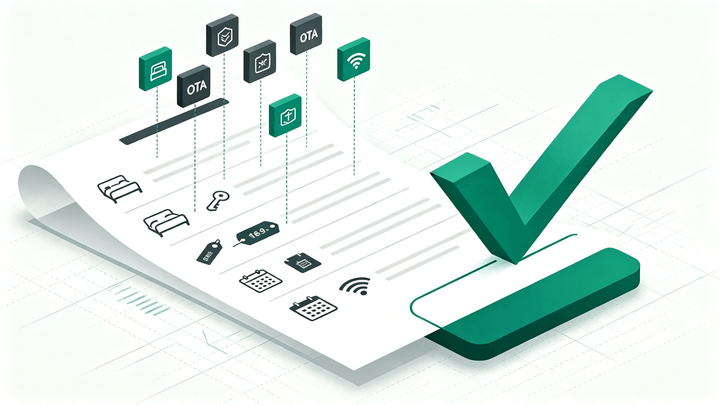
1. A Hotel PMS OTA integration is ready only when room types, rate plans, prices, inventory, restrictions, and reservations pass end-to-end tests.
2. Test new bookings, modifications, cancellations, last-room availability, closed dates, taxes, and failure alerts on every connected OTA.
3. Assign one source of truth and document who responds when the PMS, channel manager, or OTA reports an error.
A Hotel PMS OTA integration can show “connected” while still sending the wrong room, rate, or restriction. Test the complete booking loop before launch: data must travel from the Property Management System (PMS) to each online travel agency (OTA), then return as a usable reservation.
Use this checklist for Booking.com, Agoda, Expedia, Airbnb, and any other channel connected through your hotel channel manager.
What a Hotel PMS OTA Integration Must Do
An OTA integration connects distribution with hotel operations. The PMS holds rooms, rates, reservations, and stay information. The channel manager translates and sends relevant updates to each OTA, then returns bookings to the PMS.
The minimum loop looks like this: a manager changes a rate or restriction in the PMS, the update reaches the OTA, a guest books, the reservation enters the PMS, and the remaining inventory updates across other channels.
Importing reservations without pushing fresh availability back out is only a one-way connection and still leaves the hotel exposed to overselling.
Before configuring a Hotel PMS OTA integration, decide which system is the source of truth for rates, inventory, and restrictions. Staff should not edit the same field in several systems unless the provider supports that workflow.
Map Rooms and Rate Plans Before Testing Sync
Mapping links a PMS room type and rate plan to the corresponding product on each OTA. “Deluxe King” in the PMS might have a different name and code on Booking.com or Expedia. The labels do not need to match, but the commercial product must.
Review every mapping one OTA at a time. Check occupancy, bed type, meal inclusion, cancellation terms, currency, taxes, and refundability. Read our room types and rate plans guide if the inventory structure needs cleanup.
Never map different room types to one pooled product unless intentional. An error can put a sea-view booking into standard inventory or attach the wrong cancellation policy.
The Hotel PMS OTA Integration Sync Matrix
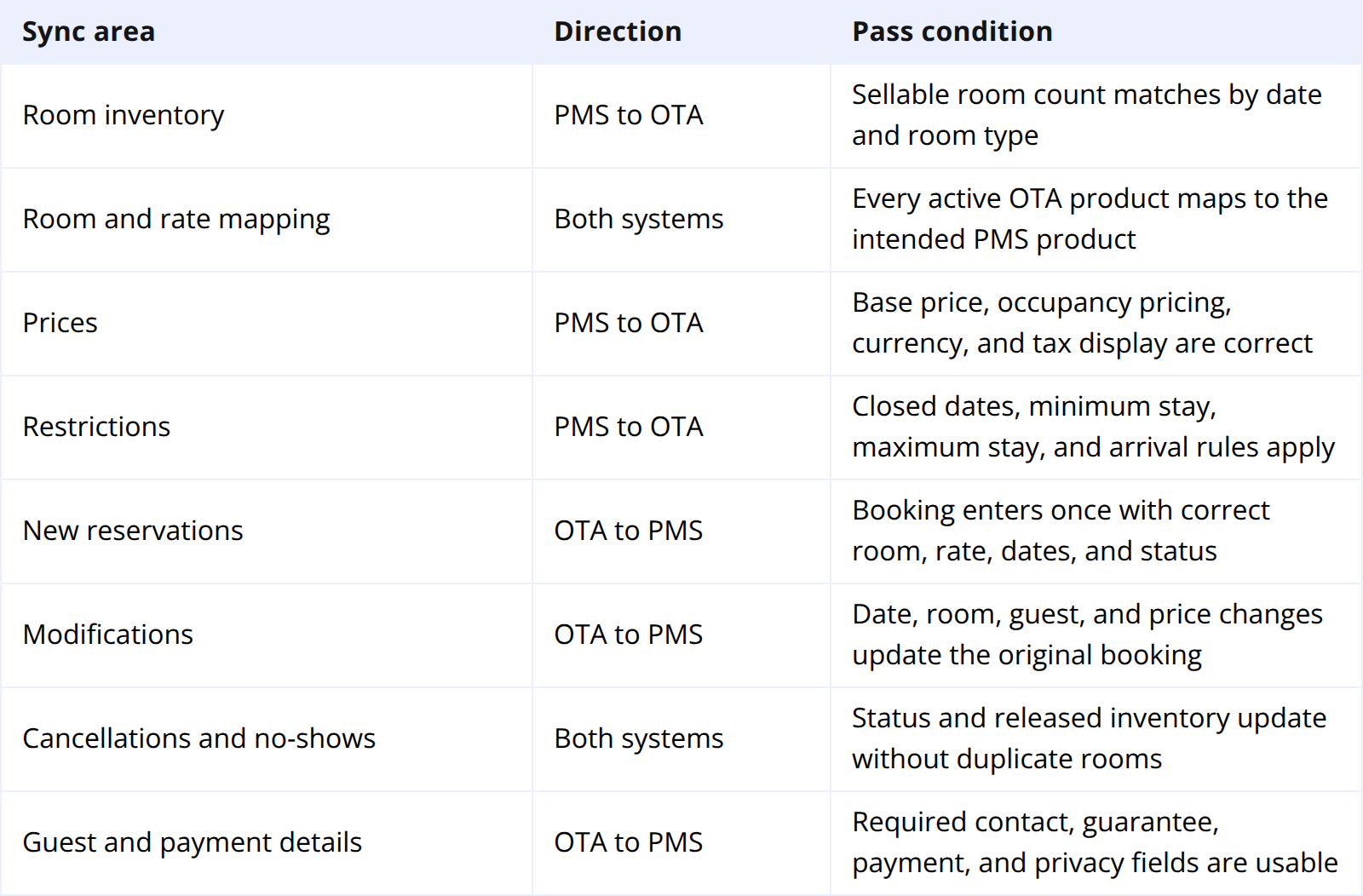
Use this matrix during configuration and record evidence for every OTA. “Pass” should mean the value is correct in the PMS, the channel manager, the OTA extranet, and the guest-facing booking page.
Load inventory for the hotel's full booking window. An integration can work for 30 days while leaving later dates closed or empty.
Test minimum stay, arrival and departure closures, advance purchase, and stop-sell separately. Confirm which restrictions sync and which remain OTA-specific.
Run These Tests Before You Go Live
Do not rely on a successful connection test. Make controlled reservations through the public OTA booking path using low-risk dates, then verify the operational result.
Test one normal booking on every OTA
Book a common room and flexible rate. Confirm dates, occupancy, rate, taxes, commission, meal plan, confirmation number, and payment method. Availability should fall on every connected channel.
Test modifications and cancellations
Change dates or guest count in the OTA and confirm the existing reservation updates without a duplicate. Cancel it and verify inventory returns once with the correct status and charge.
Test last-room availability
Set a room type to one remaining unit, then create a booking. The room should close across all connected OTAs. This is the clearest pre-launch test for overbooking risk.
Test prices, taxes, and occupancy rules
Compare one-night and multi-night stays for different occupancies. Check child pricing, extra-person charges, taxes, fees, rounding, currency, and the total received by the PMS.
Test every important restriction
Apply stop-sell and minimum-stay rules on separate dates. Search as a guest, remove each rule, and verify the product becomes bookable again.
Test failure visibility
Ask the provider to demonstrate an unmapped rate, rejected update, or interrupted connection in a safe environment. The team should see an alert, understand which dates and products are affected, and know whether updates will retry automatically.
Save screenshots and confirmation numbers. After a failure, fix the cause and repeat the full flow rather than relying on a partial retest.
Assign Ownership for Go-Live Day
Launch the Hotel PMS OTA integration in a quiet trading window, away from major events or high-occupancy dates. Record the cutover time, take a final inventory snapshot, and keep the previous connection unchanged until the provider confirms the sequence.
Assign one owner for PMS configuration, one for OTA extranet checks, and one escalation contact at the integration provider. Staff need a simple rule for where to create rates, restrictions, and manual reservations after launch.
For the first 24 to 48 hours, review new, modified, and cancelled reservations plus 30 days of availability. Continue monitoring error logs afterward.
If this integration is part of a wider system change, use our hotel software migration guide to coordinate data transfer and OTA reconnection.
Keep the Booking Loop in One Operational View
Integration problems become harder to diagnose when reservations, channel inventory, and revenue live in separate tools. A front desk may see the booking while the person managing OTAs cannot see whether the inventory update succeeded.
With Smart Order, an OTA reservation enters the PMS, the room calendar updates, connected channel availability changes, and the booking contributes to occupancy and revenue reporting. The team can follow the same booking from its source to its operational result instead of reconciling several exports.
Test Your OTA Booking Loop Before Launch
Use Smart Order to connect OTA reservations, live room availability, rate updates, and hotel reporting in one PMS workflow.
FAQ About Hotel PMS OTA Integration
What data should sync between a hotel PMS and an OTA?
At minimum, room inventory, prices, restrictions, new reservations, modifications, and cancellations should sync. Room and rate mapping must be correct, while guest, payment, tax, and policy fields should arrive with enough detail for front-desk operations.
Is an OTA integration the same as a channel manager?
The integration is the data connection. A channel manager manages connections across several OTAs and exchanges data with the PMS. See how many OTA channels a hotel should connect.
How do I test an OTA connection without causing an overbooking?
Use low-demand future dates and a cancellable booking. Confirm fields and inventory, cancel it, and verify availability returns correctly.
How often should hotels check OTA sync after launch?
Monitor closely during the first 24 to 48 hours and review connection alerts every day afterward. Hotels should also recheck mapping whenever they add a room type, rate plan, promotion, policy, or OTA.
Go Live Only After the Full Loop Passes
A Hotel PMS OTA integration is not complete when the accounts connect. It is complete when the hotel can change a sell rule, receive an accurate booking, update inventory everywhere, process a modification, and release the room after cancellation.
Test that loop on every channel. Keep evidence, assign ownership, and treat alerts as operational work. A careful launch takes longer than clicking “connect,” but it is far cheaper than correcting oversold rooms and broken rates after guests begin booking.
