A PMS for a Boutique Hotel with a Two-Person Front Desk
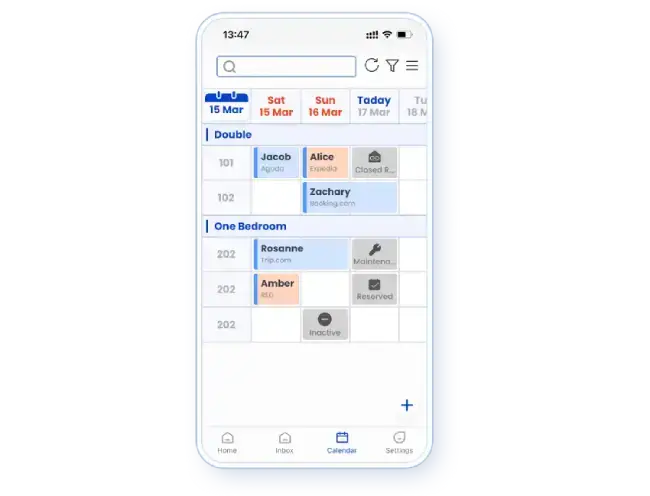
For a boutique hotel with two receptionists, choose a PMS that keeps the reservation, room readiness and guest conversation understandable to both people. Smart Order combines calendar operations with staff accounts and an inbox that can carry booking context and internal notes. That makes it a relevant option when one employee must continue work started by the other.
The aim is a clear handover: what changed, what remains open and who will act next. The following example shows how those requirements fit together. It is an illustrative shift, not a customer result.
One arrival, two people, one current record
A guest asks to arrive early. The morning receptionist reads the request while the second employee helps someone at the desk. Later, the second employee needs to know whether early arrival was approved and whether a room is ready.
In Smart Order, reservation details can appear beside the guest conversation. An internal note can retain the request and follow-up context. The unified inbox also describes routing conversations to teams and limiting message access by role.
The practical benefit is continuity: the next person can see the context instead of asking the guest to repeat it. This does not mean a message changes the booking automatically. Approved stay changes belong in the reservation record.
Keep three kinds of status distinct
| Information | What it answers | Staff responsibility |
|---|---|---|
| Reservation details | Which stay and room have been booked? | Save approved changes in the reservation |
| Room readiness | Has the room actually been prepared? | Update the relevant room status after the work is done |
| Guest conversation | What was requested or promised? | Record the follow-up and identify who will handle it |
A room may have no current guest and still need cleaning. Smart Order's room-status guide distinguishes dirty and clean states, with staff updating the status after cleaning. Reception should use that operational information before promising access.
For example, staff can leave an early-arrival request unconfirmed until the room is ready. Once readiness is confirmed, staff can complete the appropriate arrival action. An empty space on the reservation calendar should not be treated as proof that housekeeping is finished.
Put a changed booking where the next shift will find it
Smart Order's reservation-editing guide distinguishes an active reserved stay from one already settled. A reserved booking can be modified directly. A settled booking requires a different workflow, so corrections after departure should not be treated as ordinary edits.
For the two-person desk, agree who confirms a date change and who saves it. Then the other employee can continue from the updated record. The point is not to force both people through every task; it is to avoid a guest promise living only in one person's memory.
If one receptionist steps away, Smart Order's front desk tools include mobile access to bookings and room status. Use the device that suits the task. A detailed configuration change may still be easier to review on a larger screen.
Give each employee an account suited to the job
The employee-account guide describes adding staff and selecting roles or permissions. Set up the two receptionists as individual users and choose the modules each needs.
Message routing and reservation permissions should be considered separately. Access to a guest conversation does not, by itself, establish authority for every inventory or transaction action. Confirm the actual permissions in the intended configuration.
This makes the operating routine clearer: one employee can answer a request, the responsible person can approve a change, and both can understand the resulting stay.
Choose the connected routine your desk needs
Smart Order is worth prioritizing when your main difficulty is the gap between a reservation and the conversation around it. Its calendar, inbox and staff-account functions address different parts of that handover.
Select the applicable modules before adopting the routine. The current plan page places housekeeping within Professional. Message and channel access should also be confirmed for your configuration. These are capability boundaries, not a promise that two people can cover any workload.
For your next step, bring one ordinary handover problem: an early arrival, an extended stay or a guest request left for the next shift. That is enough to begin a useful conversation with Smart Order.
Frequently asked questions
What matters most for a two-person hotel front desk?
A current booking record and clear handover context matter most. Both employees should understand the stay, the room's readiness and the next action.
Can Smart Order keep a guest conversation beside booking details?
Yes. Its unified inbox describes booking details alongside conversations and internal notes for handovers. Confirm the required channel configuration.
Does an empty room on the calendar mean it is ready?
No. Booking availability and cleaning readiness answer different questions. Confirm the room's operational status before promising an early arrival.