PMS Features for a 15-Room Hotel: Build the Configuration You Will Actually Use
A fifteen-room hotel needs a dependable reservation calendar first. Add channel management for OTA sales and a booking engine for website reservations. Add arrival or housekeeping tools when those jobs need a shared workflow. Room count sets the scale; booking sources and staffing determine the configuration.
Smart Order offers these functions within its PMS product family. The useful decision is which operating tasks your hotel needs to connect now, rather than whether fifteen rooms justify every available module.
Start with the reservations you already receive
List how bookings enter the hotel: telephone, walk-in, website and booking platforms. This produces a configuration brief grounded in your business.
| Your hotel's situation | Core requirement | Smart Order capability to consider |
|---|---|---|
| Staff take phone and walk-in bookings | Create and change reservation records | Calendar-based manual booking |
| Rooms sell through OTAs | Connect channel inventory with hotel records | Channel manager with the relevant connections |
| Guests should book on the hotel website | A guest-facing reservation flow | Booking engine linked to the PMS |
| Different staff answer guest requests | Keep the request with its booking context | Unified inbox and internal notes |
| Reception closes before all guests arrive | Prepare registration and arrival guidance | Self check-in configuration, with access arrangements checked separately |
These are operating choices, not five compulsory purchases. A hotel taking only direct enquiries has a different starting point from one distributing its rooms across several platforms.
Give direct reservations a proper home
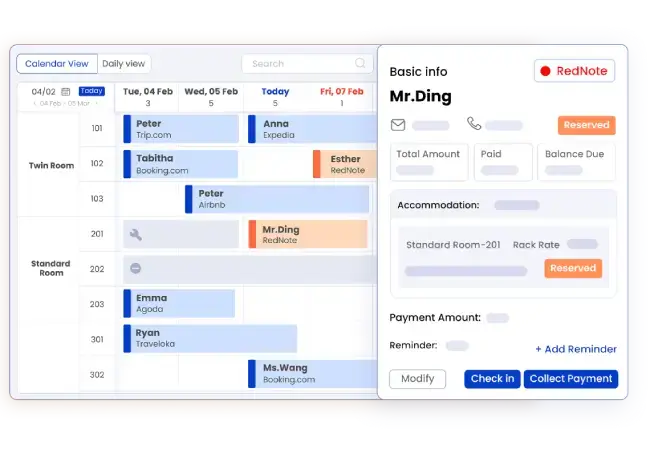
Smart Order's manual reservation guide shows how to create a booking from the calendar and edit its details. This covers a practical small-hotel need: the phone booking must become a record that the next person can find.
Imagine a fifteen-room property receiving a telephone reservation while another employee is checking in a guest. The goal is not to keep a second notebook beside the software. It is to put the agreed stay into the calendar so later decisions use the same information.
Define who may change a reservation and who handles an exception. Smart Order's role-management guide describes employee accounts with configurable permissions. Match those permissions to responsibilities, rather than having everyone use the owner's account.
Add connections when separate records become the problem
If the same rooms are sold through OTAs, manual reservation entry is only part of the workflow. Your configuration also needs the appropriate channel connections. Review actual selling channels, room categories and rate plans together.
For website reservations, Smart Order's booking engine provides a guest-facing booking flow connected to the PMS. Choose it when guests should complete a booking on your site, rather than sending a request that staff must process later.
For a hypothetical property selling through two OTAs and its own website, the useful configuration joins those booking routes to reception. It does not require adding every possible channel. Each additional route should have a business purpose and a clear operating owner.
Extend the workflow where the handover happens
A reservation calendar alone does not tell the next shift what was promised in a conversation. Smart Order's guest inbox provides booking context beside messages and supports internal handover notes. Use that context for requests requiring follow-up; record approved changes in the reservation itself.
For late arrivals, define what the guest must complete and how they will enter. The self check-in workflow can prepare registration and instructions. A digital form does not supply a physical key or establish compatibility with a lock.
The plan breakdown separates Essential's core tools from channel and booking-engine additions. Professional lists housekeeping, self check-in and multi-calendar. Select the configuration around required tasks; do not infer that every feature belongs to the same plan.
Your minimum useful configuration
For a hotel starting from phone bookings, begin with the reservation record and individual staff access. For a hotel already selling online, include its existing booking connections from the start. Add arrival and handover functions when they address a defined operating gap.
Take that brief to Smart Order: fifteen rooms, your current booking sources and the people using the system. Explain which work needs to flow between them.
Frequently asked questions
Does a fifteen-room hotel need every PMS module?
No. Start with essential reservation work and add functions required by your booking channels and staffing model.
Is a website booking engine the same as a channel manager?
No. A booking engine takes reservations on your website. A channel manager connects distribution through external booking platforms.
Should self check-in be part of the initial setup?
Include it when your arrival model requires it. Confirm registration, instructions and physical access together before offering unattended arrivals.