
Key Takeaways
- Airbnb.com allows unlimited listings under one account, but native tools aren't enough once you pass 3–5 properties.
- A property management system (PMS) with a real-time channel manager is the most effective way to prevent double bookings across platforms.
- Automated messaging sequences — from booking confirmation to post-stay review requests — can save multi-property hosts several hours per week.
- Dynamic pricing, not flat rates, is how serious Airbnb hosts maximize revenue across seasons and locations.
- Housekeeping automation and a vetted local vendor network are what keep operations running when you're not on-site.
Managing multiple listings on Airbnb.com sounds exciting — more properties, more income, more freedom. But once you're juggling three, five, or ten listings at once, that excitement can quickly turn into chaos. Missed messages, double bookings, exhausted cleaning crews, and unhappy guests can stack up faster than you'd expect.
The good news? Hosts who build the right systems from the start don't just survive multi-property management — they actually thrive. Whether you're a solo host expanding your portfolio or a property manager overseeing dozens of units, the strategies in this guide will help you run your Airbnb business without burning out.
Can You Manage Multiple Listings on Airbnb.com from One Account?
Yes — Airbnb.com allows you to manage multiple listings under a single host account. There's no hard cap on how many properties you can list. You can switch between listings from the same dashboard, set unique pricing rules for each, and track performance separately.
That said, Airbnb's built-in tools are fairly basic when your portfolio grows beyond two or three properties. You get a shared inbox, a per-listing calendar, and manual pricing controls. It works fine at small scale. But at five or more listings, the cracks start to show: you're copying and pasting the same messages, manually checking each calendar before confirming a booking, and toggling between tabs constantly.
This is the point where most hosts realize they need something more powerful — and that usually means bringing in a dedicated property management system (PMS).
Use a Property Management System (PMS) to Centralize Operations
Why You Need a Property Management System for Your Airbnb.com Business
A property management system is software that acts as the central hub for your entire short-term rental operation. Instead of logging into Airbnb.com, Booking.com, Vrbo, and your direct booking site separately, a PMS pulls everything into one place: reservations, availability, guest messages, pricing, housekeeping tasks, and revenue data.
Think of it like this: without a PMS, managing five Airbnb listings is like running five separate small businesses. With a PMS, those five listings become one streamlined operation.
Here's what changes when you adopt a PMS:
- Overbookings drop to near zero. When a guest books on Airbnb, the calendar on every other platform updates in seconds.
- Response times improve dramatically. Automated messages handle check-in instructions, check-out reminders, and review requests without you lifting a finger.
- Your team stops relying on you for every update. Housekeepers and maintenance staff can see job assignments directly through the system.
- Revenue decisions get smarter. You can see which properties are underperforming and adjust pricing or listings accordingly.
For hosts who are serious about scaling, a PMS isn't a luxury — it's what makes growth sustainable.
Key Features to Look for in an Airbnb Property Management Software
Not all PMS tools are built the same. Here's what actually matters when you're evaluating options for Airbnb.com management:
- Channel Manager with Real-Time availability Sync
- Guest messages from every platform should land in one place
- Automated Messaging
- Housekeeping and Task Management
- Rate Management and Dynamic Pricing
- Reports and Analytics
Automate Guest Communication Across All Your Airbnb Listings
Setting Up Automated Messages for Check-in, Check-out, and Reviews on Airbnb
Most guest questions are predictable. By setting up automated triggers within your property management system, you can ensure guests receive vital information exactly when they need it. A "Welcome" message should go out 24 hours before check-in, and a "Thank You" note with checkout instructions should land the morning they leave. Automated review reminders are also huge—they significantly increase the number of 5-star ratings you receive by simply asking at the right moment.
How to Use Message Templates Without Losing the Personal Touch
The fear with automation is sounding robotic. A guest who receives a generic-sounding message right away starts the stay on a cold note. But templates done well don't feel like templates — they feel like a prepared, thoughtful host.
A few tactics that work:
- Use the guest's first name in every message (most PMS tools support variable tags like
{{guest_name}}). - Include property-specific details rather than one-size-fits-all language. A mountain cabin check-in message should mention the trail nearby; a city apartment message should mention the metro stop.
- Keep your tone conversational. Avoid formal phrases like "please be advised" or "kindly note." Write the way you'd text a friend who's staying at your place.
- Save one or two messages each week for genuine personal responses — answer a specific question, acknowledge a special occasion, respond to a mid-stay issue with real care. This is what keeps your reviews strong.
 Hannah Gong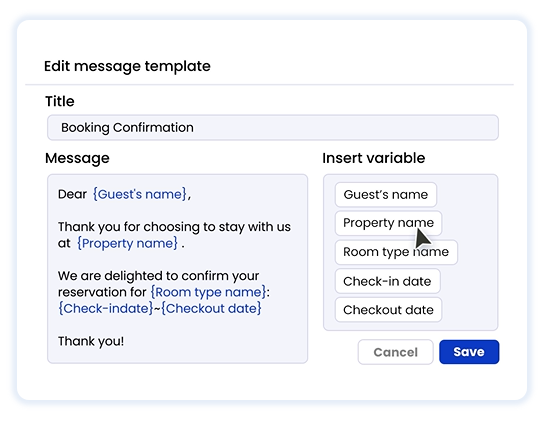
Managing Guest Reviews Efficiently When You Have Multiple Airbnb Properties
Reviews are the currency of Airbnb.com. When you have ten listings, keeping up with feedback can feel like a full-time job. Use a system that allows you to create "review templates." You can rotate through three or four different versions of a positive review to keep them looking fresh. Responding to guest reviews also boosts your SEO on the platform, signaling to Airbnb that you are an active, engaged host.
 Hannah Gong
Master Calendar and Pricing Management on Airbnb.com
Nothing ruins a host's reputation faster than a double-booking. It’s embarrassing, it hurts your rankings, and it leads to heavy cancellation fees.
How to Sync Calendars Across Multiple Airbnb Listings and Avoid Double-Booking
If you only list on Airbnb.com, the internal "Multi-Calendar" tool is okay. But if you are also on other platforms or have a direct booking site, you need a property management system with a built-in Channel Manager. This ensures that when a guest books on one platform, those dates are instantly "greyed out" everywhere else. Reliable syncing is the only way to sleep soundly at night.
Dynamic Pricing Strategies for Multi-Property Hosts on Airbnb.com
Flat-rate pricing across all seasons is one of the most common mistakes new hosts make. A beachfront property in July is worth a lot more than the same property in November. Pricing too low in peak season leaves money on the table; pricing too high in slow season means empty nights.
Dynamic pricing adjusts your rates automatically based on real-time demand signals: local occupancy data, competitor pricing, upcoming events, booking lead time, and day of week. At scale, doing this manually across multiple listings is nearly impossible.
Streamlining Housekeeping and Maintenance
Managing On-site Issues and Airbnb Property Maintenance
- Routine inspection schedule. After every third or fourth checkout, do a deeper walkthrough — or have your cleaner complete a checklist that flags anything needing attention. Catching a worn mattress or a faulty light fixture during turnover is far cheaper than receiving a complaint about it mid-stay.
- Vetted vendor contacts per property location. Have a plumber, electrician, and general handyman on speed dial for each geographic area where your properties are located. When an emergency happens at 10pm before a 9am check-in, you need someone who will actually pick up.
- A documented issue log per property. Track what's been repaired, what's been replaced, and what's approaching end of life (appliances, HVAC filters, water heaters). This helps you plan maintenance spend and prevents surprise failures.
- A clear channel for guests to report issues. Make it easy for guests to contact you during their stay. A host who responds within 15 minutes to a maintenance issue almost always avoids a bad review — even when the issue itself is frustrating.
Automating Team Coordination for Each Airbnb Property
If you're managing more than three or four properties, you almost certainly have a cleaning crew, and possibly a maintenance team. Coordinating them manually — via text, WhatsApp, or phone calls — doesn't scale. Things get missed. People show up at the wrong time. Properties aren't ready when guests arrive.
A PMS with housekeeping automation solves this cleanly. When a checkout is confirmed on Airbnb.com, the system automatically generates a cleaning task assigned to the right team member with the correct property address, the departure time, and the next check-in time. No phone calls required.
Some platforms also allow cleaners to mark jobs as complete with a photo upload, giving you remote visibility into whether the property is ready. For hosts managing properties across multiple cities, this kind of remote oversight isn't a nice-to-have — it's how the business runs.
Managing Multiple Airbnb Listings FAQ
Q1: What is the best software for Airbnb property management?
The right software depends on your scale and budget. Guesty and Hostaway are well-established options with strong feature sets — both offer channel management, unified inboxes, and automation tools, but they come at a significant monthly cost that can be hard to justify for smaller portfolios.
Smart Order PMS is worth serious consideration if you want professional-grade tools without the upfront commitment. It includes a channel manager (connected to Airbnb, Booking.com, Expedia, and others), a unified inbox, housekeeping management, a booking engine, and payment processing — and it offers a permanently free base plan. Over 200,000 properties use it globally, with hosts reporting an average 25% revenue increase.
Q2: How do I avoid double bookings if I list on other sites besides Airbnb.com?
The most reliable solution is a channel manager that syncs your availability in real time across all platforms. When a booking is confirmed on any site, your calendar closes instantly everywhere else.
If you're not using a PMS yet, Airbnb.com supports iCal calendar export, which lets you import your Airbnb calendar into other platforms and vice versa. This method has a sync delay of 15–60 minutes, so it's not foolproof. Add a buffer rule — like blocking the day before and after each booking — if you must rely on iCal.
Q3: Is it better to hire a co-host or an Airbnb management company?
It depends on how involved you want to be. A co-host is usually someone local — a trusted friend, neighbor, or professional — who handles on-the-ground tasks like check-ins, guest issues, and property inspections. Co-hosts typically charge 10–20% of booking revenue. You stay in control of the listing and strategy.
An Airbnb management company takes over almost everything: listing optimization, pricing, guest communication, cleaning coordination, and maintenance. Fees typically range from 20–35% of revenue. This makes sense if you're scaling quickly, managing remotely, or simply don't have time to be involved day-to-day.
For most hosts with two to five properties, a co-host combined with a good PMS is often the most cost-effective setup.
Q4: How many listings can you have on Airbnb.com?
Airbnb.com does not publish an official limit on how many listings a single host account can hold. In practice, individual hosts and property management companies manage hundreds of listings from one account. The platform is built to support this — especially with multi-unit listing features that allow you to list multiple identical rooms or units under one listing.
Q5: How do I sync multiple Airbnb calendars with other platforms?
There are two main approaches:
- iCal sync (free, built into Airbnb): Go to each listing's Availability settings on Airbnb.com, export the iCal link, and import it into the other platform. Repeat the process in reverse to bring the other platform's calendar into Airbnb. Updates sync every 15–60 minutes.
- Channel manager via PMS (recommended): A channel manager connects directly to each platform's API, updating availability in seconds rather than minutes. This is significantly more reliable at scale.
If you list on three or more platforms, iCal sync becomes increasingly risky. A proper channel manager is the cleaner, safer long-term solution.
