Managing vacation rental calendars manually can be time-consuming and error-prone. One missed update can lead to double-bookings, causing unhappy guests and lost revenue.
For hosts with only a few listings and a limited budget, iCal offers a simple way to sync basic availability across platforms. In contrast, a Channel Manager is the best solution for multi-platform or high-volume properties, providing real-time calendar sync to prevent double-bookings and save time.
This guide will compare both options and help you choose the right tool for your property.
What is iCal?
iCal, short for iCalendar, is a standard format for sharing calendar information. Many vacation rental platforms, including Airbnb, Vrbo, and Booking.com, allow users to export and import iCal links to keep their booking calendars updated.
How iCal Works
When using iCal, your property’s availability is shared through a calendar URL. Each platform can read this URL to update availability based on reservations made elsewhere. For example, if a guest books on Airbnb, your iCal feed can update your Vrbo calendar automatically.
However, iCal is not always instant. Most platforms refresh iCal feeds every few hours, which means there can be delays in reflecting new bookings.
Benefits of Using iCal
- Cost-effective: iCal is free and included in most vacation rental platforms.
- Simple setup: Copying and pasting calendar links requires no advanced technical knowledge.
- Basic calendar sync: For single properties or hosts with limited listings, iCal is often sufficient.
Limitations of iCal
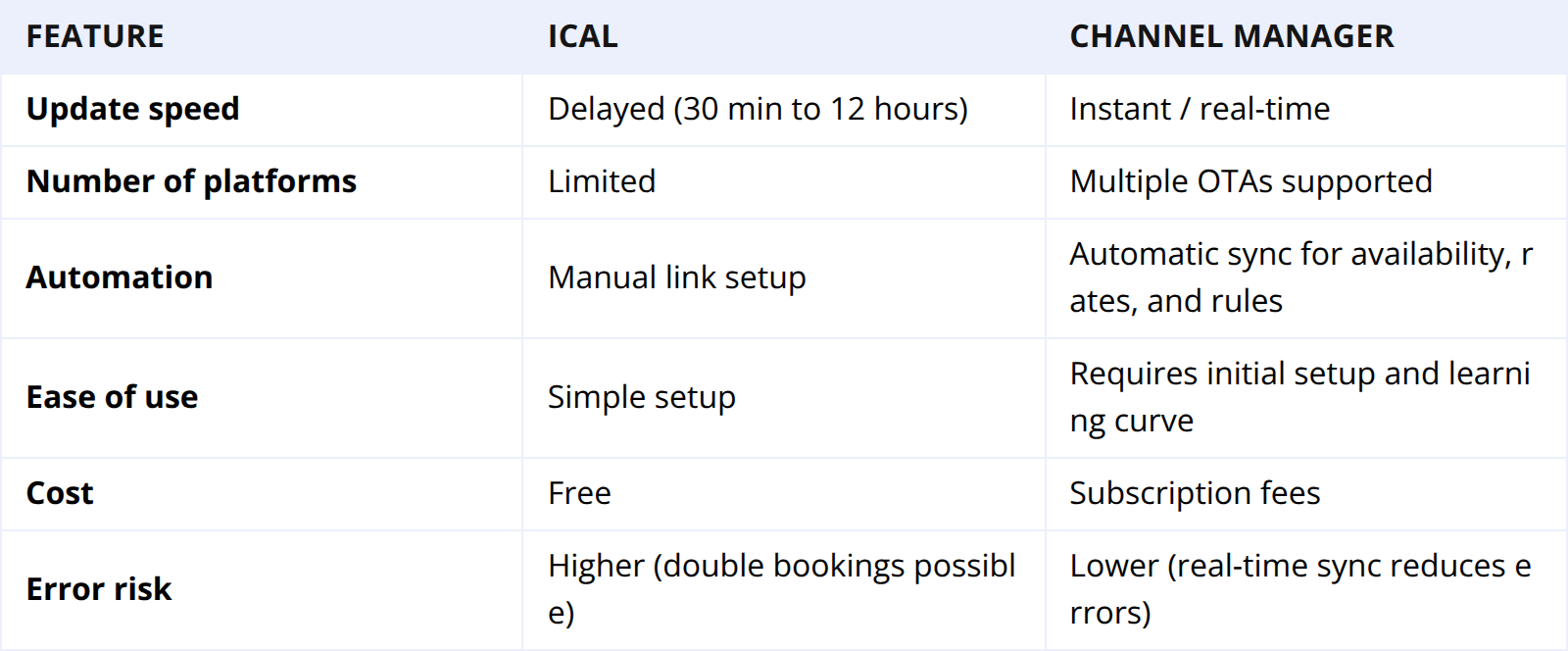
- Delayed updates: iCal refresh intervals can range from 30 minutes to 12 hours, increasing the risk of double bookings.
- Manual maintenance: Adding new channels requires generating new links for each platform.
- Limited automation: iCal only shares availability; it cannot update rates, minimum stay requirements, or other listing details.
iCal works best for small properties with a few listings or hosts who manage bookings on a limited number of platforms. In practice, iCal is most manageable when syncing 3 or fewer platforms—beyond that, the manual workload grows exponentially.
For example, adding a 4th OTA requires generating and updating a new unique iCal link, cross-verifying sync status across all channels, and troubleshooting discrepancies individually. Hosts with 4+ platforms often find themselves spending 2+ extra hours per week on link maintenance alone, erasing the time-saving benefits iCal initially offers. If you list on more than 3 OTAs or anticipate expanding your platform presence, iCal’s manual setup will quickly become a bottleneck.
What is a Channel Manager?
A channel manager is a software solution designed to automatically sync your property’s availability, rates, and booking rules across multiple online travel agencies (OTAs). It connects directly to each platform via an API, ensuring real-time updates and reducing the risk of errors.
How a Channel Manager Connects Your Calendars
Unlike iCal, a channel manager uses direct integration with OTAs. When a guest books a room on one platform, the channel manager immediately updates availability on all other connected channels. This real-time sync eliminates delays and minimizes the chance of double bookings.
Benefits of Using a Channel Manager
- Automated calendar sync: Instant updates across multiple platforms.
- Multi-platform support: Manage Airbnb, Vrbo, Booking.com, Expedia, and others from a single dashboard.
- Rate and restriction management: Update pricing, minimum stays, and promotional offers across all channels simultaneously.
- Reporting and insights: Some channel managers provide analytics on occupancy, revenue, and performance metrics.
Limitations of a Channel Manager
- Subscription costs: Most channel managers require monthly or annual fees.
- Setup complexity: Initial configuration may require more time and technical understanding compared to iCal.
- Platform limitations: Some OTAs(e.g., small local travel portals with minimal developer resources) may restrict certain API functionalities or integration features.
Channel managers are ideal for property managers with multiple listings or hosts managing several channels, where automation and reliability are critical.
iCal vs Channel Manager: Key Differences for Calendar Sync
🤔Which One is Right for Your Property?
- Small properties with a single listing: iCal may be sufficient.
- Multiple properties or high-volume bookings: Channel managers offer reliability and save time.
- Budget-conscious hosts: iCal is free, but investing in a channel manager can prevent costly double bookings.
The Hidden Risks of Relying on iCal
Many hosts stick with iCal to save $30 or $50 a month, but this "saving" often turns into a loss.
The "Sync Gap" Danger
During peak season or holidays, guests book quickly—and iCal’s refresh rate varies significantly by platform, ranging from 30 minutes to 12 hours as a general industry interval (for example, Airbnb may refresh every 1–2 hours, while Booking.com or Vrbo could have 3–6 hour gaps in some cases).
Let’s take a common scenario: if a guest books your property on Airbnb at 2:00 PM, and your connected Booking.com calendar only refreshes its iCal feed every 3 hours, your listing will remain available on Booking.com until 5:00 PM. This 3-hour window creates a high risk of double-bookings, especially when demand is high. Even with shorter refresh times (e.g., 1 hour), a 60-minute gap can lead to overlapping reservations during busy periods.
Limited Information
iCal does not tell you who booked or how much they paid. You still have to log in to each individual platform to see the guest's name, their phone number, or the total payout. This adds hours of manual admin work every week.
No Price Control
If you want to raise your prices for a local festival, you must log into every single platform to change the numbers manually. If you forget one, you might sell a room for $100 when it should have been $300.
Benefits of Moving to a Channel Manager
Switching to a Channel Manager is like hiring a 24/7 virtual assistant. It changes the way you run your business.
Total Peace of Mind
With instant Calendar Sync, the fear of calling a guest to tell them you overbooked disappears. This reliability leads to better reviews and "Superhost" status, which in turn leads to more bookings.
Dynamic Pricing Integration
Most Channel Managers connect with tools like PriceLabs or Beyond. These tools automatically adjust your rates based on local demand and competitors. The Channel Manager then pushes these prices to all your platforms instantly, ensuring you never leave money on the table.
Professionalism and Scaling
If you want to manage 5, 10, or 50 properties, iCal is physically impossible to manage. A Channel Manager allows you to add more properties without increasing your workload exponentially.
Is a Channel Manager Worth the Investment?
For most hosts, the math adds up quickly. If you currently spend 3–5 hours per week manually cross-checking calendars, updating prices across platforms, and verifying guest details (a common time commitment for hosts with 3+ listings or 2+ OTAs), Smart Order PMS built-in Channel Manager offers cost-effective automation that’s easy to quantify.Let’s break it down with Smart Order’s actual pricing:
 Drizzt Yang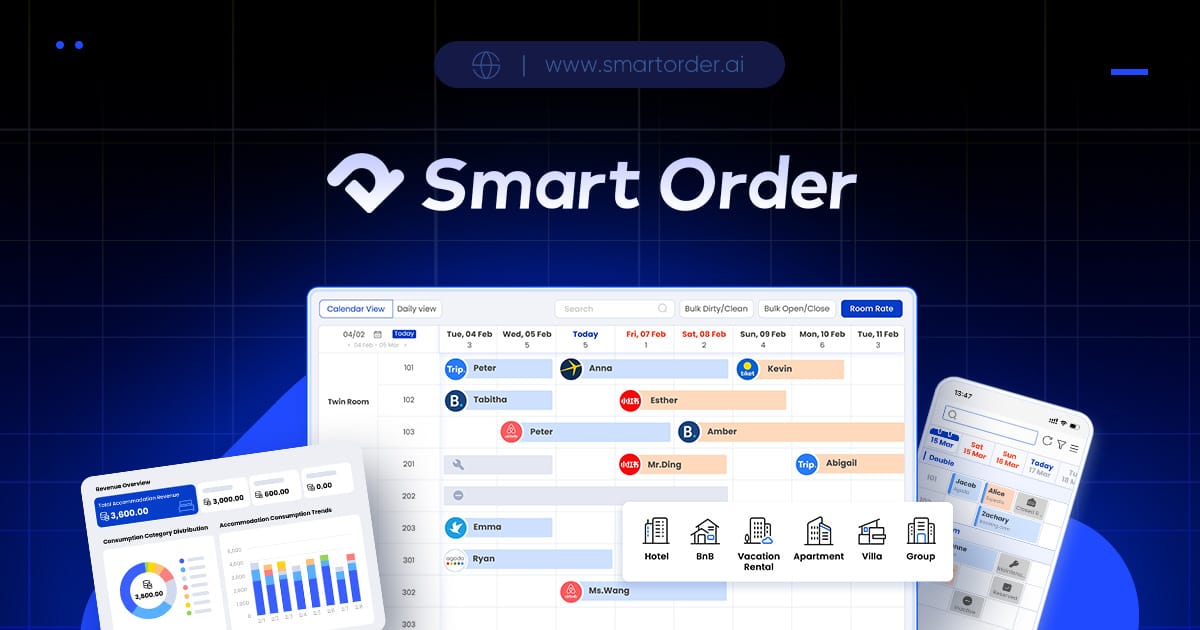
- Hosts with 1–5 properties: Our Professional plan (which includes full Channel Manager functionality—Multi-Calendar sync, OTA Channel connections, Booking Engine, and more) costs up to $25 per month. For 3–5 hours of weekly manual work, this translates to only $1.25–$2.08 per hour to eliminate double-bookings, auto-sync availability, and cut admin time.
- Hosts with 20 properties: Our Professional plan scales to $95 per month (already 5% discount). Even if you spend 5 hours weekly on manual tasks, this works out to just $4.75 per hour—far less than the cost of resolving one double-booking (which can include guest refunds, rebooking fees, and negative reviews that damage long-term revenue).
This is a tiny investment compared to the risks of sticking with manual tools: one missed price increase or double-booking could cost hundreds in lost revenue, while Smart Order’s Channel Manager pays for itself within weeks by preventing errors, saving time, and helping you capture more bookings. Most hosts using our Professional plan find they recoup the monthly fee in 1–2 months—all while gaining the freedom to focus on guest experience or growing their property portfolio.
FAQ: Calendar Sync with iCal and Channel Manager
Q1. Does iCal sync in real-time?
No. iCal depends on the "refresh rate" of the platforms involved. While some sites check more frequently than others, there is almost always a delay. This delay is the primary cause of double-bookings for busy hosts.
Q2. Can I use both iCal and a Channel Manager?
It is technically possible but highly discouraged. A Channel Manager should be your "Single Source of Truth." Using iCal links alongside a Channel Manager can create "looping" errors:
- Incorrect date blocking: A booking synced via the Channel Manager may trigger iCal to re-block the same dates, leading to duplicate blocked periods that falsely show your property as unavailable.
- Lost or corrupted booking data: iCal does not transmit guest details, pricing, or booking rules—so the Channel Manager may overwrite or ignore iCal-fed availability, resulting in missed reservations or conflicting booking confirmations.
- Irreversible sync conflicts: Resolving these issues often requires manually auditing every booking across all platforms, which negates the time-saving benefits of both tools. In severe cases, you may need to temporarily take down listings to fix data discrepancies, leading to lost revenue.
Q3. Will a Channel Manager help my Google search ranking?
Indirectly, yes. By using a Channel Manager to prevent cancellations and respond faster to guests, your "health score" on OTAs improves. Additionally, most Channel Managers help you build a direct booking site, which you can optimize for Google search results.
Q4. How hard is it to set up a Channel Manager?
The initial setup takes a few hours. You connect your listings, map your rooms, and set your base rates. Once the "mapping" is done, the software handles the rest. Most providers offer a "onboarding" specialist to help you through the process.
Q5. What happens if the Channel Manager software goes down?
Top-tier Channel Managers have 99.9% uptime. Even if their dashboard is briefly offline, the API connections to the OTAs usually remain intact. Compared to the human error involved in manual iCal management, the risk is significantly lower.
Conclusion
Both iCal and channel managers are valuable tools for vacation rental hosts. iCal is free and simple, suitable for smaller properties or a limited number of listings. Channel managers provide real-time calendar sync, automation, and multi-platform management, which makes them essential for larger properties or hosts managing multiple OTAs.
Choosing the right tool depends on your property size, the number of listings, booking volume, and how much automation you need. Investing in a channel manager can save time, reduce errors, and improve overall revenue management, while iCal remains a solid choice for cost-conscious hosts with smaller operations.
By understanding the differences between these tools and how they handle calendar sync, property managers can make informed decisions to improve efficiency and reduce the risk of booking errors.
