Managing your Airbnb minimum stay and Airbnb maximum length of stay is more than a small setting inside your dashboard. It directly affects your revenue, cleaning workload, guest quality, and even legal compliance.
Many hosts on Airbnb.com only adjust pricing and forget about trip length rules. That’s a missed opportunity. A well-planned minimum stay reduces turnovers and cleaning costs. A smart maximum stay protects you from long bookings that block your calendar or create tenancy risks.
This guide explains exactly how to set minimum and maximum stay on Airbnb, using desktop and mobile devices. You’ll also learn advanced strategies used by professional hosts and property managers to increase efficiency and stay compliant.
Why Should You Manage Your Airbnb Stay Limits?
Many new hosts leave their stay requirements open, thinking it will lead to more bookings. While that might be true initially, it often leads to operational chaos.
Boosting Operational Efficiency with Minimum Stay Rules
Short stays can look attractive because they increase booking volume. In practice, too many one-night reservations can drain your resources.
When you increase your Airbnb minimum stay, you:
- Reduce cleaning frequency
- Lower laundry and consumable costs
- Minimize check-in coordination
- Improve calendar stability
- Increase average booking value
For example, if your cleaning fee is $150 and you allow one-night stays at $180 per night, your margin is tight. Setting a two-night minimum often improves profitability without raising prices.
Professional hosts often use:
- 1-night minimum during low season
- 2–3 nights during weekends
- 3–5 nights during peak season
This approach keeps occupancy healthy while reducing operational friction.
Avoiding Legal Risks with Maximum Stay Requirements
The Airbnb maximum stay setting is often ignored. That can be risky.
In many regions, guests who stay beyond a specific number of days may gain tenant rights under local laws. In some US states, 30 consecutive days can trigger tenancy protections.
Setting a clear Airbnb maximum length of stay helps you:
- Avoid accidental long-term tenancy
- Maintain pricing flexibility
- Prevent calendar blocks from multi-month stays
- Stay aligned with local short-term rental regulations
Even if you accept longer bookings occasionally, setting a maximum limit gives you control. You can always approve exceptions manually.
How to Set Minimum and Maximum Stay on Airbnb (Step-by-Step)
The process is simple, but the interface differs depending on the device.
Setting min and max nights on desktop (Mac & PC)
Using a desktop browser gives you full control and visibility.
- Log in to your account on Airbnb.com
- Click Menu → Listings
- Select the property you want to edit
- Click Calendar
- Select Availability
- Locate the Trip length section
- Enter:
- Minimum nights
- Maximum nights
- Click Save
Changes apply immediately to your calendar.
Tip from experienced hosts: Always double-check specific date ranges after saving. Rule sets may override your general settings.
Adjusting minimum and maximum stay on the iOS App
If you manage listings on an iPhone or iPad:
- Open the Airbnb Host app
- Tap Listings
- Select your property
- Tap Calendar
- Tap Availability settings
- Choose Trip length
- Edit minimum and maximum nights
- Save changes
The iOS app sometimes hides advanced rule sets. If you can’t see detailed options, switch to desktop mode in a browser.
Managing min and max stay on the Android App
On Android:
- Open the Airbnb Host app
- Tap your listing
- Go to Calendar
- Select Availability
- Find Trip length
- Set minimum stay and maximum stay
- Save
If your Android app looks different, update it to the latest version. Airbnb frequently adjusts layout and menu structure.
Using a Mobile Browser for Stay Settings
If you prefer not to use the app:
- Open your mobile browser
- Visit Airbnb.com
- Log in
- Switch to desktop view (recommended)
- Follow the same steps as desktop instructions
Mobile browsers sometimes simplify the interface. Desktop view gives you more detailed control, especially for seasonal rules.
Advanced Strategies: Seasonal and Weekend Minimum Stays
Basic minimum and maximum stay settings are useful. Advanced rule customization can significantly increase performance.
How to Use Rule-Sets for Peak Seasons
Airbnb allows hosts to create custom rule sets for specific date ranges.
Use this feature to:
- Increase minimum stay during holidays
- Require 3-night minimum for major events
- Allow 1-night stays during low-demand weekdays
- Shorten minimum stay to fill last-minute gaps
Example strategy used by professional property managers:
Peak summer (June–August):
- Minimum stay: 4 nights
- Maximum stay: 21 nights
Shoulder season:
- Minimum stay: 2 nights
Last-minute gap (within 7 days):
- Minimum stay: 1 night
This layered approach maximizes occupancy while protecting revenue.
Always monitor performance after changing rules. Compare:
- Occupancy rate
- Average length of stay
- Cleaning cost ratio
- Revenue per available night
Stay rules should evolve with your market conditions.
Solving Common Issues with Airbnb Stay Limits
Even when configured correctly, issues can appear.
Syncing Issues with Channel Managers (e.g., Uplisting)
If you use a channel manager or PMS software, stay limits may not sync correctly.
Common problems:
- Minimum stay overridden by the channel manager
- Rule sets conflicting with PMS settings
- Calendar sync delays
To prevent conflicts:
- Decide which system controls stay rules
- Avoid setting minimum stays in both Airbnb and PMS unless required
- Re-sync calendars after rule changes
- Check availability manually after updates
From a property management perspective, centralizing rule management inside your PMS reduces errors. Many professional hosts control stay length in one place only.
If guests can book shorter stays than expected, verify:
- Rule sets for specific dates
- Last-minute booking settings
- PMS override rules
- Instant Book exceptions
Small conflicts can lead to unintended bookings.
Managing minimum and maximum stay settings directly inside Airbnb works for single listings — but once you handle multiple properties, syncing issues and rule conflicts become common.
With our Smart Order centralized property management system, you can control Airbnb minimum stay, maximum length of stay, pricing, and availability from one dashboard — without risking calendar errors or unintended bookings.
If you're ready to streamline your Airbnb stay limits and avoid syncing conflicts, follow our step-by-step guide to connect Airbnb with your PMS.
 Smart Order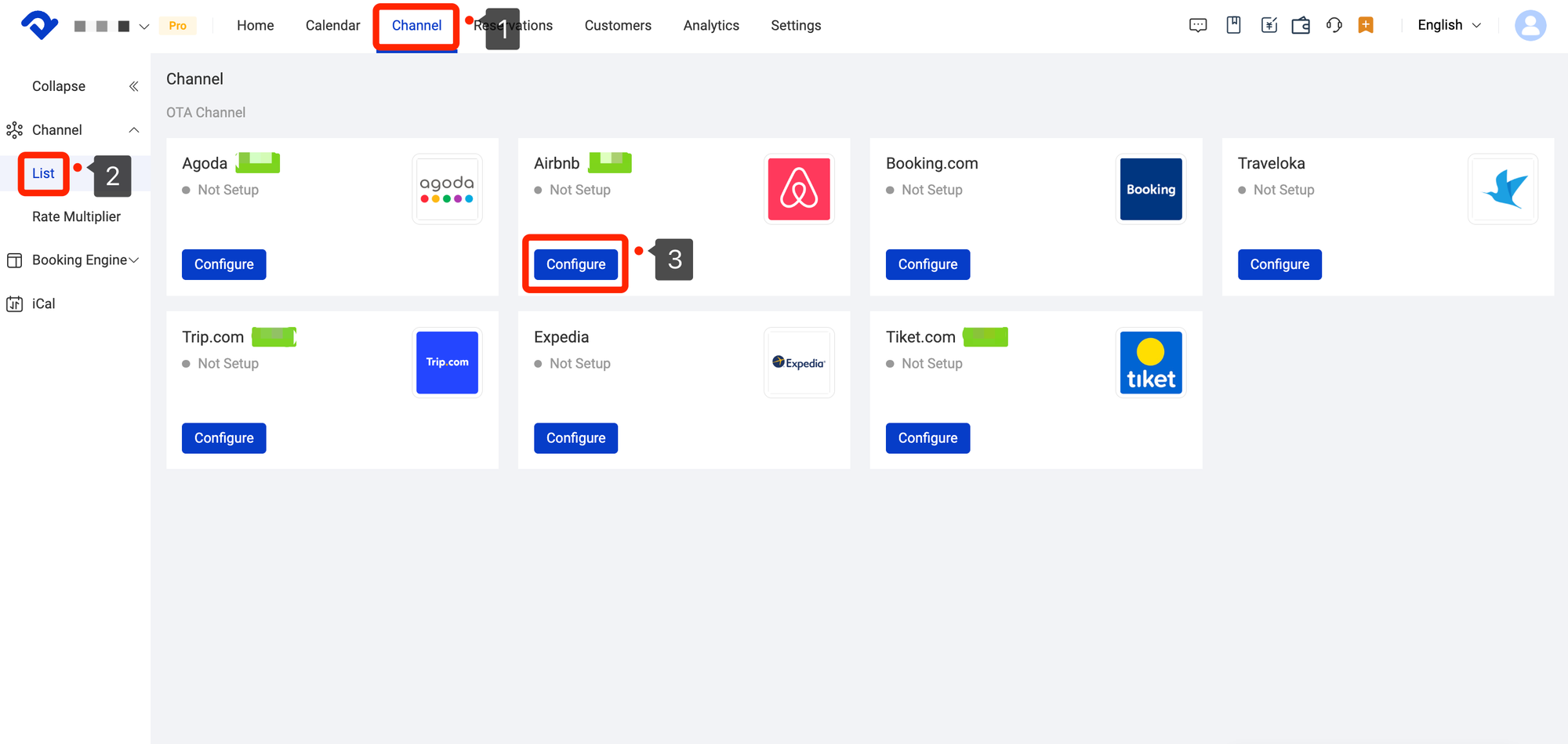
FAQs About Airbnb nights settings
Can I set a 1-night minimum stay for weekdays only?
Yes. You can create a custom rule set that applies to specific days of the week. Set a 1-night minimum from Monday to Thursday and a higher minimum for Friday and Saturday.
This strategy is common in urban markets where weekday business travel differs from weekend tourism.
Why can’t I see the "Trip Length" option in my settings?
Possible reasons include:
- You are not logged in as the listing owner
- The app version is outdated
- You are viewing simplified mobile mode
- Your listing is set as long-term rental only
Switch to desktop view on Airbnb.com if the option is missing.
Can I set different minimum stays for weekdays vs weekends?
Yes. Airbnb allows customized trip length rules by day of check-in. You can require:
- 2 nights for Friday check-in
- 3 nights for Saturday check-in
- 1 night for midweek
Always verify that the rule applies correctly by testing sample booking dates.
What happens if I don’t set a maximum stay?
If you leave the maximum stay blank, guests may book very long reservations, depending on Airbnb’s default limits and your local regulations.
This can:
- Block your calendar for months
- Limit pricing adjustments
- Increase tenancy risks
Setting an Airbnb maximum length of stay gives you control and flexibility.
Why is my minimum stay not enforced?
Several reasons may explain this:
- A date-specific rule overrides general settings
- A channel manager changed the value
- A last-minute discount rule reduces minimum stay
- A guest sends a booking request instead of using Instant Book
Review your calendar rules carefully. Test different check-in dates to confirm enforcement.
Conclusion
Controlling your Airbnb minimum stay and Airbnb maximum stay is one of the simplest ways to improve performance on Airbnb.com. These settings directly impact your workload, revenue stability, and compliance exposure.
Short stays create turnover pressure. Long stays create legal and operational risk. The right balance depends on your location, seasonality, and business model.
Review your trip length settings regularly. Adjust them based on occupancy trends and cleaning costs. If you use a channel manager or property management software, ensure stay rules are aligned across systems.
Small changes in stay limits often produce measurable improvements in profitability. Smart hosts treat minimum and maximum stay settings as strategic tools, not just technical fields inside a dashboard.
If you manage multiple listings, build a clear stay rule strategy and document it. Consistency prevents errors and protects your revenue.
Your calendar is your inventory. Stay limits help you control it with precision.
