Connecting Booking and Airbnb to Smart Order: A Hotel Setup Checklist
Smart Order's pricing page lists Booking and Airbnb among its OTA channels. A small hotel should verify the account connection, room and rate mapping, and the quoted plan before relying on either connection. A listed channel is a useful starting point; the property's own reservation, amendment and cancellation tests establish whether the proposed setup meets its needs.
For hotels in Japan and Thailand, use the same checklist with the people who will handle reservations locally. Keep channel availability, staff access and commercial terms in a written setup scope.
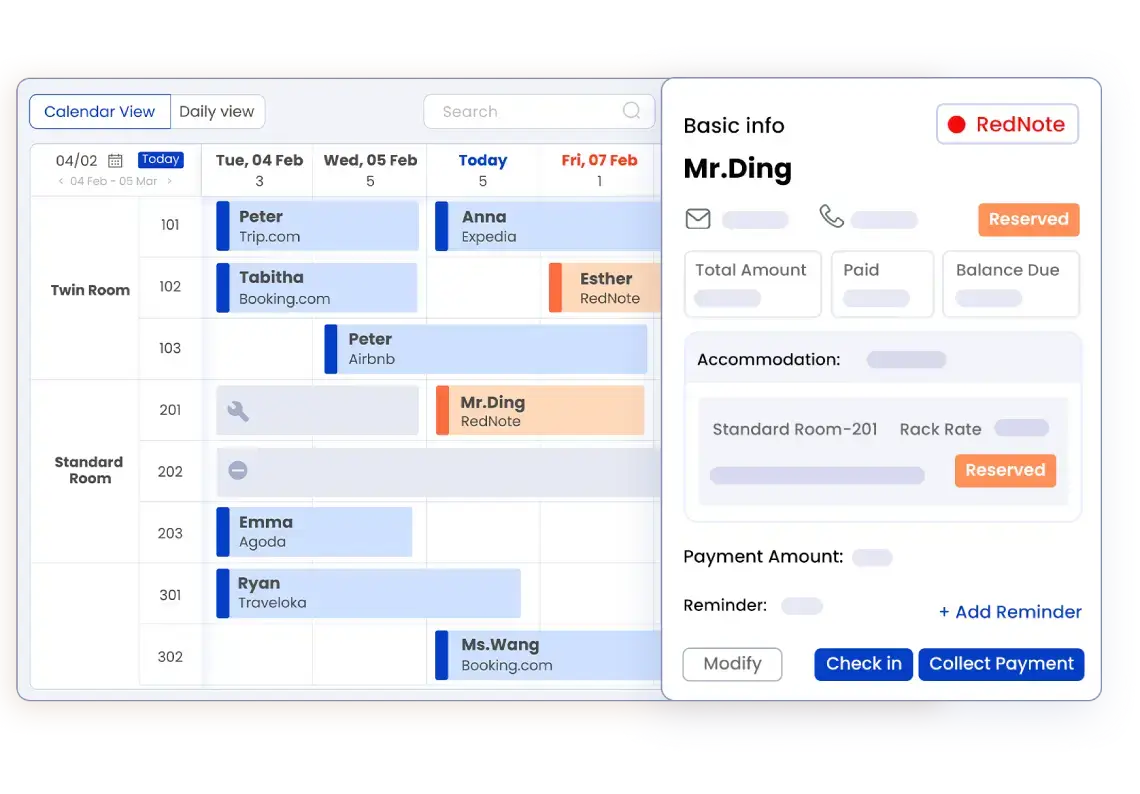
What the published plan information establishes
The Smart Order pricing page lists OTA channels and the booking engine as Essential add-ons. It lists Booking and Airbnb in the channel section. Smart Order Essential has no room-count or duration restriction. Housekeeping, self check-in and multi-calendar are listed as Professional features. Check the current quotation for the channels, properties and functions you need.
These distinctions matter when comparing the free core PMS with a connected distribution setup. Record the PMS subscription, channel add-ons, booking engine and any optional services separately. Do not infer that every integration is free because the core plan is free. Ask which items are included in Professional and which require an additional charge for your account.
Before authorizing a connection
Prepare the property and channel account identifiers, the list of room types, the rate plans and the person authorized to approve the connection. Keep account credentials in the vendor's normal secure connection process. Ask whether an existing channel-manager connection must be changed and agree who will handle that change.
Use a written mapping sheet with one row for each room type and rate plan. Check room names, occupancy, inventory, currency and the rates that guests can book. Identify any differences between what your reception team calls a room and how the channel sells it. Ask the implementation team to explain how those differences will be represented.
For a Japanese property, review the mapping with the Japanese-speaking colleague who will maintain it. For a Thai property, have the local reservations team check the room types and guest-facing descriptions. Confirm which interface and support languages are available for the quoted setup. Translate the operating instructions that staff will actually follow.
Demonstrate the reservation lifecycle
Agree an authorized test procedure with the vendor and each channel. Use sample information where possible and avoid creating an unintended guest booking.
- New reservation. Follow a test reservation into the PMS. Verify the property, room type, dates, guest count, booking reference and source. Ask where staff see a record that needs attention.
- Inventory update. Ask staff to show the corresponding availability in the PMS and on the connected channel. Record the expected update timing and what to do if the two views disagree. A channel connection does not establish that overbooking can never occur.
- Amendment. Test an agreed date or room change. Identify who receives the change, where staff see it, and how the revised booking is checked against the original reference.
- Cancellation. Verify the cancellation state, the availability released and the work left for reception. Keep cancellation policy and refund handling distinct from the reservation status.
- Payment and reconciliation. Ask which payment information arrives with the reservation and which actions remain in the channel or payment-provider account. Do not assume that connecting reservations transfers every payment or refund function.
- Exception. Rehearse a missing or delayed reservation and an inventory mismatch. Agree the contact route, the temporary operating procedure and how records are reconciled afterward.
Write down the outcome for Booking and Airbnb separately. Passing a test for one channel does not establish the behavior of the other.
Connect the channel workflow to reception
Smart Order's front-desk product page describes mobile check-in, check-out and reservation updates on the go. Demonstrate those actions using a reservation from each proposed channel and the account permissions staff will use.
Have reception locate the booking on a desk computer and on a phone. Check that colleagues can identify the latest dates, room assignment and outstanding work. Agree who can change a reservation and how the team handles a discrepancy between channel information and the PMS record. Include housekeeping or self check-in in the demonstration if those Professional features are part of the proposed workflow.
For an owner working away from Japan or Thailand, agree which colleague checks incoming reservations, which exceptions require escalation and how the owner can review the relevant record. A useful remote workflow gives each person a clear responsibility during the local operating day.
Questions to settle in the quotation
- Which Booking and Airbnb accounts and properties are included?
- Are the required channels Essential add-ons or included in the Professional quotation?
- Who performs the account authorization and room and rate mapping?
- Which reservation, availability, rate, message and payment functions are supported by each connection?
- What update timing, exception handling and support arrangements are agreed?
- Which tasks will staff still perform in the channel's own account?
Keep the completed mapping and demonstration results with the quotation so staff can check the delivered setup against what was agreed.
Frequently asked questions
Does Smart Order support Booking and Airbnb?
Its pricing page lists both among the available OTA channels. Confirm the connection requirements and supported functions for your own property and account, then demonstrate a new reservation, amendment and cancellation for each channel.
Are these connections free on Essential?
Smart Order lists OTA channels and the booking engine as Essential add-ons. The free core PMS does not establish free channel connectivity. Obtain a current quotation covering the exact channels and properties you intend to connect.
Does connecting a channel guarantee that overbooking cannot happen?
No such guarantee follows from a channel listing. Verify inventory mapping, expected update timing and the procedure for handling a discrepancy. Staff should know how to investigate a reservation that arrives late or appears differently across systems.
Can a hotel manage arrivals from a phone?
Smart Order documents mobile check-in, check-out and reservation updates. Test those actions with a channel reservation on the devices and accounts your team will use. Confirm access permissions and who handles exceptions when an owner is away.
What to do next
Bring your channel account list, room and rate mapping, staff language needs and an example reservation lifecycle to a demonstration. Ask for a written scope and separate acceptance results for Booking and Airbnb.